
Disclosure: This page may contain affiliate links. Prices were checked on the date shown and may change.
An introduction to Waves IR1 Convolution Reverb, based on information from the maker and distributors: what it does, how to use it and who it may suit. It is not scored.
Convolution reverb’s uncanny ability to reproduce hyper-realistic acoustic environments is well-known, but IR1’s 2,000+ impulse responses are what truly bring convolution reverb to life.
— Waves official site
What is IR1 Convolution Reverb?
IR1 Convolution Reverb is a convolution reverb from Waves. It uses impulse responses (IRs) recorded in real spaces to reproduce the sound of those places, and ships with more than 2,000 impulses.
The included impulse library is about 4.8 GB. It is described as covering a wide variety of acoustic spaces, from concert venues and churches to everyday places such as a stairwell or a car interior. All impulses were recorded with premium field-recording gear.
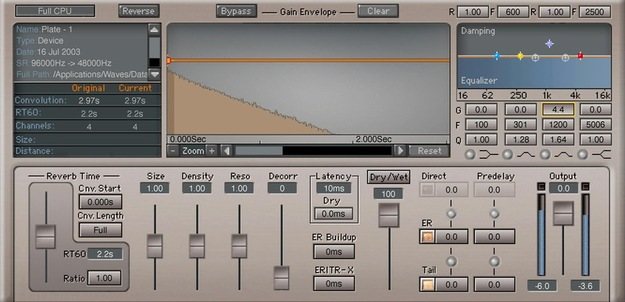
Each impulse can be modified with several editable parameters, and the reverb envelope can be shaped to produce non-linear effects. The library can also reproduce classic digital reverb hardware.
A sweep file for creating your own impulses is included, and third-party impulses or WAV files can be imported. Mono, mono-to-stereo, full stereo and efficient stereo modes are available.
Key features
More than 2,000 impulses
The roughly 4.8 GB library holds impulses of a wide variety of acoustic spaces, giving many options when looking for a space that fits a song.
Impulse editing
Several editable parameters let you modify the loaded impulse rather than just using it as is.
Classic digital reverb hardware
The library can also faithfully reproduce classic digital reverb hardware, according to the product description.
Create your own impulses
A sweep file is included for creating your own impulses, which helps when you want to capture and load a space yourself.
Third-party IRs and WAV import
Impulses from other sources and WAV files can be imported, so IRs you already own can be used in this plug-in.
Channel modes and envelope shaping
Mono, mono-to-stereo, full stereo and efficient stereo modes are available, and the reverb envelope can be shaped for non-linear effects.
Specifications
| Item | Details |
|---|---|
| Type | Convolution reverb |
| Impulses | 2,000+ (about 4.8 GB) |
| Channels | Mono / mono-to-stereo / full stereo / efficient stereo |
| Formats (Mac) | VST / AU / AAX |
| Formats (Windows) | VST / AAX |
| OS | macOS Monterey 12 to Sequoia 15, Windows 10 or later |
What is included and system requirements
- IR1 Convolution Reverb plug-in
- Impulse library (about 4.8 GB, 2,000+ impulses)
- Sweep file for creating your own impulses
- Mac: VST / AU / AAX (macOS 12 to 15)
- Windows: VST / AAX (Windows 10 or later)
How to use it
- Install the product and let your DAW scan for plug-ins.
- Load it into an effect slot on a track, or on an aux track used as a send/return.
- Choose an impulse of a space that might suit the song from the library.
- Pick a channel mode (mono, stereo and so on) that matches the track.
- Adjust the impulse parameters to set the length and amount of reverb.
- Shape the reverb envelope if needed.
- To create your own IRs, use the included sweep file.
Where it may come in handy
Adding space to instruments and vocals
Choosing a hall or room impulse to add space to home recordings is one possible use.
Post-production
Impulses of everyday places such as a stairwell or car interior may suit matching dialogue to a location.
Using your own IRs
You can import IRs or WAV files you already have and reuse a favourite space in this plug-in.
Who it may suit
- People who want a reverb based on real spaces
- People who want to load IRs they already own
- People who need to match the sound of a place in video or dialogue work
Good to know before you buy
- IR360 is the 5.1 surround counterpart based on the same engine.
- The impulse library is about 4.8 GB, so disk space is needed.
How it differs from similar products
We do not pick a winner; the official figures are placed side by side.
Waves IR360 Convolution Reverb
Both are Waves convolution reverbs with an about 4.8 GB library of more than 2,000 impulses. IR1 targets mono and stereo work, while IR360 builds on the IR1 engine for 5.1 surround environments.
Price
$129 (Plugin Boutique, checked 2026-10-27). Prices can vary by region and promotion, so check the official page before buying.
See IR1 Convolution Reverb on the product page
More of the same kind
We have introduced 112 reverbs. Here are some of the others.
- ADPTR AUDIO Utopia
- IK Multimedia CSR Plate Reverb
- Cat Psychedelia Purrigee
- McDSP Revolver Native v7
- LANDR VoxVerb
- IK Multimedia T-RackS FAME Studio Reverb
We have introduced 215 other products from Waves.
- Waves Renaissance Reverb
- Waves IR-Live Convolution Reverb
- Waves Magma Springs
- Waves IR360 Convolution Reverb
- Waves H-Reverb Hybrid Reverb
For a side-by-side comparison scored on the same criteria, see our comparison of reverbs.
See the full list in Product database: Effects.
Sources: pluginboutique.com (checked 2026-10-27)










Comments