
Disclosure: This page may contain affiliate links. Prices were checked on the date shown and may change.
An introduction to Waves IR-Live Convolution Reverb, based on information from the maker and distributors: what it does, how to use it and who it may suit. It is not scored.
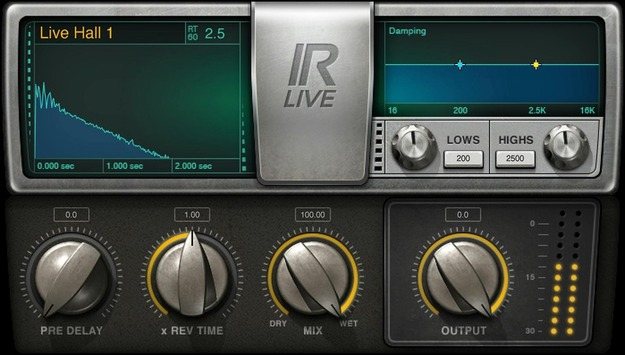
IR-Live brings convolution reverb to the stage, with low-latency performance, a streamlined interface, multipoint touch sensitivity, and a huge impulse library.
— Waves official site
What is IR-Live Convolution Reverb?
IR-Live is a convolution reverb from Waves, built on the same engine as the company's IR1 and aimed at live sound. Convolution reverb uses recordings (impulse responses) of real spaces to reproduce their reverberation.
The listed features include low-latency performance, a streamlined interface and multipoint touch support. The impulses come in a 4.8 GB library.
The library covers more than 2,000 acoustic spaces, from opera houses to punk rock clubs. It is also described as useful as a convolution reverb in the studio.
It works with MultiRack Native and leading digital consoles, and can be used with SoundGrid DSP servers, so it may be one option to consider for live streams, PA work or home recording.
Key features
Over 2,000 spaces
The library holds more than 2,000 acoustic spaces, from halls to clubs, which you can choose to place over a venue's sound.
IR1 engine
The sound engine is described as the same one used in Waves' IR1, bringing the studio convolution approach to live use.
Low latency
Low delay matters on stage. Low-latency performance is a stated feature, which may suit monitoring and similar uses.
Streamlined UI and touch
The interface is streamlined and supports multipoint touch, which may help with quick adjustments in dim venues.
4.8 GB impulse library
A 4.8 GB library of carefully recorded impulses is included.
Live-rig integration
It can be combined with MultiRack Native, leading digital consoles and SoundGrid DSP servers.
Specifications
| Item | Details |
|---|---|
| Type | Convolution reverb |
| Impulse library | 4.8 GB |
| Spaces | Over 2,000 |
| Supported OS (as listed) | macOS Monterey 12 / Ventura 13 / Sonoma 14 / Sequoia 15 |
What is included and system requirements
- IR-Live plugin
- 4.8 GB impulse library
- Install and activation through a Waves account
How to use it
- Create a Waves account and register the purchased product.
- Install it through Waves Central or similar.
- Load the plugin in your DAW or MultiRack Native.
- Pick the impulse of the space you want from the library.
- Adjust the reverb amount to balance it with the dry sound.
- Switch spaces while listening if needed.
Where it may come in handy
Live sound / PA
It may be a candidate when you want to add the reverberation of another space to a venue.
Live streaming
It may help add natural reverb to a streaming mix.
Home-recorded vocals
It could also be used to add space to vocals after recording.
Who it may suit
- People who use reverb for live sound or PA
- People who want real-space reverberation
- Users of Waves live-rig setups
Good to know before you buy
- It may be on sale at Plugin Boutique; the regular price is listed as $129.
- The listed supported OS are macOS versions; check the store page for other platforms.
Price
$129 (Plugin Boutique, checked 2026-10-27). Prices can vary by region and promotion, so check the official page before buying.
See IR-Live Convolution Reverb on the product page
More of the same kind
We have introduced 112 reverbs. Here are some of the others.
- Cherry Audio Galactic Reverb
- Solid State Logic SSL SpringVerb
- Universal Audio Hitsville Reverb Chambers
- Eventide Temperance Lite
- AIR Music Technology Ether
- AudioThing Environments
We have introduced 215 other products from Waves.
- Waves IR360 Convolution Reverb
- Waves Abbey Road Chambers
- Waves Atlas Reverb
- Waves IR1 Convolution Reverb
- Waves Renaissance Reverb
For a side-by-side comparison scored on the same criteria, see our comparison of reverbs.
See the full list in Product database: Effects.
Sources: pluginboutique.com (checked 2026-10-27)










Comments