
Disclosure: This page may contain affiliate links. Prices were checked on the date shown and may change.
An introduction to Waves IR360 Convolution Reverb, based on information from the maker and distributors: what it does, how to use it and who it may suit. It is not scored.
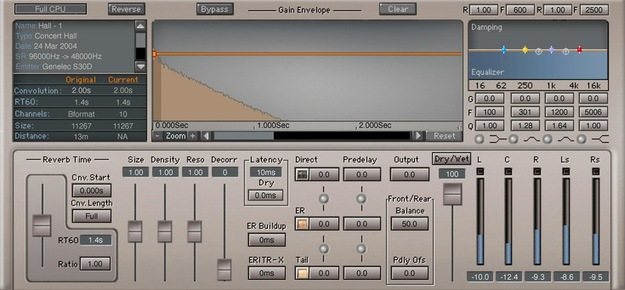
The IR360, based on the IR1’s acclaimed convolution reverb engine, delivers over 2,000 “you-are-there” 5.1 surround environments—from stairwell, to opera house, to arena.
— Waves official site
What is IR360 Convolution Reverb?
IR360 Convolution Reverb is a surround convolution reverb from Waves. Based on the IR1 reverb engine, it delivers over 2,000 5.1 surround environments.
With the growing popularity of immersive audio, creating a realistic, believable space has become more crucial, according to the description. Impulses range from a stairwell to an opera house to an arena.
A specific environment's sound can be reproduced in post-production: capture an impulse of the acoustic environment, then load it into IR360 to match your field recordings.
The reverb tail can be shortened, extended and modified. Third-party impulses or WAV files can be imported, and instructions for creating your own impulses are included.
Key features
5.1 surround environments
More than 2,000 5.1 surround environments are included, suited to immersive audio work.
IR1 engine
It is based on the IR1 convolution reverb engine.
Tail editing
The reverb tail can be shortened, extended and modified.
Editable parameters
Multiple editable parameters provide sonic flexibility.
Import your own impulses
You can capture an environment's impulse and load it to match field recordings; creation instructions are included.
Third-party IRs and WAV
Third-party impulses and WAV files can be imported.
Specifications
| Item | Details |
|---|---|
| Type | Convolution reverb (5.1 surround) |
| Impulses | 2,000+ environments (about 4.8 GB) |
| Formats (Mac) | VST / AU / AAX |
| Formats (Windows) | VST / AAX |
| OS | macOS Monterey 12 to Sequoia 15, Windows 10 or later |
What is included and system requirements
- IR360 Convolution Reverb plug-in
- Impulse library (about 4.8 GB, 2,000+ environments)
- Instructions for creating your own impulses
- Mac: VST / AU / AAX; Windows: VST / AAX
How to use it
- Install the product and let your DAW scan for plug-ins.
- Load it into an effect slot on a track, or on an aux track used as a send/return.
- Use it on a track or bus configured for 5.1.
- Choose an environment impulse from the library.
- Adjust the length of the tail.
- Adjust the tone with the parameters if needed.
- For post-production, load an impulse captured on location.
Where it may come in handy
Surround mixing
Adding the sound of a space in a 5.1 production is one possible use.
Video post-production
It may suit matching dialogue and effects to the sound of a location.
Immersive projects
Building a sense of space in immersive audio projects is another use.
Who it may suit
- People producing in 5.1 surround
- People who need to match the sound of a location in post-production
- People deciding between this and IR1 for stereo work
Good to know before you buy
- For stereo-centred work, IR1 is the closer product.
- About 4.8 GB of disk space is needed.
How it differs from similar products
We do not pick a winner; the official figures are placed side by side.
Waves IR1 Convolution Reverb
Both have an about 4.8 GB library of more than 2,000 impulses. IR360 builds on the IR1 engine for 5.1 surround environments, while IR1 targets mono and stereo.
Price
$149 (Plugin Boutique, checked 2026-10-27). Prices can vary by region and promotion, so check the official page before buying.
See IR360 Convolution Reverb on the product page
More of the same kind
We have introduced 112 reverbs. Here are some of the others.
- United Plugins Verbum Entropic Hall
- MeldaProduction MReverbMB
- AudioThing Environments
- Inspired Acoustics INSPIRATA
- Plugin Alliance Bettermaker Bettermaker BM60
- Rob Papen RP-VERB 2
We have introduced 215 other products from Waves.
- Waves IR-Live Convolution Reverb
- Waves Magma Springs
- Waves TrueVerb
- Waves H-Reverb Hybrid Reverb
- Waves Atlas Reverb
For a side-by-side comparison scored on the same criteria, see our comparison of reverbs.
See the full list in Product database: Effects.
Sources: pluginboutique.com (checked 2026-10-27)










Comments