
Disclosure: This page may contain affiliate links. Prices were checked on the date shown and may change.
An introduction to Solid State Logic SSL X-DynEQ, based on information from the maker and distributors: what it does, how to use it and who it may suit. It is not scored.
X-DynEQ features 20 different EQ types and filter shapes with dynamic EQ options for each shelf or bell filter, offering up to 24 dynamic EQ bands for detailed sound sculpting.
— Solid State Logic official site
What is SSL X-DynEQ?
SSL X-DynEQ is an EQ plug-in from Solid State Logic. It builds on the company's X-EQ 2 and adds dynamic EQ behavior, and SSL describes it as the most advanced EQ plug-in it has made. It is designed for use at any stage: recording, mixing and mastering.
A dynamic EQ changes how much a band boosts or cuts depending on the level of the incoming signal. For example, it can pull down a harsh band only when a vocal gets loud, instead of cutting it all the time. That may help keep more of the natural character of the sound than a fixed cut. When a band is switched to dynamic mode, its Attack, Release and Threshold controls become active.
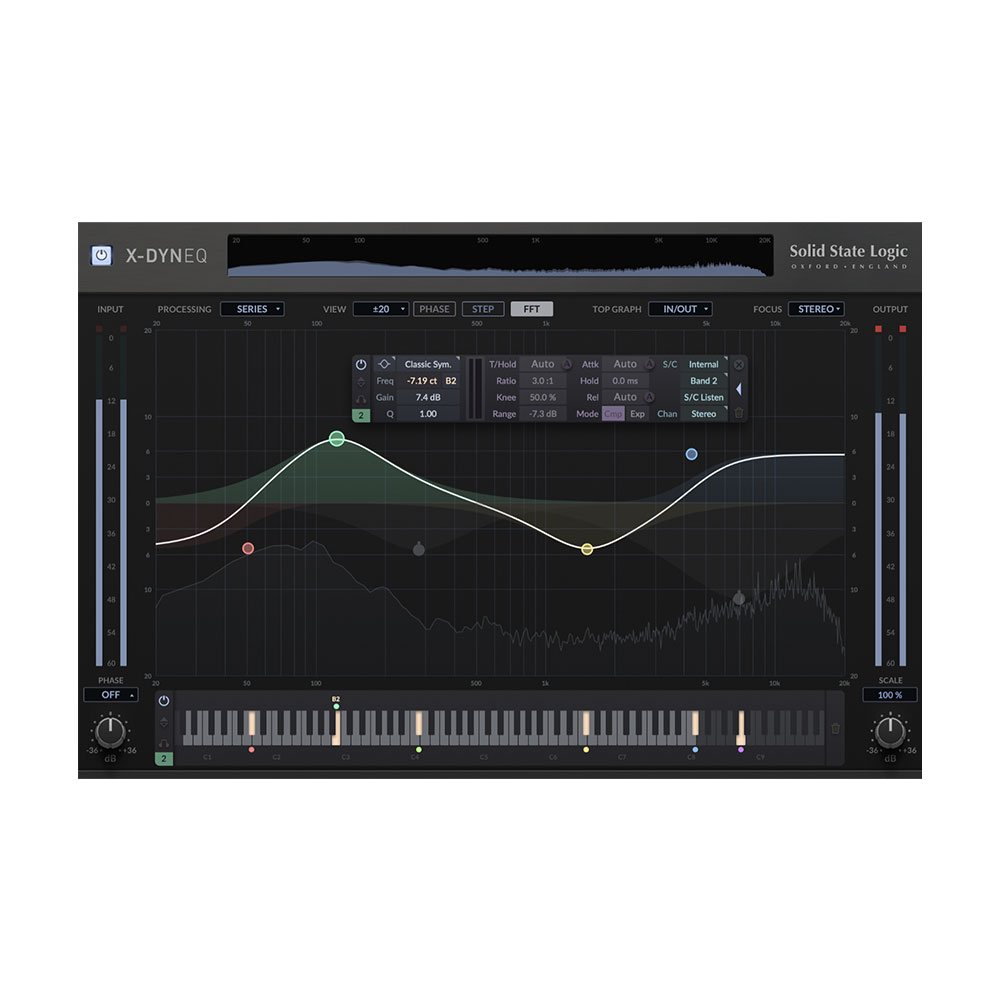
There are 20 EQ types and filter shapes. Three are new compared with X-EQ 2: Notch, Bandpass and Tilt EQ. Up to 24 bands can use dynamic processing. Each band can work on stereo, left, right, mid or side, so you can adjust just the center or just the wide part of a stereo mix.
The interface is node based: double-click the graph to create a node. Keyboard and mouse-wheel shortcuts change values, and a piano-roll view shows filter frequencies aligned with musical notes. Presets from X-EQ 2 carry over, which makes it easier to move existing work across.
Key features
Up to 24 dynamic EQ bands
Each shelf or bell band can use dynamic processing, with both upward and downward compression and expansion. This allows detailed control over how each band reacts to level changes.
Auto Attack, Release and Threshold
Using SSL's experience with program-dependent time constants, these settings adapt to the incoming signal. They may reduce the amount of manual tweaking you need.
Three new filter types
Notch, Bandpass and Tilt EQ are added over X-EQ 2. They cover precise fixes, isolating a range, and broad tonal balancing between lows and highs.
Per-band stereo processing
Every band can be set to stereo, left, right, mid or side. A Focus mode lets you concentrate on just the mid or side part of the signal.
Flexible sidechain
An internal or external sidechain signal can drive the dynamic nodes of any other band. This can be used for precise EQ work, repair, or creative effects.
HQ mode and anti-cramping technology
SSL's anti-cramping technology works against the high-frequency curve distortion that digital EQs can show, and an optional HQ mode gives a high-accuracy response.
Piano-roll view and built-in help
A view aligns filter frequencies with musical notes, and a built-in help function explains controls on screen. Both may help newer users learn the plug-in.
Specifications
| Item | Details |
|---|---|
| EQ types | 20 |
| Dynamic bands | Up to 24 |
| Processing modes | Stereo / Left / Right / Mid / Side (per band) |
| Formats (Mac) | AU, VST2, VST3, AAX Native |
| Formats (Windows) | VST2, VST3, AAX Native |
| OS (Mac) | macOS 11 Big Sur to macOS 13 Ventura (64-bit only, M1 supported) |
| OS (Windows) | Windows 10 to Windows 11 (64-bit only) |
| RAM | 4 GB minimum (8 GB recommended) |
| Authorization | Free iLok account required |
What is included and system requirements
- X-DynEQ plug-in (AU / VST2 / VST3 / AAX Native)
- Compatibility that translates X-EQ 2 presets
- Built-in help function
- A 14-day free trial is offered on the official site
How to use it
- Buy from the SSL site or a retailer, then download and install the plug-in.
- Create a free iLok account and authorize the license.
- Insert X-DynEQ on the track you want to mix in your DAW.
- Double-click the graph to create a node and set its band and gain.
- Switch the node of a problem band to dynamic mode.
- Move the threshold so it only acts when the sound gets loud (starting from the Auto settings is fine).
- If needed, choose Mid or Side to treat the center and the wide part separately.
- Set up the sidechain when you want another track to drive a band.
Where it may come in handy
Taming harsh vocal bands
If a vocal gets harsh only on loud chorus lines, setting that band to dynamic may leave the quiet parts untouched.
Mix bus and mastering touches
Because mid and side can be treated separately, you could keep the center bass while adjusting only the low end of the wide part.
Separating drums and bass
With an external sidechain, you may be able to pull down a bass band only when the kick hits.
Who it may suit
- People who feel fixed cuts thin out the sound and want to try dynamic EQ
- X-EQ 2 users who want more features while keeping their presets
- Anyone who wants mid/side processing inside a single EQ
Good to know before you buy
- A free iLok account is required for authorization (per the Plugin Boutique product information).
- The Mac requirement is listed as macOS 11 to 13. Check the official site for newer OS versions.
- A 14-day trial is offered on the official site.
- SSL states that its plug-ins are also offered as a subscription.
How it differs from similar products
We do not pick a winner; the official figures are placed side by side.
SSL X-EQ 2
X-EQ 2 is a 24-band parametric EQ with 17 EQ types, while X-DynEQ offers 20 types with up to 24 dynamic bands. X-DynEQ adds Notch, Bandpass and Tilt filters.
Price
$99 (Plugin Boutique, checked 2026-10-27). Prices can vary by region and promotion, so check the official page before buying.
See SSL X-DynEQ on the product page
Past sales
Sales we have confirmed so far. A sale with the same terms may not be held again.
| Ended | Regular | Sale | Discount | Store, date checked |
|---|---|---|---|---|
| Nov 1, 2026 | $99 | $29 | 70% off | Plugin Boutique, checked 10/24 |
More of the same kind
We have introduced 122 EQs. Here are some of the others.
- PSP Audioware PSP Datamix A567
- IK Multimedia T-RackS Linear Phase Equalizer
- Black Rooster Audio Black Rooster Audio VEQ-1P
- Antelope Audio Antelope Audio Filtek Mk3
- Minimal Audio Morph EQ
- PSP Audioware PSP ConsoleQ
We have introduced 33 other products from Solid State Logic.
- Solid State Logic SSL X-EQ 2
- Solid State Logic SSL Fusion Violet EQ
- Solid State Logic SSL Native X-Echo
- Solid State Logic SSL Native X-Saturator
- Solid State Logic SSL Fusion Vintage Drive
For a side-by-side comparison scored on the same criteria, see our comparison of EQs.
See the full list in Product database: Effects.
Sources: solidstatelogic.com pluginboutique.com (checked 2026-10-27)










Comments