
Disclosure: This page may contain affiliate links. Prices were checked on the date shown and may change.
An introduction to Solid State Logic SSL Native X-Saturator, based on information from the maker and distributors: what it does, how to use it and who it may suit. It is not scored.
X-Saturator delivers a stunning range of analogue style distortion effects.
— Solid State Logic official site
What is SSL Native X-Saturator?
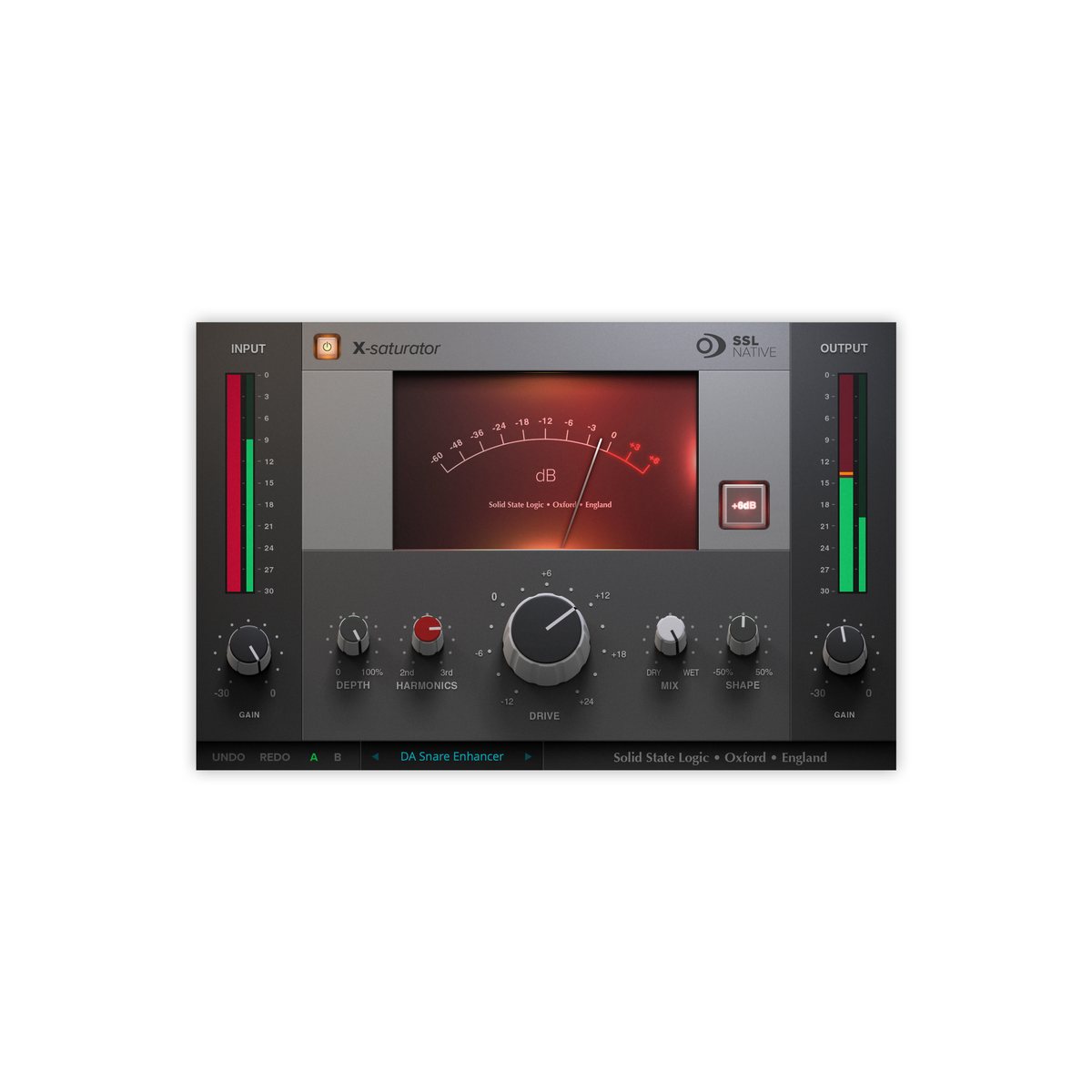
SSL Native X-Saturator is a saturation and distortion plug-in from Solid State Logic (SSL). It emulates an analogue circuit that can produce 2nd-order valve-style distortion, 3rd-order transistor-style distortion, or a blend of the two.
At low drive the distortion is mild, which the maker positions for gently warming instruments so they sit in a mix, or adding a little edge so they cut through. As the drive is raised the distortion increases, up to heavy, crushed tones according to the official description.
The control set is small and centres on four parameters. Harmonics sets the balance between 2nd and 3rd order, Drive sets how hard the circuit is pushed, Depth sets the amplitude of the distortion, and Shape moves the edge from smooth to hard. A Headroom button, a wet/dry mix and input/output meters are also provided.
It is available for macOS (AU, VST2, VST3, AAX) and Windows (VST2, VST3, AAX), with native Apple M1 support. A free iLok account is needed for authorisation. No score is given here; the page is organised from official and retailer information.
Key features
Blend 2nd and 3rd order
The Harmonics control selects valve-style 2nd-order distortion, transistor-style 3rd-order distortion, or a mix of both. A single knob moves between a warmer and a more edgy colour, which may suit comparing options on different sources.
Drive and Depth
Drive sets how hard the circuit is pushed and Depth sets the amplitude of the distortion. The same panel covers light blending and heavy distortion.
Shape control
Shape adjusts whether the edge of the distortion is smooth or hard. It may be worth trying when heavy drive needs its corners softened.
Headroom button
The Headroom button adds 6 dB of headroom so that heavily boosted or distorted signals are less likely to clip digitally.
Wet/dry mix for parallel use
A dedicated mix control sets the ratio of dry and processed signal, which suits blending a heavily distorted copy under the original.
A/B switch and meters
An A/B preset switch lets two settings be compared, and input and output meters show level while adjusting.
Specifications
| Item | Details |
|---|---|
| Type | Saturation / distortion |
| Distortion types | 2nd order (valve-style), 3rd order (transistor-style), or a blend |
| Main controls | Harmonics, Drive, Depth, Shape, Headroom, Mix |
| Formats (Mac) | AU, VST2, VST3, AAX Native |
| Formats (Windows) | VST2, VST3, AAX Native |
| macOS | macOS 11 to 13 (M1 supported, 64-bit only) |
| Windows | Windows 10 to 11 (64-bit only) |
| RAM | 4 GB minimum (8 GB recommended) |
| Authorisation | Free iLok account required |
What is included and system requirements
- Plug-in (Mac: AU, VST2, VST3, AAX Native)
- Windows: VST2, VST3, AAX Native
- A free iLok account is required for authorisation
- A user guide (PDF) is available from the official page
How to use it
- Install through the SSL Download Manager and authorise with a free iLok account.
- Load it as an insert on a track or bus in your DAW.
- Start with Harmonics near the middle to hear how 2nd and 3rd order combine.
- Raise Drive gradually and listen for how much distortion is added.
- Adjust Depth for the amplitude and Shape for the hardness of the distortion edge.
- Lower the Mix control to blend with the original for parallel processing.
- When driving hard, try Headroom and watch the input and output meters.
- Use the A and B slots to compare two settings.
Where it may come in handy
Adding edge to drums
It may be used on a drum track or bus with light drive to add definition, and the wet/dry mix may help keep the original movement.
Settling vocals into a mix
Low drive adds harmonics, so it may be worth trying on a vocal to see whether it sits better among other parts, or on a home recording that needs a little more body.
Thickening bass or synths
Switching between 2nd-order and 3rd-order character may help adjust thickness and edge on bass and synth parts.
Heavy distortion as an effect
Pushing the drive high produces crushed tones that may be tucked under the mix with the mix control.
Who it may suit
- People who want to try saturation in a single plug-in
- Those who want to compare 2nd and 3rd order distortion
- Producers adding light harmonics to drums or vocals
- Anyone who likes blending distortion in parallel
Good to know before you buy
- A free iLok account is required for authorisation.
- Supported systems are listed as macOS 11 to 13 and Windows 10 to 11 in the retailer listing; check the official page for current compatibility before buying.
- It runs as a plug-in inside a DAW, not as a standalone application.
- The official page also mentions a subscription option covering SSL plug-ins.
Price
$49 (Solid State Logic official site, checked 2026-10-27). Prices can vary by region and promotion, so check the official page before buying.
See SSL Native X-Saturator on the product page
More of the same kind
We have introduced 82 saturation and distortion effects. Here are some of the others.
- Eventide MangledVerb
- Safari Audio Rabbit Tape V2
- Universal Audio Oxide Tape Recorder
- AIR Music Technology Tape Saturator
- Safari Audio Cobra Fuzz V2
- Kuassa Efektor Bass Smasher Distortion
We have introduced 33 other products from Solid State Logic.
- Solid State Logic SSL G3 MultiBusComp
- Solid State Logic SSL SubGen
- Solid State Logic SSL Fusion Vintage Drive
- Solid State Logic SSL Fusion Violet EQ
- Solid State Logic Native X-Phase
For a side-by-side comparison scored on the same criteria, see our comparison of saturation and distortion effects.
See the full list in Product database: Effects.
Sources: solidstatelogic.com pluginboutique.com (checked 2026-10-27)










Comments