
Disclosure: This page may contain affiliate links. Prices were checked on the date shown and may change.
An introduction to MeldaProduction MMatcher, based on information from the maker and distributors: what it does, how to use it and who it may suit. It is not scored.
MMatcher is a revolutionary plugin designed to streamline your audio production workflow by providing precise spectrum, loudness, and stereo field matching.
— MeldaProduction official site
What is MMatcher?
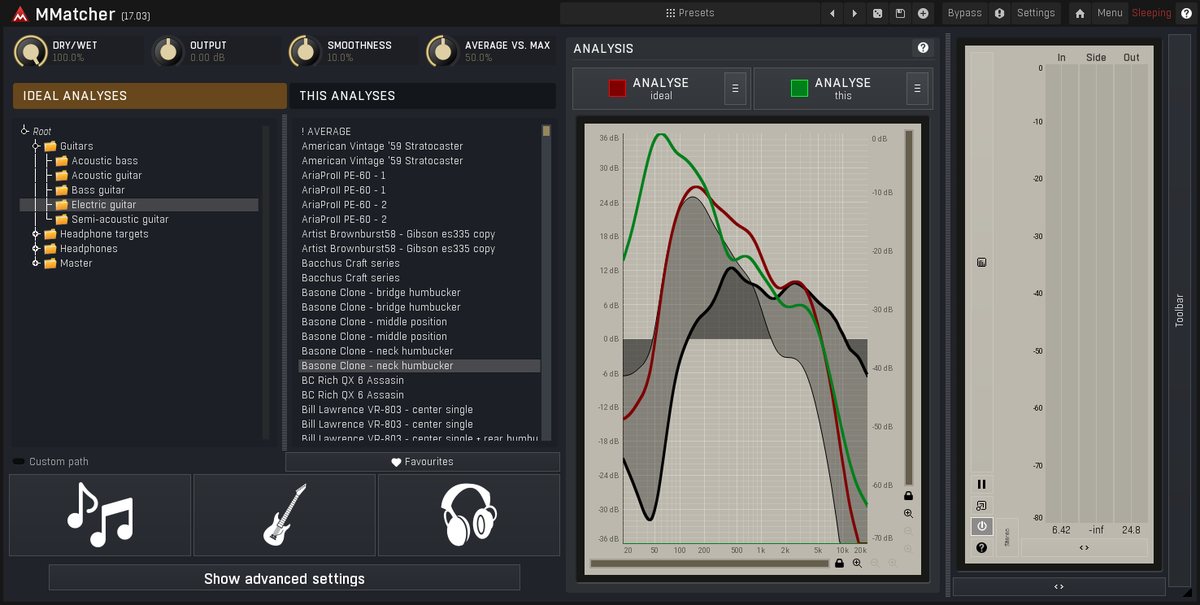
MeldaProduction MMatcher matches the spectrum, loudness and stereo field of your audio to a reference. The maker presents it as a spectrum-matching tool for many tasks.
It analyzes a reference source and dynamically adjusts your input toward its characteristics. The workflow is three steps: analyze your recording, then match it to a reference from the database or one you analyze yourself.
It is not limited to matching tracks when mastering. The maker also describes correcting headphones and studio monitors, and shaping guitar and bass tones.
The maker supplies reference data from thousands of well-known songs and a database of dry electric guitar and bass sounds analyzed from samples sent in by users, with more databases planned.
Key features
Spectrum, loudness and stereo matching
It captures the reference's spectrum, loudness and stereo image and applies them to your input, useful when you want a track to move toward a reference.
Three-step workflow
Analyze, choose a reference, then match. It may help when you want a quick sense of direction before detailed tweaking.
Master reference database
Reference data from thousands of well-known songs across genres is included, handy for mixing and mastering against commercial releases.
Headphone correction
Pick your headphone model from the database or analyze your own to apply a correction, which may help people who mix on headphones.
Studio monitor correction
With a measurement mic and test signals you can build a correction profile, and average several measurements. The maker notes it is not a substitute for acoustic treatment.
Guitar and bass database
A database of dry electric guitar and bass sounds, analyzed from hundreds of instruments sent by users, lets you compare your sound against references.
Specifications
| Item | Details |
|---|---|
| Formats (Windows) | VST / VST3 / AAX (64-bit) |
| Formats (Mac) | VST / VST3 / AU / AAX (64-bit) |
| OS (Windows) | Windows 10 / 11 (64-bit, Intel/AMD with SSE2) |
| OS (Mac) | macOS 10.14 Mojave or newer (64-bit, Intel/AMD/Apple Silicon) |
| Trial | Available on the maker's site |
What is included and system requirements
- MMatcher plugin
- Reference databases for master tracks, headphones, and guitar/bass
- Formats: VST / VST3 / AAX on Windows; VST / VST3 / AU / AAX on Mac
- Requirements: Windows 10/11 or macOS 10.14 or newer
- Activated with a serial in a MeldaProduction account
How to use it
- Get the installer from your Plugin Boutique account or the maker's download page.
- Create a MeldaProduction account and sign in to MPluginManager.
- Redeem the serial under LICENCES & ACTIVATION and install MMatcher.
- Load MMatcher in your DAW and analyze your audio.
- Pick a reference from the database or analyze your own reference audio.
- Apply the match and adjust how strongly it acts.
- For mastering, compare against the reference track to finish.
Where it may come in handy
Mastering toward a reference
You may use the spectrum of a favorite track as a guide and see how your song differs, as a pre-finish direction check.
Headphone mixing correction
Selecting your headphone model and applying correction may bring the monitoring closer to a state that is easier to judge.
Monitors and room
A measurement mic lets you build a correction profile; combined with acoustic treatment it may help even out your listening position.
Guitar and bass tone
Comparing your sound against database references may offer clues when shaping tone.
Who it may suit
- Those who mix or master their own tracks against a reference
- Those who want headphone or monitor correction as a plugin
- Guitarists and bassists who want to compare tones to references
- Existing MeldaProduction users
Good to know before you buy
- Owners of MCreativeFXBundle, MMasteringFXBundle, MMixingFXBundle, MTotalFXBundle or MCompleteBundle receive MMatcher for free in their MeldaProduction account.
- For monitor correction with a measurement mic, the maker says it is not a substitute for proper acoustic treatment.
- Licenses are activated by registering the serial in a MeldaProduction account.
Price
Please check the official page for the price.
See MMatcher on the product page
More of the same kind
Other introduction articles of the same kind.
- United Plugins BassRift
- Native Instruments Tape Wobble
- BLEASS Phase Mutant
- Rhodes Vari-Amp
- Waves Retro Fi
- MAAT LINpro
We have introduced 32 other products from MeldaProduction.
- MeldaProduction MMorph
- MeldaProduction MDrumCleaner
- MeldaProduction MVintageRotary
- MeldaProduction MMicSim
- MeldaProduction MAutoVolume
See the full list in Product database: Effects.
Sources: meldaproduction.com pluginboutique.com (checked 2026-10-27)










Comments