
Disclosure: This page may contain affiliate links. Prices were checked on the date shown and may change.
An introduction to MeldaProduction MMicSim, based on information from the maker and distributors: what it does, how to use it and who it may suit. It is not scored.
By converting the signal from your existing microphone into the sonic signature of high-end studio classics, MMicSim expands your recording possibilities
— MeldaProduction official site
What is MMicSim?
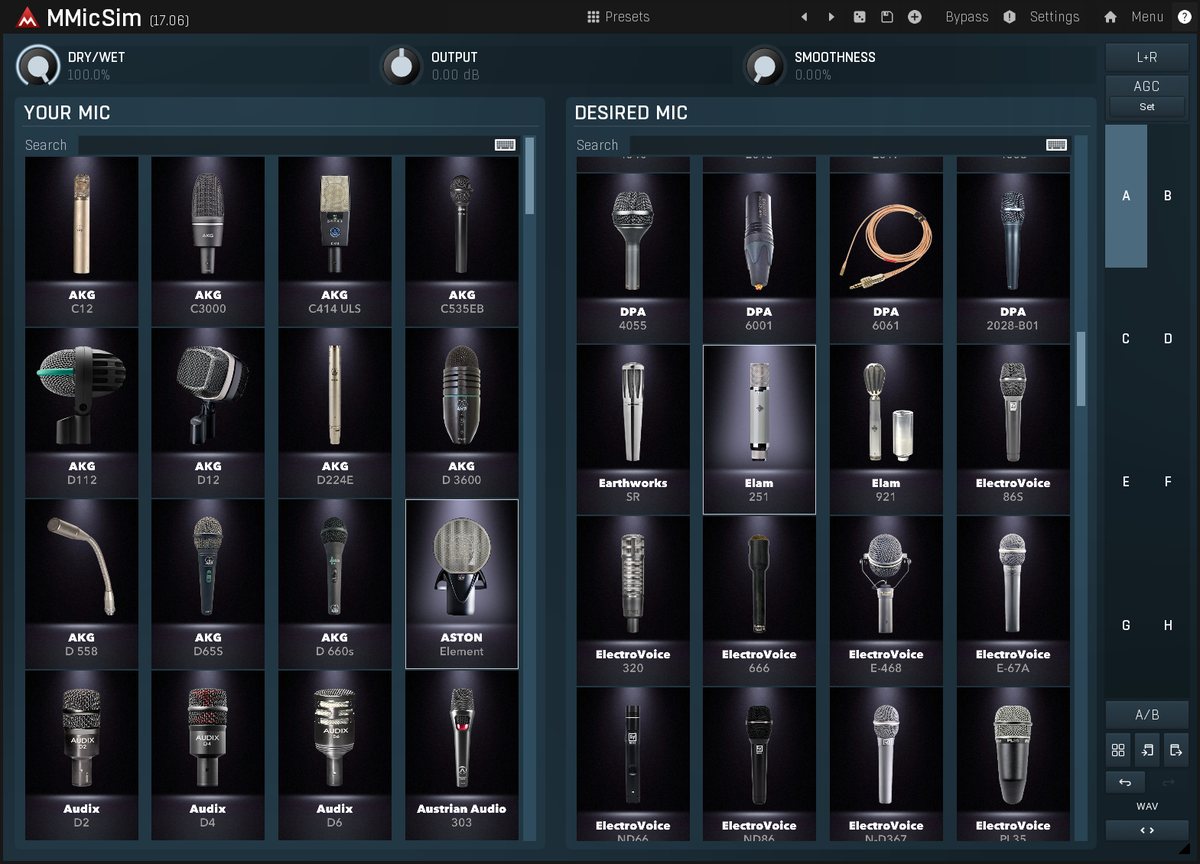
MMicSim is a microphone simulator from MeldaProduction. It aims to convert a recording made with your own microphone into the characteristics of a different microphone.
You choose the microphone you used from the 'Your Mic' list and a target from the 'Desired Mic' list.
Each microphone in the database is described as having been measured in an anechoic chamber with a multi-dynamic sweep.
Over 100 microphones are included, and more are planned to be added.
Key features
Your Mic and Desired Mic
Pick the source and target microphones.
Anechoic measurement
Each mic was measured in an anechoic chamber, so the data excludes room reflections.
Smoothness control
Used to smooth spectral inaccuracies and resonances; the maker mentions around 20% as a reference.
Dry/Wet knob
Adjusts the intensity of the core algorithm.
Over 100 microphones
More than 100 microphones are included, such as the Telefunken ELA M251 and Neumann M49b.
Specifications
| Item | Details |
|---|---|
| Maker | MeldaProduction |
| Windows | Windows 10 / 11 (64-bit), Intel/AMD with SSE2 |
| macOS | 10.14 Mojave or later (64-bit), Intel/AMD/Apple Silicon |
| Formats | VST / VST3 / AAX (plus AU on Mac) |
| Microphones | Over 100 |
What is included and system requirements
- MMicSim plug-in
- Data for over 100 microphones
How to use it
- Load the plug-in on a DAW track.
- Select the microphone you actually used in 'Your Mic'.
- Select the target microphone in 'Desired Mic'.
- Play the recording and check the change.
- Adjust Smoothness to even out spectral irregularities.
- Set the amount with Dry/Wet.
- Switch to other target mics and compare the differences.
Where it may come in handy
Vocal recording
It could be used to shift a vocal recorded with a dynamic mic toward the characteristics of another microphone.
Drums
You may be able to virtually swap the mic on a snare or kick.
Guitar amps
It could be used to try different microphones on a cabinet recording.
Who it may suit
- People who want to try other mics' characteristics using their own microphone
- People who want to compare microphones after recording
- Home recordists who want a reference when choosing a mic
Good to know before you buy
- The conversion is plug-in processing and may differ from the real microphone.
- A free trial is offered on the official site.
- The price displayed on Plugin Boutique and the official site differed.
Price
Please check the official page for the price.
See MMicSim on the product page
More of the same kind
Other introduction articles of the same kind.
- Boz Digital Labs ProVocative
- Sugar Bytes Looperator
- Metric Halo / Make Believe MB TMPC
- Waves MaxxVolume
- Waves CLA Effects
- UJAM RETROCRAFT
We have introduced 32 other products from MeldaProduction.
- MeldaProduction MConvolutionMB
- MeldaProduction MMatcher
- MeldaProduction MAutoVolume
- MeldaProduction MCompare
- MeldaProduction MDrumCleaner
See the full list in Product database: Effects.
Sources: meldaproduction.com pluginboutique.com (checked 2026-10-27)










Comments