
Disclosure: This page may contain affiliate links. Prices were checked on the date shown and may change.
An introduction to Minimal Audio Morph EQ, based on information from the maker and distributors: what it does, how to use it and who it may suit. It is not scored.
Morph EQ is an expressive EQ designer.
— Minimal Audio official site
What is Morph EQ?
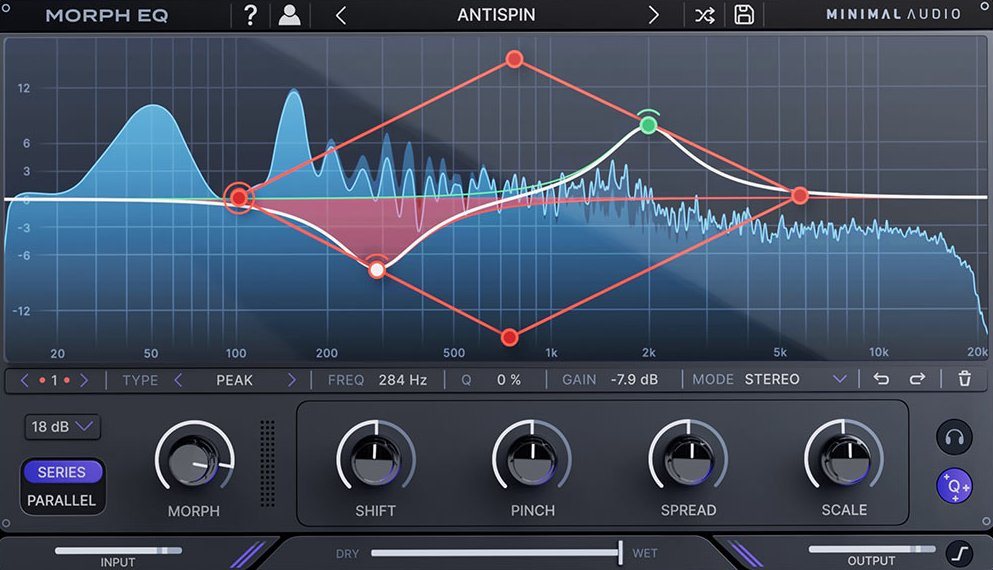
Morph EQ is an expressive equalizer plug-in from Minimal Audio in which filter movements can be drawn. It aims at EQ that changes over time as well as fixed corrective settings.
At the center is the ability to draw filter paths freely. A drawn path can be moved along with a single knob, so EQs in which frequency and gain change together can be built quickly.
Macro control is included. It can shift the overall filter shapes, move the cutoff or widen the stereo image. Seven filter types can be combined, with a real-time analyzer to watch while adjusting.
More than 100 presets are included, ranging from twisted effects to essential mixing settings. It supports AU, VST, VST3 and AAX on macOS, and VST, VST3 and AAX on Windows.
Key features
Drawable filter paths
Filter movements can be drawn freely and travelled with a single knob, allowing moving tones that a static EQ cannot produce.
Integrated macro control
Shifting filter shapes, moving the cutoff and creating stereo spread can be done with only a few controls.
Seven filter types
Seven stereo filter types can be combined, in serial or parallel configurations.
Routing and analysis
Stereo, single-channel and mid-side routing are supported, with a high-resolution spectrum analyzer.
Adaptive Q mode
A mode inspired by analog filter resonance is included, letting the Q respond to gain.
100+ presets
More than 100 presets range from effect-like sounds to essential mixing, and EQ undo and redo are supported.
Specifications
| Item | Details |
|---|---|
| Filter types | 7 (stereo) |
| Routing | Stereo / single channel / mid-side |
| Configuration | Serial and parallel |
| Presets | 100+ |
| Formats (Mac) | AU, VST, VST3, AAX |
| Formats (Windows) | VST, VST3, AAX |
| Operating systems | macOS 10.9 or higher (64-bit only), Windows 10 or higher (64-bit only) |
| Activation | An internet connection is required for activation |
What is included and system requirements
- Morph EQ plug-in (two activations)
- Free updates and support
- 30-day return period (official)
How to use it
- Install after purchase and activate.
- Restart your DAW and insert the plug-in on a track.
- Pick a nearby preset first.
- Add filters and draw the path you want to move along.
- Move along the path with the morph knob and write automation if needed.
- Adjust routing while watching the analyzer.
Where it may come in handy
Moving filter effects
Because filter paths can be drawn and travelled, it may be worth trying for build-ups and breaks.
Stereo width movement
Macro controls can create stereo effects, so it may help in widening synths and pads.
Regular mix corrections
Some presets are for essential mixing, so it may also serve for ordinary corrections.
Who it may suit
- People who want an EQ that changes over time
- People who want to draw filter movements
- People looking for a sound-design oriented EQ
Good to know before you buy
- An internet connection is required for activation.
- It is also available through Minimal Audio's All Access plan (official).
Price
$49 (Minimal Audio official site, checked 2026-10-27). Prices can vary by region and promotion, so check the official page before buying.
See Morph EQ on the product page
More of the same kind
We have introduced 122 EQs. Here are some of the others.
- Three-Body Technology Transi-Q
- Waves Renaissance Equalizer
- Antelope Audio Antelope Audio VEQ-1A
- Antelope Audio VEQ-STU 900
- Eventide EQ45
- United Plugins FireEQ
We have introduced 8 other products from Minimal Audio.
- Minimal Audio Cluster Delay
- Minimal Audio Current
- Minimal Audio Minimal Audio Hybrid Filter
- Minimal Audio Fuse Compressor
- Minimal Audio Ripple Phaser
For a side-by-side comparison scored on the same criteria, see our comparison of EQs.
See the full list in Product database: Effects.
Sources: minimal.audio pluginboutique.com (checked 2026-10-27)










Comments