
Disclosure: This page may contain affiliate links. Prices were checked on the date shown and may change.
An introduction to NUGEN Audio Stereoplacer, based on information from the maker and distributors: what it does, how to use it and who it may suit. It is not scored.
Choose the frequencies you want to fix and move them anywhere, leaving the rest of the stereo image intact.
— NUGEN Audio official site
What is Stereoplacer?
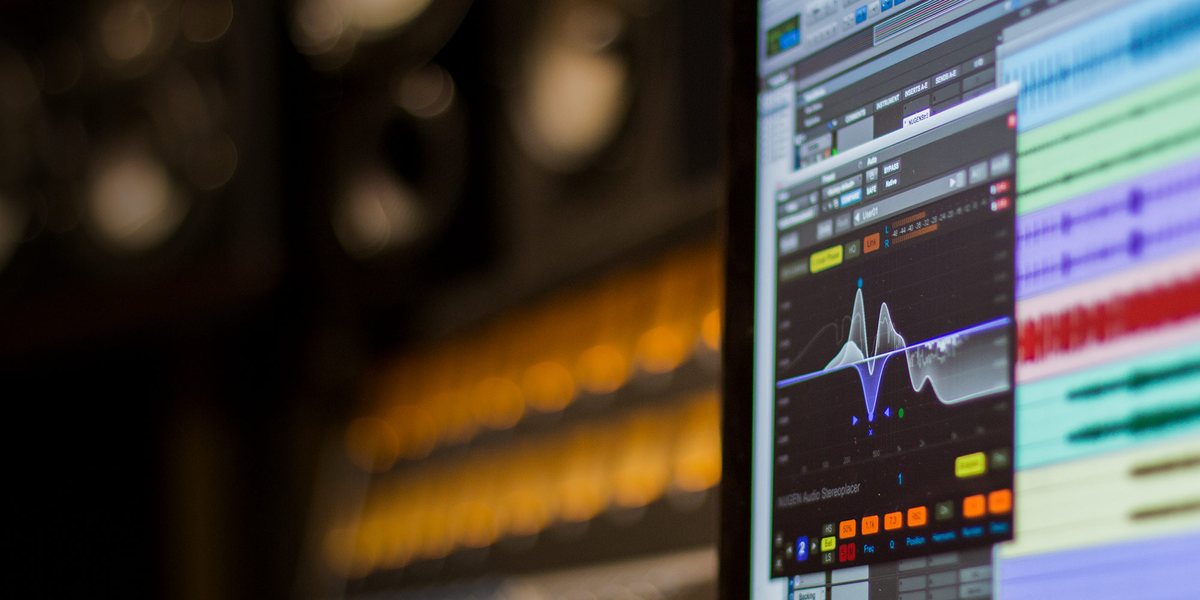
Stereoplacer is a frequency-specific panning tool from NUGEN Audio. It works like an EQ, but instead of raising or lowering a band, it pans that band left or right without affecting the rest of the stereo image.
The official page names restoring a stereo image from mono as the most common use, for example from archive material or recordings limited by input count. Panning lower notes of a mono piano to the left and higher notes to the right is one example. Pulling the fundamentals of drum loops with extreme panning back toward the center is another.
Like an EQ it uses bell curves and high and low shelves, with up to 10 bands. A switchable harmonic control also moves linked harmonics and overtones, described as giving more natural-sounding panning.
Supported formats are AAX, VST3, AU and AudioSuite in 64-bit. It is also included in NUGEN bundles such as Focus, NUGEN Producer and NUGEN Post.
Key features
Frequency-specific panning
Select a band as in an EQ and place only that band elsewhere in the stereo field, leaving the rest in place.
Up to 10 bands
Bell, high-shelf and low-shelf curves can be combined across up to 10 bands.
Harmonic capture
Harmonically linked bell curves can be added to each node and moved from a single root point.
Keeping lows centered
Keep the lows centered and move only the higher attack components, giving an impression of panning.
Solo and visual feedback
Solo the band you are adjusting, with dynamic visual feedback.
Mono compatibility
The official page says mono compatibility is maintained.
No factory presets
Because settings depend on the source, no factory presets are installed; custom presets can be saved.
Specifications
| Item | Details |
|---|---|
| Type | Frequency-specific panner |
| Bands | Up to 10 |
| Curves | Bell / high shelf / low shelf |
| Formats | AAX, VST3, AU, AudioSuite (64-bit) |
| Minimum system | Mac OSX 10.9 / Windows 7, 512 MB RAM |
| Price (official) | USD 129 |
What is included and system requirements
- Stereoplacer plug-in
- Formats: AAX, VST3, AU, AudioSuite (64-bit)
- Free demo on the official site
- Also included in Focus, NUGEN Producer and NUGEN Post bundles
How to use it
- Install the demo or full version.
- Insert Stereoplacer on the target track.
- Create a node on the band to move and listen in solo.
- Move its left/right position.
- Enable the harmonic function if overtones should follow.
- Check in both stereo and mono for unwanted dropouts.
- Combine several nodes as you would with an EQ.
- Save frequently used settings as presets.
Where it may come in handy
Widening mono material
Panning low notes of a mono piano left and high notes right may create width.
Re-centering sample loops
The official page cites pulling extreme panning of loops back toward the center.
Correcting mic placement
It might fix balance problems caused by microphone placement, band by band.
Panning only the highs of a bass
Keeping lows centered while moving higher components is one idea.
Who it may suit
- Those who want to widen mono material
- People repositioning sampled loops
- Users who prefer EQ-style panning control
- Anyone who wants width with a centered low end
Good to know before you buy
- No factory presets are included.
- A 64-bit host is expected.
- A free demo is available on the official site.
How it differs from similar products
We do not pick a winner; the official figures are placed side by side.
Stereoizer
NUGEN describes Stereoizer as a tool that expands the stereo image, from mono to stereo to super-wide. Stereoplacer is described as moving individual frequency bands left or right.
Price
$129 (NUGEN Audio official site, checked 2026-10-27). Prices can vary by region and promotion, so check the official page before buying.
See Stereoplacer on the product page
More of the same kind
Other introduction articles of the same kind.
- Waves Eddie Kramer Bass Channel
- Waves PAZ Analyzer
- Waves Curves Resolve
- AudioThing Arguments
- Arturia Phaser BI-TRON
- MeldaProduction MDrumCleaner
We have introduced 30 other products from NUGEN Audio.
- NUGEN Audio Jotter
- NUGEN Audio Halo Downmix
- NUGEN Audio LM-Correct
- NUGEN Audio NUGEN Audio SEQ-S
- NUGEN Audio SigMod
See the full list in Product database: Effects.
Sources: nugenaudio.com pluginboutique.com (checked 2026-10-27)










Comments