
Disclosure: This page may contain affiliate links. Prices were checked on the date shown and may change.
An introduction to Waves Renaissance Equalizer, based on information from the maker and distributors: what it does, how to use it and who it may suit. It is not scored.
The neutral, unbiased sound means that any changes made to your tracks happen because you set the controls to make those changes.
— Waves official site
What is Renaissance Equalizer?
Renaissance Equalizer is an equalizer Waves has offered for over two decades. The product page describes a neutral, unbiased sound: changes happen because you set the controls, not because the EQ adds its own character.
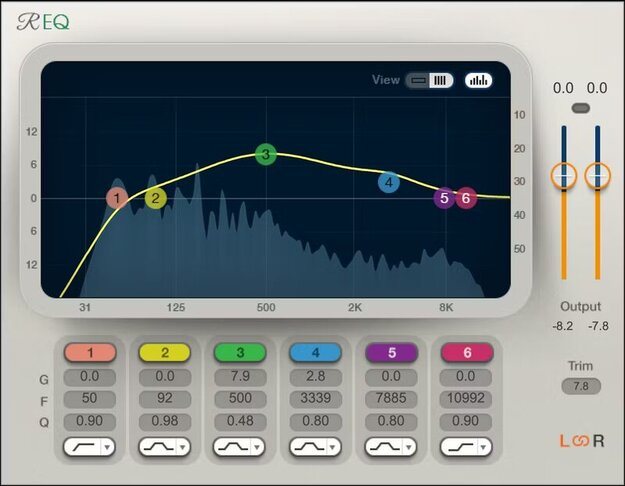
It is built from 2-, 4- or 6-band components. All bands offer several curve options, and you can pick the band count that matches the job.
The interface is clean and touch-friendly, showing all band parameters at once or focusing on a single band. There are three skins, and the Dark skin is described as ideal for video editing suites.
An integrated spectrum analyzer shows how the EQ affects the sound, left and right channels can be linked or processed separately, and a Trim control helps with gain staging. Formats are VST, AU and AAX on Mac and VST and AAX on Windows.
Key features
2, 4 or 6 bands
You choose between 2-, 4- and 6-band components. Fewer bands for simple fixes and six when finer shaping is wanted.
Multiple curves per band
Every band has multiple curve options, so the same frequency can be cut sharply or lifted broadly depending on the goal.
Built-in spectrum analyzer
An integrated analyzer shows how the EQ affects the sound, which may help to compare what you hear with what you see.
Linked or separate channels
Left and right channels can be linked or processed independently, which may help with material whose sides are unbalanced.
Trim and skins
The Trim control simplifies gain staging, and three skins are provided; the Dark skin is intended for video editing suites.
Specifications
| Item | Details |
|---|---|
| Type | Equalizer |
| Band layouts | 2 / 4 / 6 bands |
| Mac | macOS Monterey 12 to Sequoia 15, VST, AU, AAX |
| Windows | Windows 10 or later, VST, AAX |
| List price | $99 (Plugin Boutique) |
What is included and system requirements
- Renaissance Equalizer (2-, 4- and 6-band components)
- Formats: Mac VST/AU/AAX; Windows VST/AAX
- Requirements: macOS Monterey 12, Ventura 13, Sonoma 14, Sequoia 15 (VST, AU, AAX); Windows 10 or later (VST, AAX)
How to use it
- Create a Waves account, or log in if you already have one.
- Register the serial number shown in your Plugin Boutique account under Register New Products in your Waves account.
- Download, install and log in to the Waves Central app.
- In the Install Products tab, choose the product and click Install & Activate.
- Open your DAW and load the Waves plug-in from the plug-in list.
- Insert it on a track and choose the band-count component you need.
- Move frequency and gain of the needed bands in small steps and check the analyzer.
- Match output with Trim and compare with the plug-in on and off.
Where it may come in handy
Basic mix corrections
It may be used for basic fixes such as reducing unwanted low-end build-up or adding a little top end.
Video and streaming edits
With a Dark skin described as suited to video editing suites, it may fit work done in dim editing environments.
Left/right balance on stereo material
Separate channel processing may help correct recordings whose sides differ.
Who it may suit
- People who want a neutral EQ for basic corrections
- People who like choosing a light band count for the task
- People who adjust EQ while watching an analyzer
Good to know before you buy
- A Waves account, serial registration and installation via Waves Central are required.
- The list price is the strike-through price on the sales page, which also showed a limited-time discount.
How it differs from similar products
We do not pick a winner; the official figures are placed side by side.
Waves Q10 Equalizer
Renaissance Equalizer is offered as 2-, 4- or 6-band components, while Q10 is a 10-band parametric; both list at $99.
Price
$99 (Plugin Boutique, checked 2026-10-27). Prices can vary by region and promotion, so check the official page before buying.
See Renaissance Equalizer on the product page
More of the same kind
We have introduced 122 EQs. Here are some of the others.
- Antelope Audio VEQ-56
- Kuassa EFEKTOR Paten Graphic Equalizer
- Three-Body Technology Transi-Q
- W. A. Production Ignition
- Solid State Logic SSL X-EQ 2
- Tokyo Dawn Labs TDR VOS SlickEQ GE
We have introduced 215 other products from Waves.
- Waves API 550
- Waves H-EQ Hybrid Equalizer
- Waves Q10 Equalizer
- Waves Manny Marroquin EQ
- Waves Q-Clone
For a side-by-side comparison scored on the same criteria, see our comparison of EQs.
See the full list in Product database: Effects.
Sources: pluginboutique.com (checked 2026-10-27)










Comments