
Disclosure: This page may contain affiliate links. Prices were checked on the date shown and may change.
An introduction to Antelope Audio VEQ-STU 169, based on information from the maker and distributors: what it does, how to use it and who it may suit. It is not scored.
The simple, yet powerful 3 band inductor-based EQ carries a signature musicality owing to the combination of its high-end smoothness and headroom alongside clean and precise lows.
— Antelope Audio official site
What is VEQ-STU 169?
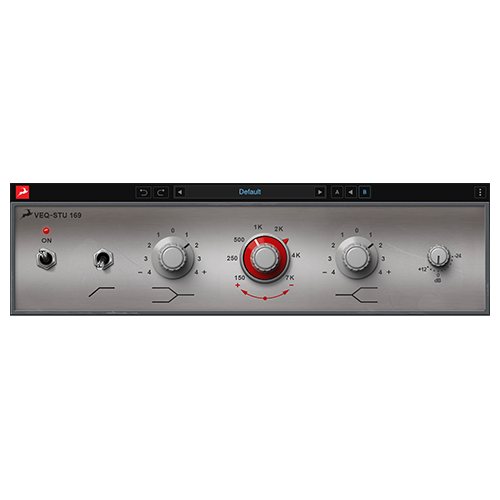
Antelope Audio VEQ-STU 169 models the EQ section of a second-generation analog Western European mixing desk made in the late 1970s to early 1980s. It is a three-band inductor-based EQ.
The low band shelves at 60 Hz, the mid band is a sweepable bell between 150 Hz and 7 kHz, and the high band shelves at 10 kHz. A low-pass filter is also included.
It is described as suited to broad tone shaping, with high-end smoothness and headroom alongside clean, precise lows.
The Native plugin runs in your DAW, and a real-time version runs on compatible Synergy Core devices.
Key features
Three-band layout
Low, mid, and high bands for simple overall tone shaping, better for broad strokes than fine repair.
Inductor-based model
Models the character of an inductor-based EQ with a warm, musical aim.
60 Hz low shelf
The low band shelves at 60 Hz for adjusting low-end weight.
Sweepable mid bell
Sweep between 150 Hz and 7 kHz to explore the presence of vocals and instruments.
10 kHz high shelf
The high band shelves at 10 kHz, which may suit adjusting air.
Low-pass filter
A low-pass filter is included to clear unwanted high-frequency content.
Native and Synergy Core
Offered as a Native plugin and a Synergy Core real-time version.
Specifications
| Item | Details |
|---|---|
| Type | 3-band inductor-based EQ with low-pass filter |
| Low | 60 Hz shelf |
| Mid | 150 Hz to 7 kHz bell |
| High | 10 kHz shelf |
| Versions | Native / Synergy Core Real-Time |
What is included and system requirements
- VEQ-STU 169 (Native plugin)
- Synergy Core Real-Time version
How to use it
- Purchase and authorize through an Antelope account.
- Install it and load it in your DAW.
- Insert VEQ-STU 169 on a track.
- Sweep the mid band to find areas of interest.
- Adjust low-end weight with the low shelf.
- Add air with the high shelf.
- Use the low-pass if you need to clear unwanted highs.
Where it may come in handy
Bus coloration
It may suit gentle broad shaping across a bus.
Vocals
Sweeping the mid may help find a presence region.
Drum bus
Shelves could adjust lows and highs.
Synergy Core setups
On compatible devices it may be used in real time while recording.
Who it may suit
- People who want to try a late-1970s desk EQ character
- Those who prefer broad tone shaping over fine repair
- Antelope device users
- Anyone looking for a simple three-band EQ
Good to know before you buy
- Native and Synergy Core Real-Time versions are provided.
- Check the system requirements on Antelope's page.
Price
$169 (Plugin Boutique, checked 2026-10-27). Prices can vary by region and promotion, so check the official page before buying.
See VEQ-STU 169 on the product page
More of the same kind
We have introduced 122 EQs. Here are some of the others.
- Zynaptiq BALANCE
- MAAT MAAT SantaCruzEQ12
- Eventide EQ45
- Solid State Logic SSL X-EQ 2
- McDSP AE400 Active EQ Native v7
- Newfangled Audio EQuivocate
We have introduced 54 other products from Antelope Audio.
- Antelope Audio VEQ-55A
- Antelope Audio Antelope Audio Gyratec XIV
- Antelope Audio VEQ-4K ORANGE
- Antelope Audio NEU-PEV
- Antelope Audio VMEQ-5
For a side-by-side comparison scored on the same criteria, see our comparison of EQs.
See the full list in Product database: Effects.
Sources: antelopeaudio.com pluginboutique.com (checked 2026-10-27)










Comments