
Disclosure: This page may contain affiliate links. Prices were checked on the date shown and may change.
An introduction to Waves Eddie Kramer Bass Channel, based on information from the maker and distributors: what it does, how to use it and who it may suit. It is not scored.
Eddie’s goal was crystal-clear: fat bass tones with presence that pop on radio mixes, without being overbearing
— Waves official site
What is Eddie Kramer Bass Channel?
Eddie Kramer Bass Channel is the bass plugin in Waves' Eddie Kramer series. It is presented as capturing the bass-production approach of Eddie Kramer, the engineer and producer associated with work by Jimi Hendrix, The Rolling Stones and Led Zeppelin.
According to the product page, his goal was fat bass tones with presence that stand out even in radio mixes without being overbearing. You can choose between a more aggressive character and a more dynamic one.
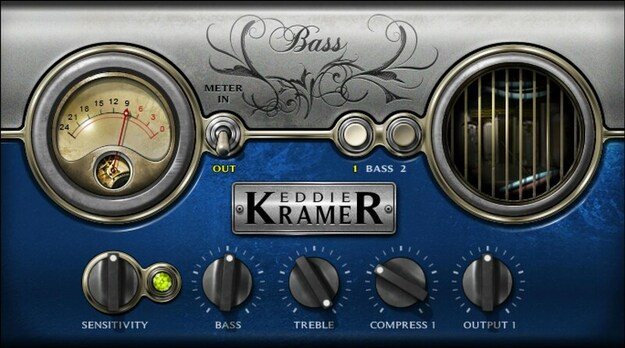
The controls are few: Sensitivity, Bass, Treble and Compression. Sensitivity has a dedicated LED, described as helping with gain staging and response.
It may suit situations where you want to settle on a bass sound quickly. Because Waves' own site could not be read, this introduction relies on the Plugin Boutique product page.
Key features
Two bass characters
Bass 1 is a dynamic, less compressed sound that breathes, and Bass 2 increases compression for an aggressive, big sound. You might switch between them to suit the track.
Sensitivity LED
A dedicated LED that indicates response to the input. It lets you watch gain staging as you set levels, which may make level choices easier.
Bass and Treble tone
Two tone controls for the low and high ranges, which may let you shift the overall bass tone quickly.
Compression
A dial for the amount of compression, to set the dynamics intensity as needed.
Quick setup
With few controls, it is described as letting you settle on a sound in few steps. It may be an option when there is no time to build a complex chain.
Specifications
| Item | Details |
|---|---|
| OS | Mac: macOS Monterey 12 / Ventura 13 / Sonoma 14 / Sequoia 15 (VST / AU / AAX); Windows 10 or later (VST / AAX) |
| Type | Bass channel-strip style plugin |
| Formats | Mac: VST / AU / AAX, Windows: VST / AAX |
| Characters | Bass 1 (dynamic) / Bass 2 (more compression) |
| Controls | Sensitivity, Bass, Treble, Compression |
What is included and system requirements
- Eddie Kramer Bass Channel plugin
- Supported OS and formats are listed under specifications
How to use it
- Install it as a Waves product and rescan plugins in the DAW.
- Insert it on a bass track.
- Choose Bass 1 or Bass 2.
- Adjust Sensitivity and watch the LED for response.
- Shape the tone with Bass and Treble.
- Set the amount with Compression.
- Listen in the full mix and switch characters if needed.
Where it may come in handy
Rock bass
You might try it when shaping bass presence within a guitar-heavy band arrangement.
Quick sketches
It could be used to set a bass sound quickly so the arrangement can move forward.
Comparing two textures
Switching between Bass 1 and Bass 2 might help you decide between a breathing sound and a bigger, pushed one.
Who it may suit
- Those who want to finish bass sounds quickly
- Those mixing bass in rock-style arrangements
- Those who prefer plugins with few controls
Good to know before you buy
- The Eddie Kramer series includes Bass Channel, Guitar Channel and Effects Channel.
- When used through a Plugin Boutique rent-to-own plan or Beatport Studio, an internet connection is required every 30 days to validate the license.
- Please also check Waves' own product page for full specifications and prices.
How it differs from similar products
We do not pick a winner; the official figures are placed side by side.
Eddie Kramer Guitar Channel
Bass Channel is for bass, with two characters (Bass 1 / Bass 2) and Sensitivity, Bass, Treble and Compression. Guitar Channel is for guitar, with three settings (two rhythm, one lead) and Compression, Treble, Midrange, Delay, Reverb and Flange.
Price
Please check the official page for the price.
See Eddie Kramer Bass Channel on the product page
More of the same kind
Other introduction articles of the same kind.
- LANDR LANDR FX Bass
- UJAM Finisher NEO
- Mellowmuse Mellowmuse ATA Auto Time Adjuster
- Sound Particles Brightness Panner 2
- Universal Audio A-Type Multiband Dynamic Enhancer
- Yamaha VOCALO CHANGER PLUGIN
We have introduced 215 other products from Waves.
- Waves MV2
- Waves SoundShifter
- Waves Eddie Kramer Effects Channel
- Waves CLA MixDown
- Waves Waves Maserati B72
See the full list in Product database: Effects.
Sources: pluginboutique.com (checked 2026-10-27)










Comments