
Disclosure: This page may contain affiliate links. Prices were checked on the date shown and may change.
An introduction to LANDR LANDR FX Voice, based on information from the maker and distributors: what it does, how to use it and who it may suit. It is not scored.
Let your voice take center-stage in your mixes. Polish, smooth, and control your vocals with everything from tastefully tailored EQ to epic reverb to full-on distortion with over 40 curated presets.
— LANDR official site
What is LANDR FX Voice?
LANDR FX Voice is a multi-effect plugin for vocals from LANDR. EQ, reverb, delay, compression, saturation and more are gathered in one plugin, and it is built around choosing a preset and setting how strongly it is applied rather than editing many parameters.
It ships with 46 presets in seven categories: Vocals, EQ, Reverb, Delay, Compression, Saturation and FX. The Vocals category is organized by genre and singing style, while the EQ category covers things like adding presence or reducing muddiness, so presets can be found by purpose.
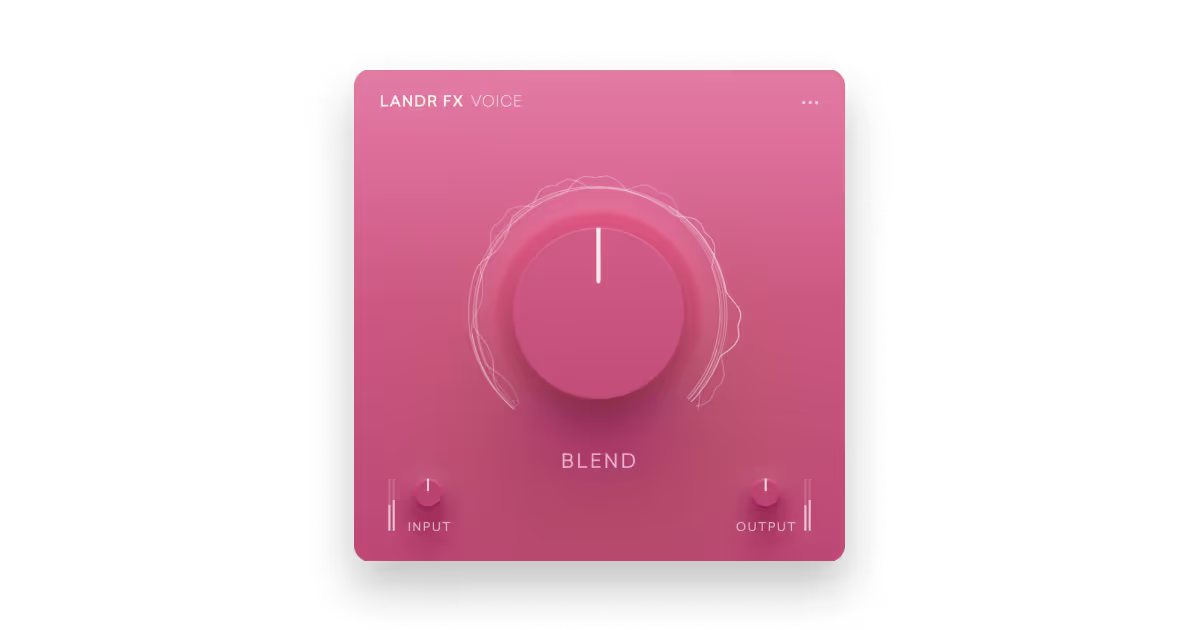
The main control is a blend dial. After picking a preset, you set how much of the effect is applied with that one dial. For finer adjustment, input and output levels are also available, and the maker suggests stacking several instances to combine effects.
The maker positions the LANDR FX series as usable at any stage: tracking and monitoring, songwriting and mixing. For home recording, it may be useful when you want to hear the intended vocal sound while you record. The official page also states that it is included with LANDR Studio.
Key features
46 presets in 7 categories
The plugin includes 46 presets split into Vocals, EQ, Reverb, Delay, Compression, Saturation and FX. Because they are grouped by purpose, they may give you a starting point when you are unsure where to begin.
Blend dial
After choosing a preset, one dial sets how strongly it is applied. This may suit people who want to avoid complicated settings, or situations where a light touch is wanted.
Corrective presets
The official page mentions corrective presets such as De-Mud and De-Ess. They could be candidates when a vocal sounds muddy or sibilant.
Real-time processing while recording
The maker says processing runs in real time so you can monitor with a preset applied while recording. This may help when you want to sing with the intended direction in your headphones.
Input and output levels
The workflow is preset-centered, but input and output levels can be adjusted. This may help you fit it to the plugins placed before it.
Stacking multiple instances
The maker suggests running several instances to layer effects. You might assign different roles to each, such as one for EQ-type presets and another for reverb.
Specifications
| Item | Details |
|---|---|
| Type | Preset-based multi-effect for vocals |
| Presets | 46 (7 categories) |
| Formats | VST3, AU, AAX (Windows: VST3 and AAX) |
| OS | macOS 10.14 or later (Apple Silicon native / Intel), Windows 10 (64-bit) or later |
| Licensing | Activated through a LANDR account (a redeem code is used for Plugin Boutique purchases) |
What is included and system requirements
- LANDR FX Voice plugin with 46 presets
- OS: macOS 10.14 or later / Windows 10 (64-bit) or later
- Formats: VST3, AU, AAX (Windows: VST3 and AAX)
- Also included with a LANDR Studio subscription
How to use it
- Create a LANDR account (this applies to Plugin Boutique purchases too).
- Enter the redeem code you received in the Plugins tab of your LANDR library using Use Redeem Code.
- Choose Install next to LANDR FX Voice in My plugins.
- Download and run the installer for your operating system.
- Open your DAW and insert LANDR FX Voice on the vocal track.
- Choose a preset from a category and set the amount with the blend dial.
- Adjust input and output levels if needed, and add a second instance with a preset from another category for anything else you want to address.
Where it may come in handy
Home-recorded vocals
It may be useful when you want to hear the intended vocal sound in your headphones while recording. Some singers may find that a little reverb-type preset makes singing easier.
Starting a vocal mix
You could use EQ or compression-type presets to shape the outline of a vocal as a rough early stage before finer adjustments.
Voiceover and streaming
Presets for muddiness and sibilance might also suit spoken voice. The maker describes it mainly for singing, so whether it fits should be tested.
Backing vocals and harmonies
Delay or FX-type presets could give backing parts a different color from the lead.
Who it may suit
- Home recordists who prefer choosing presets over detailed settings
- People who want to tidy muddiness or sibilance quickly
- Those who want to monitor with a sound close to the finished one while recording
- Anyone who would rather use one plugin than a chain of several
Good to know before you buy
- It is preset-centered; it is not designed for editing each effect's parameters individually.
- Activation through a LANDR account is required.
- On Windows the formats are VST3 and AAX (AU is for Mac).
- The official page states it is also included with LANDR Studio.
How it differs from similar products
We do not pick a winner; the official figures are placed side by side.
LANDR FX Beats
Both are LANDR FX plugins built around presets. Voice has 46 presets in 7 categories, while Beats has 46 presets in 6 categories (Kits, Kick, Snare, Cymbals, EQ and FX). Voice is aimed at vocals and Beats at drums.
Price
Please check the official page for the price.
Also included with LANDR Studio (the official page says from USD 8.25 per month).
See LANDR FX Voice on the product page
More of the same kind
We have introduced 35 vocal processors. Here are some of the others.
- BLEASS BLEASS Voices
- UJAM VOXCRAFT
- Polyverse Music Polyverse Manipulator
- Antelope Audio InTune Chorus
- Bogren Digital A-Class Vocal
- United Plugins QuickVox
We have introduced 10 other products from LANDR.
- LANDR LANDR VoxChain / VoxTune / VoxVerb / VoxDeEss
- LANDR VoxVerb
- LANDR LANDR Strata
- LANDR LANDR FX Bass
- LANDR LANDR Ultimate Bundle
For a side-by-side comparison scored on the same criteria, see our comparison of vocal processors.
See the full list in Product database: Effects.
Sources: landr.com pluginboutique.com (checked 2026-10-27)










Comments