
Disclosure: This page may contain affiliate links. Prices were checked on the date shown and may change.
An introduction to United Plugins Front DAW, based on information from the maker and distributors: what it does, how to use it and who it may suit. It is not scored.
Create a front door for every recording, and call it Front DAW. So that every track would have a true analogue input.
— United Plugins official site
What is Front DAW?
Front DAW is a saturation plug-in from United Plugins of the Czech Republic, meant to make a DAW mixer behave more like an analogue console. The maker says it grew from English producer Greg Brimson's idea of giving every track an analogue input stage.
It uses United Plugins' VARM (Variable Analogue Random Modeling) technology, which models slight random differences in the values of electrical parts so that each plug-in instance behaves slightly differently.
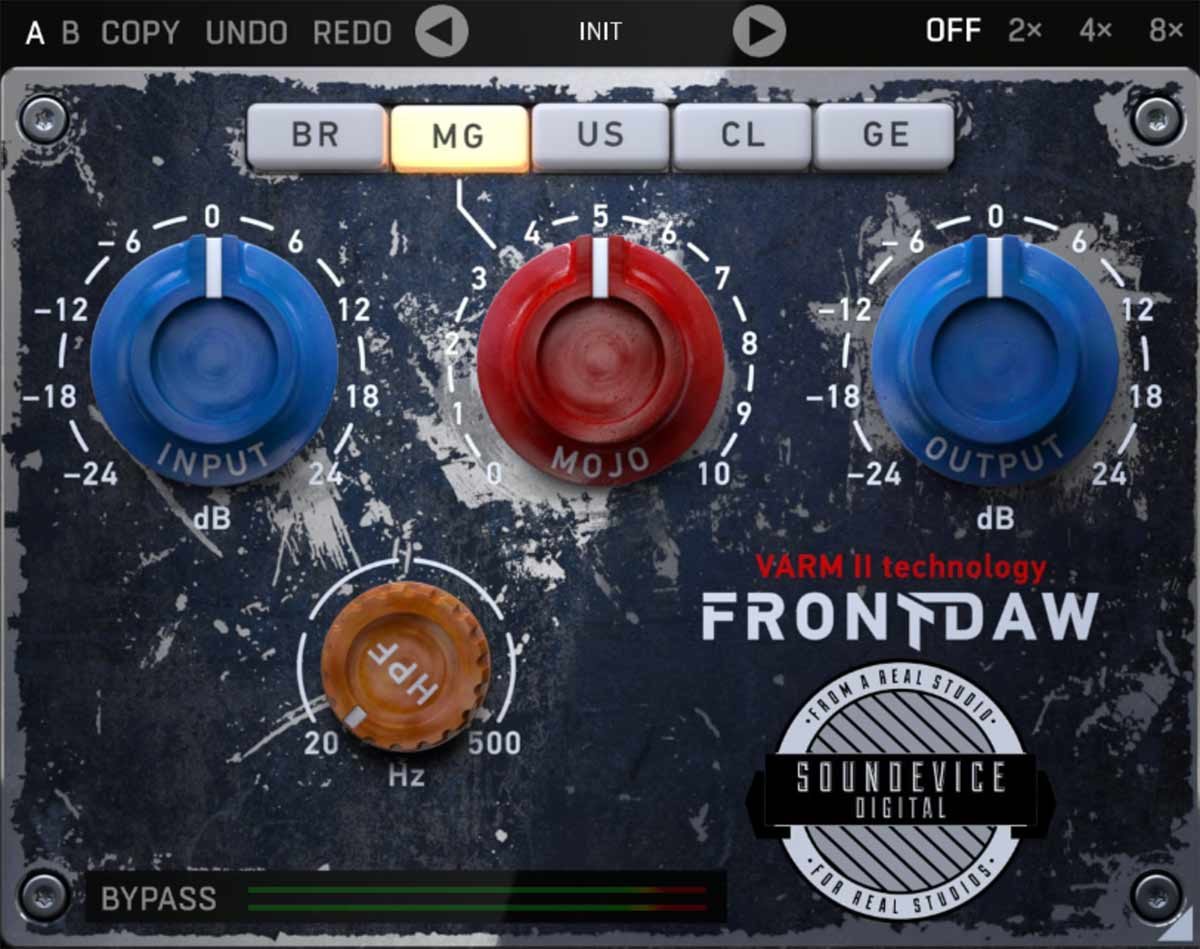
According to the official description, five buttons (BR, MG, US, CL and GE) select the type of circuit. BR suggests a British console, US a punchy American input stage and GE a German tube console, while MG and CL are newer magnetic-tape and clip saturation modes.
The main control is Mojo, the amount of saturation. The effect is gentle and intended for use on many tracks at once. The CPU load is light, licensing is file-based with no iLok, and a 15-day free trial is offered.
Key features
Track-to-track variation with VARM II
The technology models random differences in component values, so each instance behaves slightly differently. This may help avoid a uniform result when the same setting is used on many tracks.
Five circuit buttons
BR, MG, US, CL and GE can be chosen, covering British, American and German-style input stages plus magnetic-tape and clip saturation, for comparison per source.
Mojo knob
This knob sets the amount of saturation. As the effect is gentle, it can be placed lightly across all tracks to shape the overall character.
Light CPU load
The maker says it is designed for use on every track and keeps CPU load low. A sleep-on-silence function is also included.
Resizable 3D GUI
The interface can be resized by dragging the arrow at the bottom right, smaller for busy sessions or larger for fine adjustments.
64-bit processing at any sample rate
Internal processing is 64-bit and any sample rate is supported, including 192 kHz or higher.
Smart bypass and free updates
The smart bypass avoids clicks when automating, and the maker states that updates are free.
Specifications
| Item | Details |
|---|---|
| Saturation types | BR / MG / US / CL / GE |
| Control | Mojo |
| Internal processing | 64-bit |
| Sample rate | Any (including 192 kHz or higher) |
| Formats | VST2 / VST3 / AAX / AU |
| OS | macOS 10.10 or newer (Apple Silicon supported), Windows 8 to 10 (per Plugin Boutique) |
| Licensing | License file, no iLok |
| Trial | 15 days, full functionality |
What is included and system requirements
- Front DAW plug-in
- File-based license activation
- 15-day trial (after expiry it continues as a limited free version)
How to use it
- Get it from the maker's site or Plugin Boutique.
- Run the installer.
- Obtain and apply the license file with your United Plugins account.
- Insert it on tracks in your DAW mixer.
- Choose a circuit type from BR, MG, US, CL and GE.
- Set the amount with Mojo, starting low.
- Use the same setup on other tracks and listen to the overall character.
- Compare against bypass.
Where it may come in handy
On every track
As the maker describes, it can be placed on all tracks to add an analogue-style character to a mix.
Thin recordings
The artist testimonials mention using it to add body to recordings made with inexpensive mics and interfaces.
Drums and bass
Circuit types can be switched to compare the texture per source.
Mix cohesion
A light setting across the mix could be used to see how tracks blend.
Who it may suit
- Users who want console-style coloration on a DAW mixer
- Those looking for a light saturation to place on many tracks
- Users who prefer licensing without iLok
- Those who want to try a 15-day trial first
Good to know before you buy
- The effect is gentle and it is not designed for heavy distortion.
- The maker's page lists five buttons while Plugin Boutique's text lists three; the maker's newer description is used here.
- After the trial, the maker says it continues as a free version with limited access to some features.
Price
$55 (United Plugins official site, checked 2026-10-27). Prices can vary by region and promotion, so check the official page before buying.
See Front DAW on the product page
More of the same kind
We have introduced 82 saturation and distortion effects. Here are some of the others.
- PSP Audioware PSP BinAmp
- D16 Group Devastor 2
- W. A. Production Punchy Worm
- Black Rooster Audio Magnetite
- MNTRA Instruments BRUITAGE
- Klevgrand SquashIt
We have introduced 34 other products from United Plugins.
- United Plugins Cyberdrive
- United Plugins Cyberdrive Core
- United Plugins Plamen
- United Plugins WideFire
- United Plugins DarkFire
For a side-by-side comparison scored on the same criteria, see our comparison of saturation and distortion effects.
See the full list in Product database: Effects.
Sources: unitedplugins.com pluginboutique.com (checked 2026-10-27)










Comments