
Disclosure: This page may contain affiliate links. Prices were checked on the date shown and may change.
An introduction to Waves eMo D5 Dynamics, based on information from the maker and distributors: what it does, how to use it and who it may suit. It is not scored.
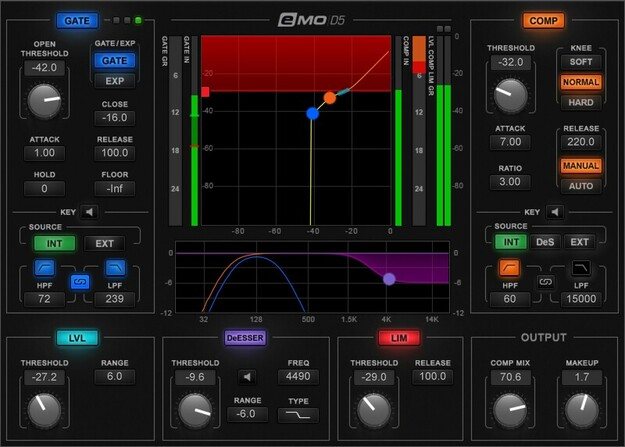
Whether for live mixing or for studio work on music, voiceovers, or narration, eMo D5 incorporates 5 essential dynamics processing solutions: Compressor, Gate/Expander, Leveler, Limiter, and DeEsser.
— Waves official site
What is eMo D5 Dynamics?
eMo D5 Dynamics is a Waves plug-in that combines five dynamics processors: Compressor, Gate/Expander, Leveler, Limiter and DeEsser. It is described for both live mixing and studio work on music, voiceovers and narration.
It is designed to be used as part of the channel strip of the Waves eMotion LV1 live mixer, and can also be used as a separate plug-in. It is described as having zero latency and ultra-low CPU consumption.
The compressor and expander/gate include sidechain input and filters. Parallel compression is supported, and an exclusive dynamics detection process is said to cut pumping and breathing.
The single-window, touchscreen-friendly interface puts every parameter in view, and the displays change for the selected processor. 27 presets are included.
Key features
Five dynamics tools
Compressor, Gate/Expander, Leveler, Limiter and DeEsser in a single plug-in.
Zero latency
Described as having no latency and low CPU load, features aimed at live use too.
Sidechain and filters
The compressor and expander/gate have sidechain input and filters.
Parallel compression
Parallel compression can return punch to compressed sounds.
DeEsser
Includes a de-esser with 3 filter types and pre/post routing.
Multi-touch and presets
A single-window interface compatible with multi-touch, plus 27 presets.
Specifications
| Item | Details |
|---|---|
| Formats (Mac) | VST / AU / AAX |
| Formats (Windows) | VST / AAX |
| OS (Mac) | macOS Monterey 12 to Sequoia 15 |
| OS (Windows) | Windows 10 or later |
| License | Registration and activation through a Waves account |
What is included and system requirements
- Mac: macOS Monterey 12 / Ventura 13 / Sonoma 14 / Sequoia 15 (VST, AU, AAX)
- Windows: Windows 10 or later (VST, AAX)
- 27 presets
- Also used as a processor in the eMotion LV1 channel strip
How to use it
- Create a Waves account (or log in if you already have one).
- In 'Register New Products', enter the serial number shown in your Plugin Boutique account.
- Download and install Waves Central, then log in.
- On the 'Install Products' tab, tick the product and click 'Install & Activate'.
- Open your DAW and insert the plug-in on a track or bus.
- Insert eMo D5 Dynamics, choose the processor you want on screen, and start from a preset.
Where it may come in handy
Vocal recording and narration
With compression and de-essing on one screen, you might try vocal cleanup in a single plug-in.
Live streaming and live mixing
Zero latency may make it an option for real-time use.
Tidying instrument dynamics
You could use the Gate and Leveler to tame noise and level variation.
Who it may suit
- People who want several dynamics tools on one screen
- People polishing voiceover or narration
- People looking for a plug-in that also works for live mixing
Good to know before you buy
- A Waves account and license activation are required (for purchases through Plugin Boutique, the serial number is registered to a Waves account).
- Supported systems are listed as macOS Monterey 12 through Sequoia 15 on Mac and Windows 10 or later on Windows.
- The product page describes it as designed for use as part of the eMotion LV1 channel strip.
Price
Please check the official page for the price.
See eMo D5 Dynamics on the product page
More of the same kind
We have introduced 10 de-essers. Here are some of the others.
- Three-Body Technology Future DS
- Solid State Logic SSL DeEss
- Softube Weiss Deess
- Techivation T-De-Esser 2
- McDSP DE555
- Airwindows DeEss
We have introduced 215 other products from Waves.
- Waves Berzerk Distortion
- Waves Manny Marroquin EQ
- Waves IDX Intelligent Dynamics
- Waves JJP Drums
- Waves Kaleidoscopes
For a side-by-side comparison scored on the same criteria, see our comparison of de-essers.
See the full list in Product database: Effects.
Sources: pluginboutique.com (checked 2026-10-27)










Comments