
Disclosure: This page may contain affiliate links. Prices were checked on the date shown and may change.
An introduction to Waves Kaleidoscopes, based on information from the maker and distributors: what it does, how to use it and who it may suit. It is not scored.
Kaleidoscopes combines classic modulation pedals—phaser, flanger, tremolo, and chorus—into a multi-FX playground.
— Waves official site
What is Kaleidoscopes?
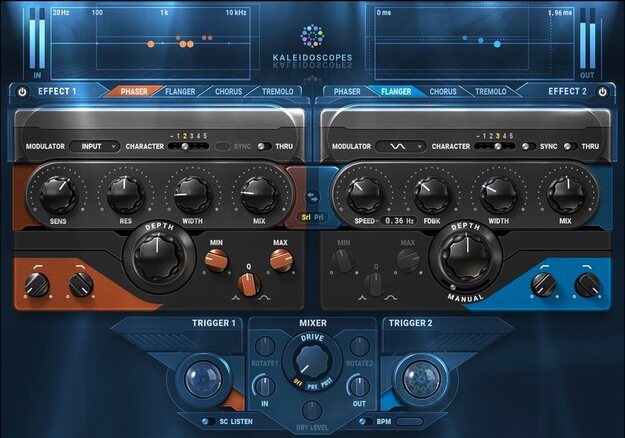
Kaleidoscopes is a modulation-based multi-effect from Waves. It brings together four effect types familiar from guitar pedals: phaser, flanger, tremolo and chorus, all in a single plug-in.
Inside are two independent modulation engines. Each engine can run a flanger, phaser, chorus or tremolo, and the two can be connected in series or in parallel. For example, you can place a tremolo after a chorus and hear the combination in one window.
Another feature is smart triggering. The movement reacts to the input signal or a sidechain signal, so the modulation speed and depth can change with the performance. You could change the rate with guitar strums or start a sweep from a drum hit, rather than letting a fixed speed run continuously.
Supported formats are VST, AU and AAX. The Plugin Boutique product page lists macOS 12 to 15 on Mac and Windows 10 or later on PC. It may suit synths, guitars, vocals and other sources.
Key features
Two independent modulation engines
There are two engines, which can be linked in series or in parallel. One could run a gentle chorus while the other adds tremolo. This may help when you want a combination that is awkward to build from separate pedals.
Four modulation types
Each engine offers flanger, phaser, chorus and tremolo. Because these pedal-style effects sit in one place, you can switch between them while looking for movement that fits a track.
Smart triggering
The modulation responds to the incoming signal. The rate can speed up on stronger playing, or a sweep can start on a drum hit. It may help add performance-like changes to programmed synths.
Selectable modulation source
The signal that drives the movement can be the input, a sidechain, or one of several waveshapes. This could be used to link one track's movement to another.
Five analog tonal characters
Five analog-style tonal characters can be added to extend the effects. They may be useful for finishing touches when you want a little more weight or grit than clean modulation gives.
Controls for each engine
Each engine has Speed, Resonance, Width, Depth and Mix controls. With a limited set of knobs, it may be easy to follow even if you are new to modulation effects.
Specifications
| Item | Details |
|---|---|
| Type | Multi-effect (modulation) |
| Engines | 2 (series or parallel) |
| Effects | Flanger, phaser, chorus, tremolo |
| Tonal characters | 5 analog-style |
| Formats (Mac) | VST / AU / AAX |
| Formats (Windows) | VST / AAX |
| OS | macOS 12 to 15, Windows 10 or later |
What is included and system requirements
- Plug-in (Mac: VST / AU / AAX, Windows: VST / AAX)
- Supported OS: macOS Monterey 12, Ventura 13, Sonoma 14, Sequoia 15 / Windows 10 or later
- Plugin Boutique has shown a free-gift offer with purchases (this changes over time)
How to use it
- Insert the plug-in on a track in your DAW and open it.
- Start with engine 1 only and choose an effect type, such as chorus.
- Move Speed and Depth to set how fast and how deep the movement is.
- Use Mix to balance the effect against the dry signal.
- Add engine 2 and compare series and parallel routing.
- Change the modulation source to the input or a sidechain so the effect follows the performance.
Where it may come in handy
Adding movement to synth pads
A static-sounding pad may gain movement from slow phaser and chorus layers. Setting different rates on the two engines can make the motion more complex.
Following guitar or bass playing
With the trigger reacting to the input, the modulation could speed up only when you play harder.
Sweeps timed to drums
Feeding a drum track to the sidechain lets kick and snare hits start the movement, which may tie the effect to the rhythm.
Who it may suit
- People who want pedal-style modulation gathered in one plug-in inside a DAW
- People who want to add movement and thickness to synths and pads
- People who want to try effects that respond to playing or drums
Good to know before you buy
- The seller is Waves. The Plugin Boutique page also shows a free-gift offer, which changes over time.
- The product page lists VST / AU / AAX on Mac and VST / AAX on Windows. Check that your DAW's format is covered before buying.
- Check Waves' official instructions after purchase for license management and installation.
How it differs from similar products
We do not pick a winner; the official figures are placed side by side.
Waves CLA Bass
Kaleidoscopes has two modulation engines that combine four pedal-style effects. CLA Bass has six effects made for bass, each with three modes. One is aimed at movement through modulation, the other at shaping bass tone.
Price
Please check the official page for the price.
See Kaleidoscopes on the product page
More of the same kind
We have introduced 46 modulation effects. Here are some of the others.
- Minimal Audio Poly Flanger
- W. A. Production Orchid
- BLEASS BLEASS Chorus
- D16 Group Godfazer
- Valhalla DSP ValhallaSpaceModulator
- Acon Digital Multiply 2
We have introduced 215 other products from Waves.
See the full list in Product database: Effects.
Sources: pluginboutique.com (checked 2026-10-27)










Comments