
Disclosure: This page may contain affiliate links. Prices were checked on the date shown and may change.
An introduction to Waves Renaissance Channel, based on information from the maker and distributors: what it does, how to use it and who it may suit. It is not scored.
Now, the Renaissance Channel brings together compression, expansion, gating, sidechaining, and four bands of EQ into one convenient plugin.
— Waves official site
What is Renaissance Channel?
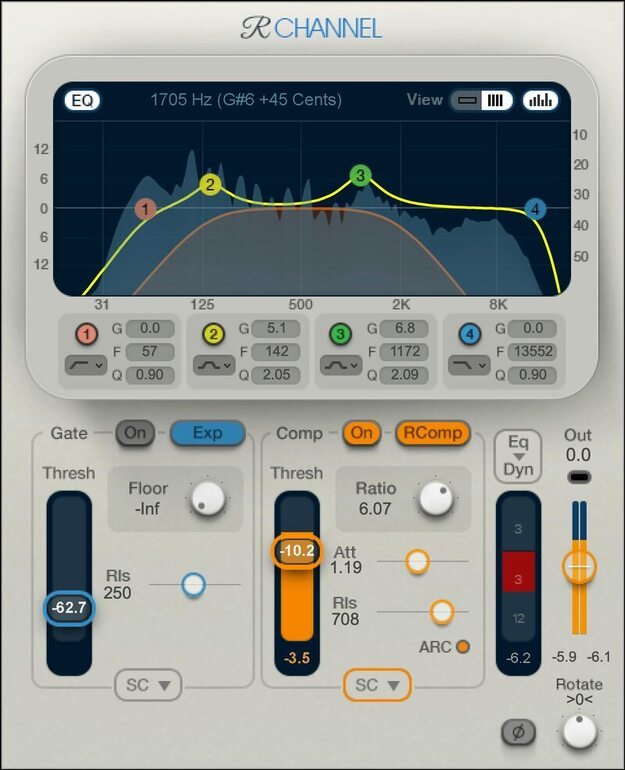
Renaissance Channel is a channel-strip plug-in that gathers features of the Waves Renaissance series. Compression, expansion, gating, sidechaining and a four-band EQ are included in one unit.
The compressor section can switch between R-Comp and R-Vox, the latter optimized for voice. The expander can also work as a gate, and the compressor and the expander/gate each have separate sidechains.
The four-band EQ has multiple response curves, and the display can show a spectrum analyzer in the background. A Rotation control supplements console panning by adjusting the stereo image.
A saved preset recalls all the optimized processor settings in one click. Supported systems are macOS Monterey 12 through Sequoia 15 (VST/AU/AAX) and Windows 10 or later (VST/AAX).
Key features
R-Comp and R-Vox
The compressor can switch between standard R-Comp and voice-optimized R-Vox, which may help when treating vocals and other sources differently.
Expander that also works as a gate
The expander can serve as a gate, which may be worth trying for handling low-level noise or breaths.
Separate sidechains
The compressor and the expander/gate have independent sidechains, so each can be driven by a different signal.
Four-band EQ
Four EQ bands with multiple response curves allow tone correction within the same plug-in.
Spectrum display
A switchable spectrum analyzer can be shown behind the display, giving visual feedback while adjusting the EQ.
Rotation
It supplements console panning with stereo image control, which may help when adjusting the placement of stereo material.
Specifications
| Item | Details |
|---|---|
| Type | Channel strip (compressor / expander-gate / EQ) |
| Compressor | Switchable R-Comp / R-Vox |
| Sidechain | Separate for compressor and expander/gate |
| EQ | Four bands (multiple response curves) |
| Mac | macOS Monterey 12, Ventura 13, Sonoma 14, Sequoia 15 (VST / AU / AAX) |
| Windows | Windows 10 or later (VST / AAX) |
What is included and system requirements
- Plug-in (Mac: VST / AU / AAX, Windows: VST / AAX)
- Built-in compressor, expander/gate and four-band EQ
- Spectrum analyzer display
- A free trial is offered (Plugin Boutique)
How to use it
- After purchase, install and activate the Waves license.
- Insert Renaissance Channel on the track to process.
- Choose R-Comp or R-Vox for the compressor.
- Set up noise handling in the expander/gate.
- Configure the sidechains if needed.
- Adjust tone with the four-band EQ and check the spectrum display.
- For stereo material, adjust placement with Rotation.
- Save the adjusted settings as a preset.
Where it may come in handy
Vocal channel processing
Trying R-Vox compression, gate and EQ in one plug-in is one way to use it.
Narration and streaming
Combining gate and EQ may help tidy a voice.
Individual tracks such as drums
Using sidechains and EQ may help consolidate the processing of one track.
Placing stereo material
Rotation can help when panning alone is not enough.
Who it may suit
- People who want compression, gate and EQ in one plug-in
- Users who want simpler vocal channel processing
- Those who want to try the Waves Renaissance series together
- Users who want fewer plug-ins on a channel
Good to know before you buy
- Waves license activation is required.
- On Mac, macOS Monterey 12 through Sequoia 15 are listed.
- This entry is based on the Plugin Boutique product page.
How it differs from similar products
We do not pick a winner; the official figures are placed side by side.
Waves Renaissance Axx
Renaissance Channel is a channel strip with compression, expander/gate, sidechains and a four-band EQ. Axx is a compressor for stringed instruments with three controls.
Price
Please check the official page for the price.
See Renaissance Channel on the product page
More of the same kind
We have introduced 51 channel strips. Here are some of the others.
- Softube Empirical Labs Trak Pak for Console 1
- Solid State Logic SSL Guitarstrip
- Harrison Consoles 32Classic Channel Strip
- Harrison Consoles MPC Channel Strip
- Antelope Audio DRM-60
- Wave Arts TrackPlug 7
We have introduced 215 other products from Waves.
- Waves SSL EV2 Channel
- Waves Abbey Road REDD Consoles
- Waves Scheps Omni Channel 2
- Waves SSL G-Channel
- Waves AudioTrack
See the full list in Product database: Effects.
Sources: pluginboutique.com (checked 2026-10-27)










Comments