
Disclosure: This page may contain affiliate links. Prices were checked on the date shown and may change.
An introduction to Waves Renaissance Axx, based on information from the maker and distributors: what it does, how to use it and who it may suit. It is not scored.
So, welcome to Renaissance Axx—which optimizes “under the hood” parameters for stringed instruments and similar sounds like plucked synths.
— Waves official site
What is Renaissance Axx?
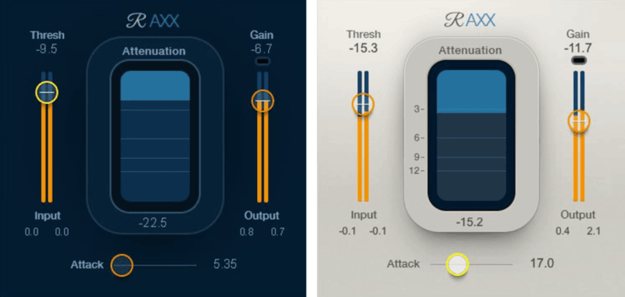
Renaissance Axx is a compressor in the Waves Renaissance series that optimizes its internal parameters for guitar, bass and other stringed instruments. The product description says general-purpose compressors tend to be complex, so this one narrows the number of controls to those actually needed.
Three controls are adjusted, while ratio and release time are calculated dynamically and automatically by the plug-in. It is described as adding sustain on guitar and fullness on bass, and placing it before an amp simulator is mentioned as a way to smooth distortion.
Besides stringed instruments, it is said to work on plucked synth sounds. Automatic limiting catches occasional peaks, and metering shows what the compressor is doing. The interface skin can be chosen from light, dark or legacy.
28 artist and factory presets are included. Supported systems are macOS Monterey 12 through Sequoia 15 (VST/AU/AAX) and Windows 10 or later (VST/AAX).
Key features
Three controls
The adjustable controls are narrowed to three. It may help when compression should be set quickly rather than tuned in detail.
Automatic ratio and release
Ratio and release time are calculated dynamically from the input, keeping the controls few while the compression behavior stays adaptive.
Sustain and fullness
Added sustain for guitar and fullness for bass are the described uses. More consistent levels may help parts sit in a mix.
Before amp simulators
Placing it before an amp simulator is described as a way to get smoother distortion.
Automatic limiting and metering
Limiting catches occasional peaks, and metering shows the action, speeding up adjustments.
Three skins and 28 presets
Light, dark and legacy skins are available, along with 28 artist and factory presets.
Specifications
| Item | Details |
|---|---|
| Type | Compressor (for stringed instruments) |
| Controls | 3 |
| Presets | 28 (artist / factory) |
| Skins | Light / Dark / Legacy |
| Mac | macOS Monterey 12, Ventura 13, Sonoma 14, Sequoia 15 (VST / AU / AAX) |
| Windows | Windows 10 or later (VST / AAX) |
What is included and system requirements
- Plug-in (Mac: VST / AU / AAX, Windows: VST / AAX)
- 28 artist and factory presets
- Three skins: light, dark and legacy
- A free trial is offered (Plugin Boutique)
How to use it
- After purchase, install and activate the Waves license.
- Insert Renaissance Axx on a guitar or bass track in the DAW.
- Start from a preset close to the source.
- Move the three controls and check the amount of compression on the meter.
- If using an amp simulator, insert it before the simulator and compare.
- Change the skin to a preferred one.
- Save the setting and try it on other tracks.
Where it may come in handy
Sustain on electric guitar
It may be useful when compression is wanted to add sustain.
Leveling bass
Adding fullness while evening out levels is one way to use it.
Before an amp simulator
It may be worth trying when levels should be evened out before distortion.
Plucked synths
The description says it suits sounds with an attack, similar to stringed instruments.
Who it may suit
- People starting to use compression on guitar and bass recordings
- Users looking for a compressor with few settings
- Those who want to even out levels before an amp simulator
- Users who want to try the Waves Renaissance series
Good to know before you buy
- Waves license activation is required.
- On Mac, macOS Monterey 12 through Sequoia 15 are listed.
- This entry is based on the Plugin Boutique product page.
How it differs from similar products
We do not pick a winner; the official figures are placed side by side.
Waves Renaissance Channel
Axx is a compressor for stringed instruments with three controls. Renaissance Channel is a channel strip that combines compression, an expander/gate, sidechains and a four-band EQ.
Price
Please check the official page for the price.
See Renaissance Axx on the product page
More of the same kind
We have introduced 85 compressors. Here are some of the others.
- Native Instruments Supercharger GT
- Universal Audio Century Tube Channel Strip
- Universal Audio UA 175B & 176 Tube Compressor Collection
- Kuassa EFEKTOR CP3603 Compressor
- Universal Audio 1176 Classic Limiter Collection
- Solid State Logic SSL autoBUS
We have introduced 215 other products from Waves.
- Waves V-Comp
- Waves Kramer PIE Compressor
- Waves Linear Phase Multiband Compressor
- Waves Renaissance Compressor
- Waves PuigChild Compressor
For a side-by-side comparison scored on the same criteria, see our comparison of compressors.
See the full list in Product database: Effects.
Sources: pluginboutique.com (checked 2026-10-27)










Comments