
Disclosure: This page may contain affiliate links. Prices were checked on the date shown and may change.
An introduction to Solid State Logic SSL Fusion Stereo Image, based on information from the maker and distributors: what it does, how to use it and who it may suit. It is not scored.
The Stereo Image plug-in is modelled on the mid-side processing circuit from the SSL Fusion stereo outboard hardware processor.
— Solid State Logic official site
What is SSL Fusion Stereo Image?
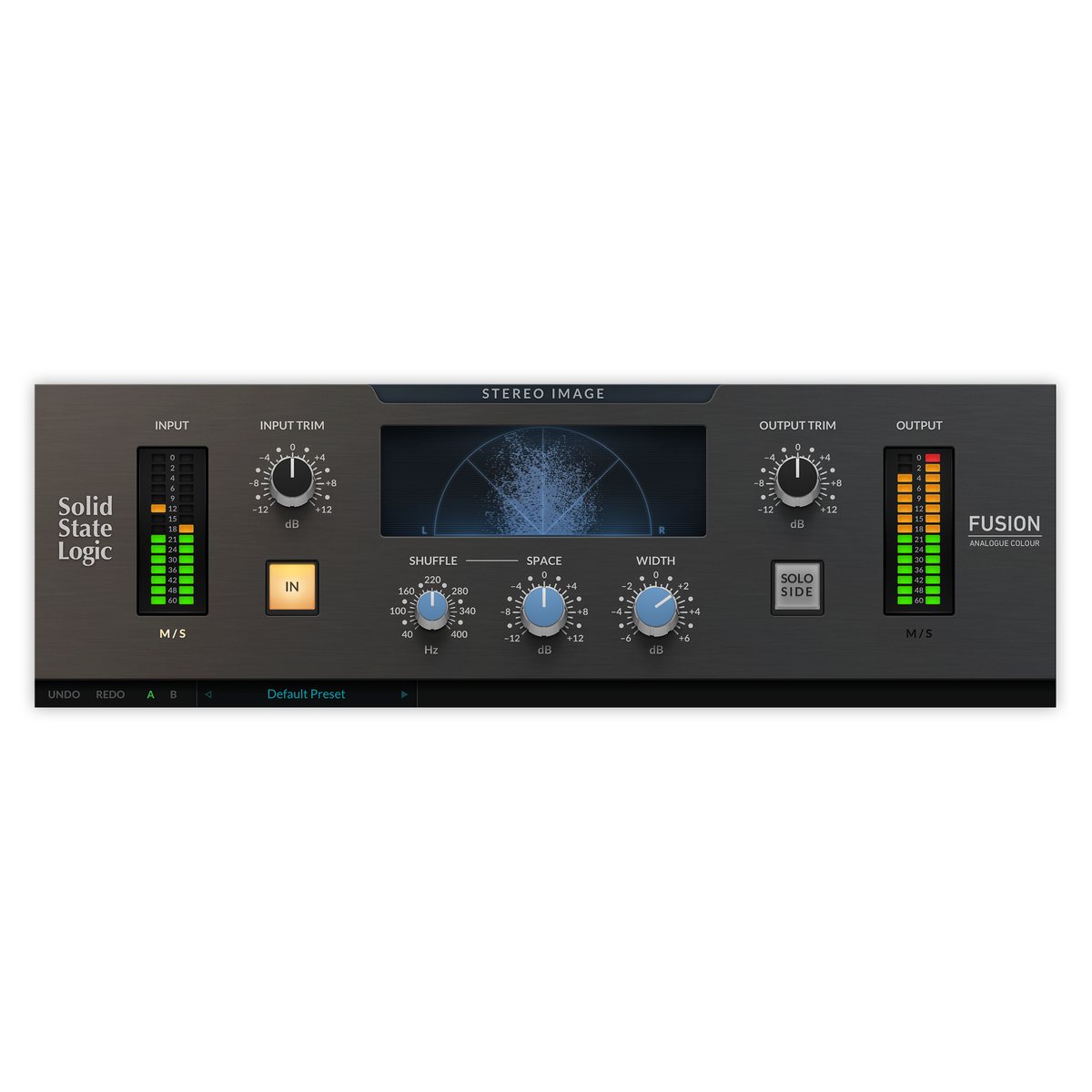
SSL Fusion Stereo Image is a stereo width plug-in modelled on the mid-side processing circuit from the SSL Fusion hardware processor made by Solid State Logic. It splits a stereo signal into a sum signal (L+R) for the center (Mid) and a difference signal (L-R) for the left and right content (Side).
The Width control raises or lowers the level of the side signal, so you can narrow or widen the stereo image. Space is a frequency-dependent width control based on the concept of stereo shuffling, which the maker says can add depth effects.
The plug-in adds a new Shuffle control that changes the frequency cut-off in the Space circuit. The maker describes it as a way to add weight and presence or to carve out space in the stereo field.
A polar sample plot vectorscope shows the stereo image, and Solo Side lets you listen to the side component alone. The input and output meters can be switched to M/S display.
Key features
Width control
Raises or lowers the side signal level to widen or narrow the stereo image. It may be used to adjust the spread of a whole mix or of an individual vocal or instrument.
Space control
A circuit that broadly boosts or cuts the bass-frequency region of the side signal, based on stereo shuffling. You may try it when you want to add depth.
Shuffle control
A parameter that changes the frequency cut-off of the Space circuit, newly added in the plug-in version. It may help when you want to adjust which range the effect covers.
Vectorscope
A polar sample plot displays the stereo image, so you may check spread and phase balance visually while adjusting.
Solo Side and M/S meters
Solo Side lets you hear the side component alone, and the M/S toggles switch the input and output meters to mid-side display so you can see which component you are moving.
Presets from engineers
The maker lists presets from Adrian Hall, Alan Moulder, Caesar Edmunds, Charlie Holmes, Michael Brauer, Romesh Dodangoda and Sean Divine.
SSL Plug-in Engine
Includes SSL's shared preset management, A/B comparison and undo/redo, so you can compare settings while adjusting.
Specifications
| Item | Details |
|---|---|
| Type | Stereo imager (mid-side processing) |
| Main controls | Width / Space / Shuffle / Solo Side |
| Metering | Vectorscope, M/S input and output meters |
| Formats (Mac) | AU / VST2 / VST3 / AAX Native |
| Formats (Windows) | VST2 / VST3 / AAX Native |
| Apple Silicon | Native support |
| Trial | 14-day free trial (maker) |
| Licensing | Free iLok account required (per Plugin Boutique) |
What is included and system requirements
- SSL Fusion Stereo Image plug-in
- Formats: AU / VST2 / VST3 / AAX Native on Mac; VST2 / VST3 / AAX Native on Windows (64-bit only)
- System requirements (per Plugin Boutique): macOS 11 Big Sur to 13 Ventura on Mac, Windows 10 to 11, 4 GB RAM minimum (8 GB recommended)
- Presets by Adrian Hall, Alan Moulder, Caesar Edmunds, Charlie Holmes, Michael Brauer, Romesh Dodangoda and Sean Divine
How to use it
- Download and install the 14-day trial from SSL's product page.
- Authorize the license with a free iLok account.
- Rescan plug-ins in your DAW and insert it on a track or the master bus.
- Move Width to adjust the stereo spread.
- Use Space to boost or cut the bass region of the side signal.
- Use Shuffle to change the Space cut-off and adjust which range is affected.
- Check the vectorscope for spread and phase balance.
- Use Solo Side to listen to the side component alone and check the balance.
Where it may come in handy
Adjusting mix width
You may place it on the stereo bus to widen or narrow the mix slightly, using Solo Side to check the side component while adjusting.
Tidying stereo sources
When a stereo synth or guitar feels too wide or too narrow, you may adjust its width on the individual track.
Checking before mastering
It may also be used to check the balance between mid and side while watching the vectorscope and M/S meters.
Who it may suit
- People who want to adjust the stereo width of a mix
- People who want to try mid-side processing easily
- People who want to see the stereo image on a vectorscope while working
- People who prefer to try a trial before deciding
Good to know before you buy
- A free iLok account is required for authorization (per Plugin Boutique).
- The store lists macOS 11 Big Sur through 13 Ventura; please check the maker's latest information for newer OS versions.
- This is separate from the SSL Fusion hardware; the plug-in models its mid-side circuit.
How it differs from similar products
We do not pick a winner; the official figures are placed side by side.
SSL Native Channel Strip 2
SSL Fusion Stereo Image focuses on mid-side processing, with Width, Space, Shuffle and a vectorscope. SSL Native Channel Strip 2 is a channel strip with EQ, compressor and gate/expander, and its version 2 output section includes mid-side width.
Price
Please check the official page for the price.
See SSL Fusion Stereo Image on the product page
More of the same kind
We have introduced 18 stereo and imaging tools. Here are some of the others.
- W. A. Production Pumper 3
- Zynaptiq WIDE
- Blue Cat Audio Blue Cat's StereoScope Multi
- Waves Waves PS22 Stereo Maker
- Mastering The Mix STEREOVAULT
- Austrian Audio StereoCreator
We have introduced 33 other products from Solid State Logic.
- Solid State Logic Acoustifier
- Solid State Logic SSL Module8
- Solid State Logic Native X-Phase
- Solid State Logic SSL 4K G
- Solid State Logic SSL Native X-Comp
See the full list in Product database: Effects.
Sources: solidstatelogic.com pluginboutique.com (checked 2026-10-27)










Comments