
Disclosure: This page may contain affiliate links. Prices were checked on the date shown and may change.
An introduction to W. A. Production Pumper 3, based on information from the maker and distributors: what it does, how to use it and who it may suit. It is not scored.
New compression parameters for Pumper 3 include adjustable wet / dry parallel compression and RMS shaping controls, ideal for perfecting your sound in the box, without resorting to complex channel audio routing.
— W. A. Production official site
What is Pumper 3?
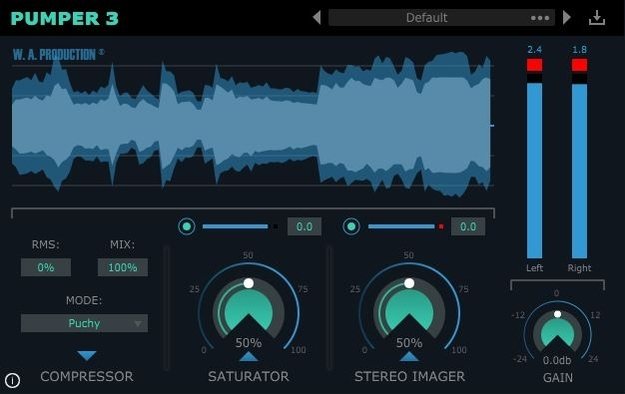
Pumper 3 is a dynamics plug-in from W. A. Production that combines a compressor, a saturator and a stereo imager in one unit. It is the third version of the Pumper line and adds more controls to each module. It may suit situations where the weight and energy of kicks, synths or guitars need shaping.
The compressor offers four modes: Punchy, Fat, Clean and Soft. The product description positions Punchy for kicks and percussion, Fat for bringing out low end, Clean for vocals and acoustic instruments, and Soft for light processing on a master channel. A wet/dry control for parallel compression and RMS shaping controls are also included.
The saturator covers a range from subtle warmth to harder distortion. Rise and Fall settings shape how the saturation responds to transients and how it settles. The stereo imager has dedicated low and high shelf modes with frequency and resonance controls, so the widening can be focused on specific ranges.
Each module has its own input control, and a real-time waveform display shows the audio before and after processing. The 50 factory presets are grouped for drums, vocals, bass, keys, synths, acoustic instruments and mastering. It runs on Windows 8 or later and macOS 10.13 or later, and a PDF manual and tutorial video are included.
Key features
Four compressor modes
Punchy, Fat, Clean and Soft can be selected. Switching between them may help match the goal, such as adding energy, building low end or lightly gluing a mix.
Parallel compression and RMS shaping
A wet/dry control sets up parallel compression inside the plug-in, and RMS shaping controls are provided. It may reduce the need to duplicate channels and build extra routing.
Saturator with Rise and Fall
Besides the drive amount, the attack-side Rise and release-side Fall settings can be adjusted. They may be worth trying when the transient response or texture needs changing.
Stereo imager with frequency focus
Low and high shelf modes plus frequency and resonance controls are provided. Because the widened range can be chosen, it may help when the lows should stay centered while upper bands are widened.
Per-module input and waveform display
Each of the three modules has an input control, and the waveform display shows audio before and after processing, which helps check the effect while balancing levels.
50 factory presets
Presets are provided for drums, vocals, bass, keys, synths, acoustic instruments and mastering. Custom settings can also be saved as user presets.
Specifications
| Item | Details |
|---|---|
| Type | Dynamics processor (compressor / saturator / stereo imager) |
| Compressor modes | Punchy / Fat / Clean / Soft |
| Presets | 50 factory presets |
| Supported OS | Windows 8 or later (32/64-bit), macOS 10.13 or later (64-bit only) |
| AAX | Requires Pro Tools 11 or higher |
| Included | PDF manual, tutorial video |
| Interface | Resizable |
What is included and system requirements
- Plug-in (Windows / macOS)
- 50 factory presets
- PDF manual
- Tutorial video
- AAX version requires Pro Tools 11 or higher
- Buyers on Apple Silicon Macs are advised to review compatibility before purchasing
How to use it
- After purchase, install the plug-in with the installer and rescan plug-ins in the DAW.
- Insert Pumper 3 on a track to process, such as drums or a synth.
- Pick a preset category close to the source, such as drums or vocals, from the preset menu.
- Switch between Punchy, Fat, Clean and Soft to compare how each mode behaves.
- Set the amount of parallel processing with the wet/dry control and adjust RMS shaping as needed.
- Adjust the saturation amount and the Rise and Fall settings to shape the texture.
- Choose the range to widen in the stereo imager and balance the modules with their input controls.
- Save settings you like as a user preset.
Where it may come in handy
Kicks and percussion
The Punchy mode may be useful when the energy of a hit needs shaping. A little saturation can also be added to bring out the outline.
Thickening synths and guitars
Combining the saturator and stereo imager may help adjust thickness and width. The lows can be kept centered while upper ranges are widened.
Vocals and acoustic instruments
The Clean mode may suit gentle leveling, raising the parallel ratio little by little while checking the result.
Finishing a master
Lightly applying the Soft mode may be a way to check how a whole mix holds together.
Who it may suit
- People who want compression, saturation and stereo processing in one plug-in
- Producers who want to set up parallel compression more simply
- Beat and synth-based producers shaping the energy of drums and synths
- Users who want to start from presets and learn adjustments gradually
Good to know before you buy
- The AAX version requires Pro Tools 11 or higher.
- Mac users on Apple Silicon should review the compatibility notes on the product page before purchasing.
- A free trial is offered.
- This entry is based on the Plugin Boutique product page.
How it differs from similar products
We do not pick a winner; the official figures are placed side by side.
W. A. Production Puncher 2
Pumper 3 has a compressor, saturator and stereo imager with 50 presets. Puncher 2 has a transient shaper, multiband compressor and parallel compressor with 48 presets.
Price
Please check the official page for the price.
See Pumper 3 on the product page
More of the same kind
We have introduced 18 stereo and imaging tools. Here are some of the others.
- Sound Particles Space Controller Standard
- iZotope Ozone Imager
- Zynaptiq WIDE
- Austrian Audio StereoCreator
- MeldaProduction MAutopanMB
- Mastering The Mix STEREOVAULT
We have introduced 42 other products from W. A. Production.
- W. A. Production Dynawide
- W. A. Production ImPerfect
- W. A. Production Drifter
- W. A. Production Obsidian
- W. A. Production Screamo
See the full list in Product database: Effects.
Sources: pluginboutique.com (checked 2026-10-27)










Comments