
Disclosure: This page may contain affiliate links. Prices were checked on the date shown and may change.
An introduction to Mastering The Mix STEREOVAULT, based on information from the maker and distributors: what it does, how to use it and who it may suit. It is not scored.
STEREOVAULT analyzes your audio, helps you find a great stereo width, then gives you powerful tools to shape it however you want, with every move level matched.
— Mastering The Mix official site
What is STEREOVAULT?
STEREOVAULT is a stereo width plug-in from Mastering The Mix. It analyzes the audio to suggest a starting point for stereo width, then offers a set of tools to shape it.
The analysis proposes settings by source type (mix, music, bass, drums, vocals) and genre, with four options: Focused, Balanced, Wide and Super Wide.
When a processed sound is louder, it can seem better only because of level. Its Level Match function compensates loudness after analysis so you can judge the stereo change itself, according to the maker.
Transparent Mode suits master-bus work and Flexible Mode suits individual tracks and stems. It may be worth considering for anyone shaping stereo width during mixing or mastering.
Key features
Smart Presets
Analyzes the audio and suggests width settings for the instrument and genre across Focused, Balanced, Wide and Super Wide, which may serve as a starting point when unsure where to begin.
Level Match
Adjustments after analysis are loudness-compensated so you can compare the stereo change without being swayed by a level increase.
Reference track import
Importing a reference track generates a width preset based on its stereo profile, which may help when you want to approach the width of a song you admire.
Stereo Visualiser
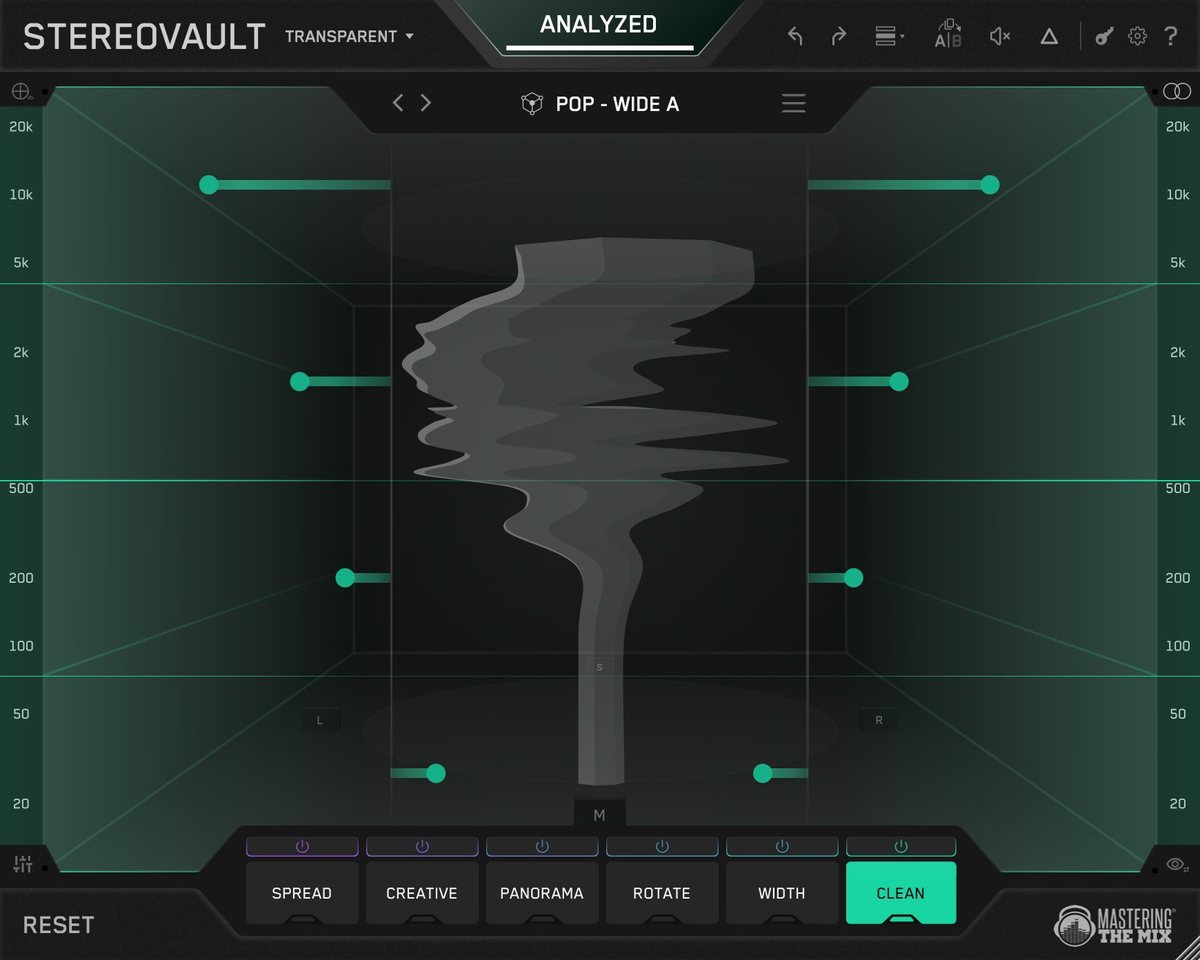
A real-time display of the stereo image across the frequency range, with a 2D view and a 3D view that maps Mid and Side energy into a room-like map. Frequencies with phase concerns turn red.
Six processing tabs
Spread, Creative, Panorama, Width, Rotate and Clean tabs cover widening, per-band panning, mid/side balance and mid or side EQ in one plug-in.
Up to six frequency bands
The Band Editor and QuickSplit create up to six bands for independent stereo processing, for example keeping the lows narrow while widening the highs.
Specifications
| Item | Details |
|---|---|
| Type | Stereo width and imaging |
| Processing tabs | Spread / Creative / Panorama / Width / Rotate / Clean |
| Frequency bands | Up to 6 |
| Modes | Transparent Mode / Flexible Mode |
| Supported OS | macOS 10.15 or later (Apple Silicon native; AU, VST3, AAX) / Windows 10 or later (VST3, AAX) |
What is included and system requirements
- STEREOVAULT plug-in (Mac: AU / VST3 / AAX, Windows: VST3 / AAX)
- Stereo Visualiser
- The official store lists a free Mastering Essentials bundle (EXPOSE 2, LEVELS, LIMITER) with purchase
How to use it
- Buy from the Mastering The Mix site or Plugin Boutique and register the license (a trial is also offered).
- Run the installer and restart your DAW.
- Load STEREOVAULT on the track or master bus you want to adjust.
- Play audio so it can analyze, then choose a suggested preset.
- Pick the closest of the four options, Focused to Super Wide.
- Use the visualiser to check low-end width and phase warnings.
- Switch tabs to add the processing you need.
- Toggle between processed and bypassed with level matching in place.
Where it may come in handy
Finishing the master bus
Transparent Mode may help set the overall stereo width of a mix.
Widening mono sources
The Spread tab includes processing for widening mono material.
Adjusting width while keeping the low end
You could keep the lows narrow and widen only the highs.
Who it may suit
- People who want to shape stereo width while mixing or mastering
- Those who want a width guide from a reference track
- Users who like to check phase issues visually
Good to know before you buy
- Supported systems are macOS 10.15 or later and Windows 10 or later.
- The maker sometimes runs sales, so check the current price before buying.
- Check the official store for the details and conditions of the bundled offer.
Price
Please check the official page for the price.
See STEREOVAULT on the product page
More of the same kind
We have introduced 18 stereo and imaging tools. Here are some of the others.
- W. A. Production Dynawide
- MeldaProduction MAutopanMB
- Soundtoys PanMan
- Klevgrand Pana
- Blue Cat Audio Blue Cat's StereoScope Multi
- Sound Particles Space Controller Standard
We have introduced 6 other products from Mastering The Mix.
- Mastering The Mix FASTER MASTER
- Mastering The Mix MIXVAULT
- Mastering The Mix REFERENCE 3
- Mastering The Mix FUSER
- Mastering The Mix ANIMATE
See the full list in Product database: Effects.
Sources: masteringthemix.com pluginboutique.com (checked 2026-10-27)










Comments