
Disclosure: This page may contain affiliate links. Prices were checked on the date shown and may change.
An introduction to Blue Cat Audio Blue Cat's StereoScope Multi, based on information from the maker and distributors: what it does, how to use it and who it may suit. It is not scored.
A unique multi-track stereo analysis tool for mixing and mastering.
— Blue Cat Audio official site
What is Blue Cat's StereoScope Multi?
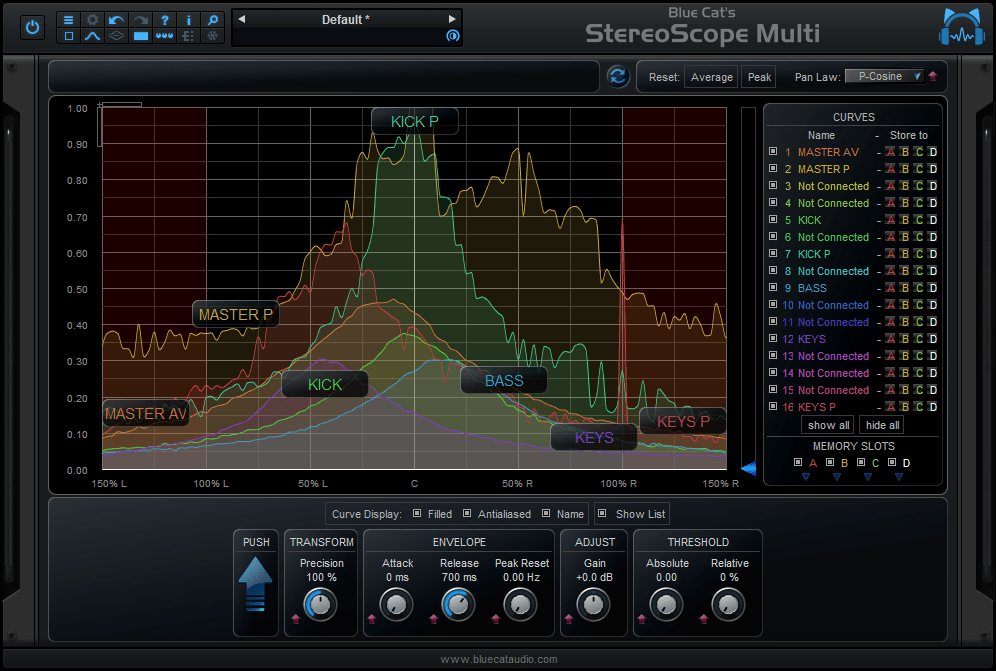
Blue Cat's StereoScope Multi is an analysis plugin that compares the stereo image of several tracks on one screen. The maker says you can see which part of the stereo field each instrument uses.
It is built on the same stereo analysis algorithms as StereoScope Pro from the same maker. Multi can show up to 16 curves on one graph, and its routing lets you set parameters per track.
Placed before and after an effect chain, it can also show how the effects change the stereo image. The maker lists tracking phase cancellation and mono-compatibility problems across multiple tracks as a use.
Operation features include instant, peak and average curves, saving curves for A/B comparison, window opacity control, and full MIDI control and automation.
Key features
Several tracks on one screen
A data sharing mechanism gathers information from instances on different tracks into one display. It may help when you want to see how instruments overlap in the stereo field.
Up to 16 curves
The maker states that instant, peak or average curves for up to 16 tracks can be shown on one graph, which helps with dense sessions.
Phase and mono compatibility
The maker lists easy detection of phase cancellation and mono-compatibility issues across tracks or within an effect chain. It could be a check after widening a stereo effect.
Difference curves and A/B
It can compute and display the difference between curves and compare against saved curves, suited to checking before and after a change.
Zoom and measurement
Animated zoom and coordinate display let you measure details of the stereo image, useful when you want to enlarge a region of interest.
Blue Cat standard features
MIDI Learn and automation, no CPU load on silence, undo/redo, a preset manager and skinnable UI are included.
Specifications
| Item | Details |
|---|---|
| Type | Multi-track stereo analysis plugin |
| Formats | VST / VST3 / AU / AAX (varies by OS and bit depth) |
| Mac | Apple Silicon support, macOS 10.9 or later (per Plugin Boutique) |
| Windows | Windows 7 / 8 / 10 (same source) |
| Simultaneous display | Up to 16 curves |
| Trial | Free trial listed at Plugin Boutique |
What is included and system requirements
- The plugin (VST / VST3 / AU / AAX; formats vary by environment)
- Preset manager
- Manual and tutorials on the maker's site
How to use it
- After purchase, download the installer from the email sent with your registered serial.
- Run the .pkg on Mac or the installer on Windows.
- In your DAW, insert StereoScope Multi on each track you want to compare.
- Set the data sharing and routing options in each instance.
- Play the project and confirm that each track's curve appears on the same screen.
- Switch between instant, peak and average curves and look for overlap.
- Save a curve before changing a setting so you can compare before and after.
Where it may come in handy
Seeing how instruments overlap in stereo
Lining up the stereo width of guitars, keys and backing vocals may reveal parts that crowd the same position.
Checking after a stereo effect
Compare before and after a chorus or stereo delay to see whether phase has been affected.
Checking overall width while mastering
The graph of the whole mix can show whether the image leans to one side.
Checking mic phase while recording
When recording with several mics, it may help you see how the tracks relate in phase.
Who it may suit
- People who want to compare stereo spread per instrument while mixing
- Those checking mono compatibility after effects
- Users who like analysis plugins
- Anyone considering StereoScope Pro for single-track analysis
Good to know before you buy
- It is an analysis tool and does not change the sound.
- To compare several tracks, load one instance per track.
- The maker lists StereoScope Multi in the All Plugins Pack, Analysis Pack, Crafters Pack and Multi Pack.
- The Plugin Boutique system requirements carry notes on formats; check the maker's current information before buying.
How it differs from similar products
We do not pick a winner; the official figures are placed side by side.
Blue Cat's StereoScope Pro
The maker describes StereoScope Multi as aimed at showing several tracks at once (up to 16 curves) and StereoScope Pro as a single-track analyzer with audio-to-MIDI capability.
Price
$99 (Blue Cat Audio official site, checked 2026-10-27). Prices can vary by region and promotion, so check the official page before buying.
See Blue Cat's StereoScope Multi on the product page
More of the same kind
We have introduced 18 stereo and imaging tools. Here are some of the others.
- Waves Waves PS22 Stereo Maker
- W. A. Production Dynawide
- Solid State Logic SSL Fusion Stereo Image
- Mastering The Mix STEREOVAULT
- Austrian Audio StereoCreator
- iZotope Ozone Imager
We have introduced 21 other products from Blue Cat Audio.
- Blue Cat Audio Blue Cat's All Plug-Ins Pack
- Blue Cat Audio Blue Cat's PolyVibe
- Blue Cat Audio Blue Cat's Axiom 2
- Blue Cat Audio Blue Cat's Analysis Pack
- Blue Cat Audio Blue Cat's StereoScope Pro
See the full list in Product database: Effects.
Sources: bluecataudio.com pluginboutique.com (checked 2026-10-27)










Comments