
Disclosure: This page may contain affiliate links. Prices were checked on the date shown and may change.
An introduction to Waves Magma Tube Channel Strip, based on information from the maker and distributors: what it does, how to use it and who it may suit. It is not scored.
Sculpt your tracks with the rich, textured analog tube Magma sound—now available in a full channel strip, covering your most crucial mixing needs: compression/gating, EQ, and saturation.
— Waves official site
What is Magma Tube Channel Strip?
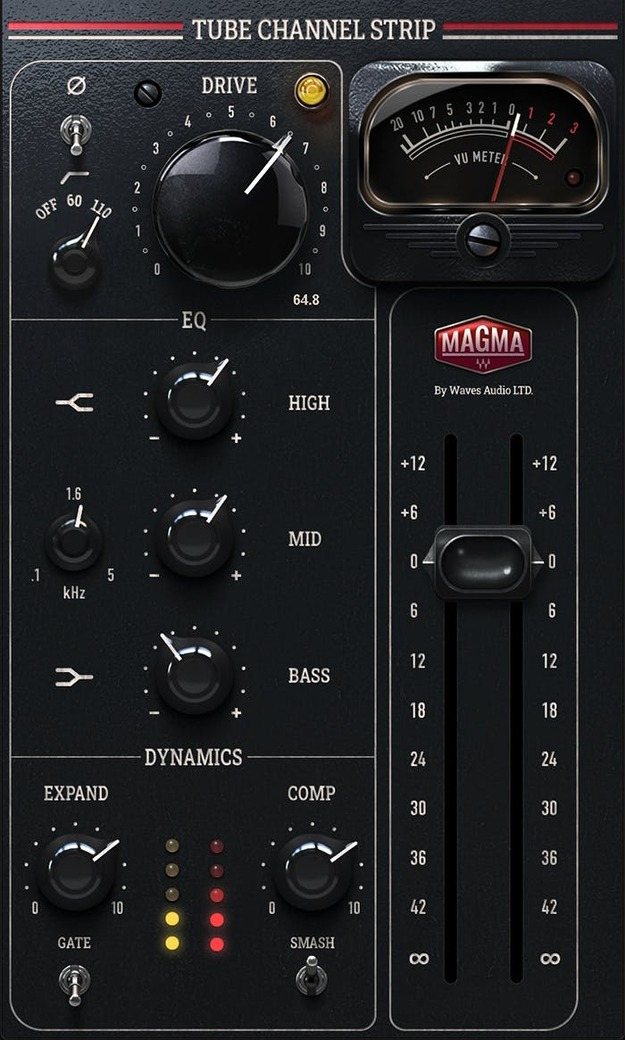
Magma Tube Channel Strip is a channel strip from Waves built around the character of analog tubes. It puts dynamics (compression and gate/expander), EQ and saturation on one screen.
The store description says it is built for speed, with a few straightforward knobs designed to avoid extreme results wherever they are turned. It is intended to add warmth, depth and richness to vocals, instruments or buses.
Saturation ranges from subtle to fully distorted. Compression is tube-style and, per the description, can be subtle or aggressive.
The EQ has three bands for a smooth top end and a fuller low end. A gate/expander is included, along with 450 artist presets from Grammy-winning producers and engineers.
Key features
Dynamics, EQ and saturation together
Compression, EQ and saturation share one window, which may reduce the number of plug-ins needed per track.
Few knobs, quick workflow
Controls are few and tuned to avoid extremes, which may suit fast mixing.
Tube saturation
Saturation spans subtle color to heavy distortion, and can be tried for warmth on vocals or instruments.
Tube compression
Compression can be light or pronounced, and gluing a bus is among the uses mentioned.
Three-band EQ
A musical three-band EQ gives a smooth top end and fuller bottom.
Gate/expander
The gate/expander tightens dynamics and can reduce unwanted noise or spill.
450 artist presets
Presets from Grammy-winning producers and engineers provide many starting points.
Specifications
| Item | Details |
|---|---|
| Maker | Waves |
| Category | Channel strip |
| Sections | Tube saturation, compressor, gate/expander, 3-band EQ |
| Presets | 450 |
| Formats (Mac) | VST / AU / AAX |
| Formats (Windows) | VST / AAX |
| OS | macOS Monterey 12 to Sequoia 15, Windows 10 or later |
What is included and system requirements
- Mac: macOS Monterey 12, Ventura 13, Sonoma 14, Sequoia 15 (VST / AU / AAX)
- Windows: Windows 10 or later (VST / AAX)
- The license is registered to a Waves account and installed with the Waves Central app
How to use it
- After buying at Plugin Boutique, the serial number appears in your user account.
- Create a Waves account (or log in) and open the confirmation link sent by email.
- In the Waves account choose Register New Products and enter the serial number.
- Download and install the Waves Central app and log in with the Waves account.
- On the Install Products tab tick this product and press Install & Activate.
- Open the DAW, pick the plug-in from the list and insert it on a track.
- Step through the presets first to learn what each control does, then fine-tune.
Where it may come in handy
Adding warmth to a vocal
It might be tried when a vocal track needs tube-style texture and light compression.
Gluing drum or mix buses
On a bus, compression and drive can bring parts together.
Working with fewer plug-ins
Because EQ, dynamics and saturation sit in one tool, it may suit lighter projects.
Who it may suit
- People who want quick control over track texture
- Home producers interested in tube-style coloring
- Users who like learning from presets
Good to know before you buy
- A Waves account is required to register the license.
- Information is based on the Plugin Boutique product page.
Price
Please check the official page for the price.
See Magma Tube Channel Strip on the product page
More of the same kind
We have introduced 51 channel strips. Here are some of the others.
- Solid State Logic SSL Native Drumstrip
- Solid State Logic SSL Guitarstrip
- Antelope Audio Antelope Audio VEQ-4K PINK
- McDSP Channel G Compact
- Solid State Logic SSL Native Vocalstrip 2
- Harrison Consoles 32Classic Channel Strip
We have introduced 215 other products from Waves.
- Waves Scheps Omni Channel 2
- Waves Renaissance Channel
- Waves Abbey Road EMI TG12345 Channel
- Waves Kramer HLS Channel
- Waves SSL G-Channel
See the full list in Product database: Effects.
Sources: pluginboutique.com (checked 2026-10-27)










Comments