
Disclosure: This page may contain affiliate links. Prices were checked on the date shown and may change.
An introduction to Antelope Audio Antelope Audio VEQ-4K PINK, based on information from the maker and distributors: what it does, how to use it and who it may suit. It is not scored.
Modeled after a unit originally appearing in the late 80s, the VEQ-4K features proportional gain settings and shelving HF & LF EQs.
— Antelope Audio official site
What is Antelope Audio VEQ-4K PINK?
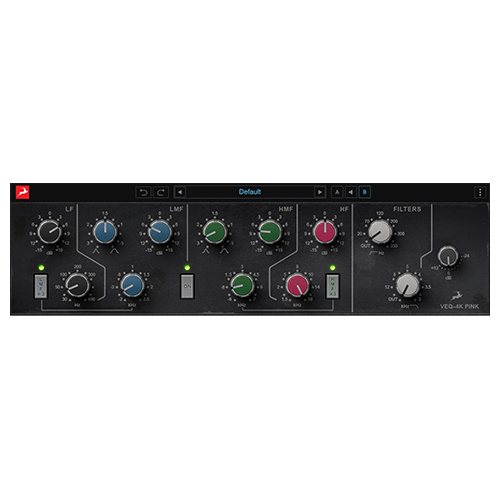
VEQ-4K PINK is a four-band EQ that Antelope Audio modeled on the channel-strip EQ of a late-1980s British console. It is one of four color-named revisions in the VEQ-4K series.
Antelope says the original features proportional gain behavior, where the curve changes with the gain setting, and HF and LF shelving. A distinctive dip and bump just before the shelf boost or cut is described as the EQ's signature.
The Pink version has a wider frequency range and the boost/cut range extended to ±20 dB. It has four bands with high-pass and low-pass filters, and an optional bell curve for the LF band.
Antelope offers all four revisions as native plug-ins. A native version for your DAW and a real-time version for Synergy Core devices are included.
Key features
Proportional gain
The curve shape changes with the amount of gain, which Antelope lists as a trait of the original.
HF and LF shelving
High and low bands are shelving types, with a dip and bump just before the boost or cut.
±20 dB gain range
The Pink version extends the boost/cut range to ±20 dB.
Four bands plus filters
Four bands with high-pass and low-pass filters.
Bell option on LF
The LF band can use a bell curve instead of shelving.
Native and Synergy Core
Native for your DAW and real-time on Synergy Core devices.
Specifications
| Item | Details |
|---|---|
| Bands | 4 + high-pass / low-pass filters |
| Gain range | ±20 dB |
| LF band | Shelving (bell option) |
| Versions | Native / Synergy Core real-time |
What is included and system requirements
- Native plug-in (macOS / Windows)
- Synergy Core real-time version (for compatible devices)
How to use it
- Install from Antelope's software store.
- Insert VEQ-4K PINK on a track in your DAW.
- Trim the range with the high-pass and low-pass filters if needed.
- Set the frequency and gain of the four bands.
- Switch the LF band to a bell curve if you want one.
- Compare against the original sound while adjusting.
Where it may come in handy
Tone shaping in a mix
The distinctive shelving curves might suit bolder tonal changes.
Adjusting vocals and guitars
Four bands might allow moving mid-range emphasis while correcting.
Comparing within the series
Trying the other revisions side by side might help pick one for the material.
Who it may suit
- Users who want to try a British-console-style EQ
- Those who want an EQ with a wide gain range
- Owners of Antelope interfaces
Good to know before you buy
- The official product page is brief; see the requirements page for details.
- Antelope Cosmos (subscription) unlocks 75+ native plug-ins.
- The Synergy Core version needs a compatible Antelope interface.
How it differs from similar products
We do not pick a winner; the official figures are placed side by side.
Antelope Audio Filtek Mk3
VEQ-4K PINK has four bands plus filters with a ±20 dB range. Filtek Mk3 has three bands plus filters with 12 frequencies per band and stepped ±16 dB.
Price
$149 (Plugin Boutique, checked 2026-10-27). Prices can vary by region and promotion, so check the official page before buying.
See Antelope Audio VEQ-4K PINK on the product page
More of the same kind
We have introduced 51 channel strips. Here are some of the others.
- Waves SSL G-Channel
- Waves Renaissance Channel
- Universal Audio SSL 4000 E Channel Strip
- Harrison Audio Bass Flow
- AudioThing Space Strip
- Harrison Consoles MPC Channel Strip
We have introduced 54 other products from Antelope Audio.
- Antelope Audio DRM-60
- Antelope Audio VEQ-4K BROWN
- Antelope Audio VEQ-4K BLACK
- Antelope Audio NEU-W495
- Antelope Audio VEQ-STU 900
See the full list in Product database: Effects.
Sources: en.antelopeaudio.com pluginboutique.com (checked 2026-10-27)










Comments