
Disclosure: This page may contain affiliate links. Prices were checked on the date shown and may change.
An introduction to Waves Maserati DRM, based on information from the maker and distributors: what it does, how to use it and who it may suit. It is not scored.
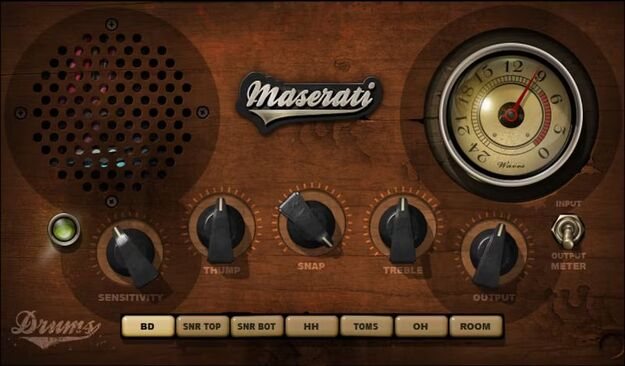
DRM leverages its THUMP, SNAP, and TREBLE controls for individual drums: kick, snare top, snare bottom, hi-hats, toms, overheads, and room mics.
— Waves official site
What is Maserati DRM?
Maserati DRM is a drum plug-in from Waves, developed with Grammy-winning mixer Tony Maserati. It is described as designed to let the excitement of percussive transients be heard through dense mixes.
Three controls are central: THUMP for low-end depth, SNAP for compression, and TREBLE for definition. Seven modes cover kick, snare top, snare bottom, hi-hats, toms, overheads and room mics, so each drum track gets its own setting.
It is intended for kits sent to separate tracks, such as from a multi-output drum module, where each part is treated individually. The description says it works on live or programmed drums.
Separate modes are provided for insert and send use, and there are 59 presets. Turning Sensitivity to its maximum pushes the effect harder.
Key features
Seven modes for individual drum sounds
Seven modes cover kick, snare top and bottom, hi-hats, toms, overheads and room mics, so the same knobs behave differently per part.
Thump adds depth
Thump adds depth and bottom to kick, snare and toms, and could be tried on drum tracks that feel thin.
Snap increases compression
Snap raises compression and is described as suited to room and overhead mics.
Treble adds definition
Treble adds definition and articulation.
Sensitivity for harder pushing
Setting Sensitivity to maximum pushes a sound even harder.
Insert and send modes
Separate modes exist for use as an insert or as a send effect.
59 presets
Fifty-nine presets help choose a suitable setting for each drum.
Specifications
| Item | Details |
|---|---|
| Maker | Waves |
| Designer | Tony Maserati |
| Category | Drum effect |
| Modes | 7 |
| Main controls | THUMP / SNAP / TREBLE / Sensitivity |
| Presets | 59 |
| Formats (Mac) | VST / AU / AAX |
| Formats (Windows) | VST / AAX |
| OS | macOS Monterey 12 to Sequoia 15, Windows 10 or later |
What is included and system requirements
- Mac: macOS Monterey 12, Ventura 13, Sonoma 14, Sequoia 15 (VST / AU / AAX)
- Windows: Windows 10 or later (VST / AAX)
- The license is registered to a Waves account and installed with the Waves Central app
How to use it
- After buying at Plugin Boutique, the serial number appears in your user account.
- Create a Waves account (or log in) and open the confirmation link sent by email.
- In the Waves account choose Register New Products and enter the serial number.
- Download and install the Waves Central app and log in with the Waves account.
- On the Install Products tab tick this product and press Install & Activate.
- Open the DAW, pick the plug-in from the list and insert it on a track.
- Step through the presets first to learn what each control does, then fine-tune.
Where it may come in handy
Keeping drums audible in dense songs
It might be tried when drum attacks get buried under vocals and synths.
Per-part processing of a multi-output drum module
Parts can be sent to separate tracks and each given a suitable mode.
Adding weight to room and overhead mics
Snap could add compression and help glue the air of the kit.
Who it may suit
- People who want simple per-part drum shaping
- Producers of dense arrangements
- Users of multi-output drum modules
Good to know before you buy
- A Waves account is required to register the license.
- Information is based on the Plugin Boutique product page.
Price
Please check the official page for the price.
See Maserati DRM on the product page
More of the same kind
Other introduction articles of the same kind.
- Sound Particles Energy Panner 2
- W. A. Production Zqueezer
- Digital Brain Instruments Midi Player Pro
- Antelope Audio V-AMP
- IK Multimedia Mic Room
- United Plugins FireSpacer
We have introduced 215 other products from Waves.
- Waves Abbey Road King's Microphones
- Waves Maserati GRP
- Waves Playlist Rider
- Waves NLS Non-Linear Summer
- Waves TRACT System Calibration
See the full list in Product database: Effects.
Sources: pluginboutique.com (checked 2026-10-27)










Comments