
Disclosure: This page may contain affiliate links. Prices were checked on the date shown and may change.
An introduction to Digital Brain Instruments Midi Player Pro, based on information from the maker and distributors: what it does, how to use it and who it may suit. It is not scored.
Midi Player Pro acts as a wrapper to turn any vst2/vst3/au MIDI FX plugin into a standalone application.
— Digital Brain Instruments official site
What is Midi Player Pro?
Midi Player Pro is a plug-in host for MIDI effects from Digital Brain Instruments. It loads VST2, VST3 and AU MIDI FX plug-ins and runs them as a standalone application. It is 64-bit only.
One aim is to make MIDI FX usable in DAWs that do not support them; the store description gives MPC and Maschine software as examples. Combined with a virtual loopback MIDI driver, it can also bridge MIDI between applications on the same computer.
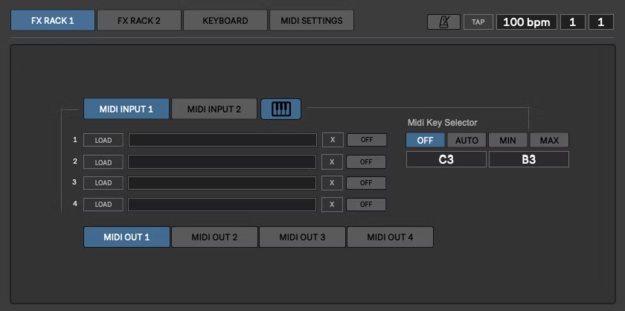
The layout has two MIDI FX racks, each holding up to four plug-ins. There are two MIDI input sources, so two keyboards can be played separately or through shared effects, and up to four MIDI outputs, each with its own channel.
Each rack has a MIDI range filter so that only selected notes pass through its MIDI FX. A project tempo setting, computer keyboard as a MIDI device, a built-in MIDI keyboard and saving and recalling of sessions are also included.
Key features
Two MIDI FX racks
Each of two racks holds up to four VST2 / VST3 / AU MIDI FX plug-ins, so chains of arpeggiators or chord tools could be built.
Dual MIDI input
Two MIDI keyboards can be used at the same time, with separate or shared effects.
Up to four MIDI outputs
Up to four MIDI outputs can each be given its own channel, which may help when sending to hardware or several software instruments.
MIDI range filter
Each rack can limit processing to a note range, letting different ranges pass through different MIDI FX.
Tempo setting
The project tempo can be set so that MIDI FX plug-ins that depend on tempo stay in step.
Project management
Sessions can be saved and recalled, templates stored and last-used settings loaded. The computer keyboard and a built-in keyboard can also play notes.
Specifications
| Item | Details |
|---|---|
| Maker | Digital Brain Instruments |
| Type | MIDI FX plug-in host |
| Supported plug-ins | VST2 / VST3 / AU MIDI FX |
| Racks | 2 (up to 4 plug-ins each) |
| MIDI inputs | 2 |
| MIDI outputs | Up to 4 |
| Mac | Intel: OS 10.11.6 or later; Apple silicon: OS 11.0 or later (64-bit only) |
| Windows | Windows 8 or later (64-bit only) |
| Recommended RAM | 4 GB or more |
What is included and system requirements
- Midi Player Pro (VST2 / VST3 / AU)
- Two MIDI FX racks and a built-in MIDI keyboard
- Project save and template functions
How to use it
- After purchase at Plugin Boutique, download the files from your account.
- Run the installer.
- Launch Midi Player Pro as a standalone app or plug-in.
- Load MIDI FX plug-ins into a rack.
- Choose your keyboard or other device as the MIDI input.
- Set the channel and destination for each MIDI output.
- If needed, set the note range that passes through using the MIDI range filter.
- Save the setup and recall it from a project next time.
Where it may come in handy
DAWs without MIDI FX
In environments such as MPC or Maschine software that cannot host MIDI effects, it may fill that gap.
Live playing
You could route two keyboards through different effects to several software or hardware instruments.
MIDI between applications
With a virtual loopback MIDI driver it may serve as a bridge to another application.
Processing by note range
The range filter lets you try sending low and high notes through different MIDI FX.
Who it may suit
- Users whose DAW does not support MIDI FX
- Those looking for a setup for several MIDI devices or keyboards
- People who want to run MIDI effects as a standalone app
Good to know before you buy
- MIDI FX plug-ins must be supplied separately.
- Passing MIDI between applications requires a separate virtual loopback MIDI driver.
Price
Please check the official page for the price.
See Midi Player Pro on the product page
More of the same kind
Other introduction articles of the same kind.
- Moog Moogerfooger MF-101S Lowpass Filter
- Toolroom Records Infinite
- NoiseWorks VoiceAssist
- Waves Waves Maserati B72
- W. A. Production Detroubler
- IK Multimedia MixBox
We have introduced 8 other products from Digital Brain Instruments.
- Digital Brain Instruments DSP Manager 2
- Digital Brain Instruments Digital Brain Instruments Spacelab
- Digital Brain Instruments Digital Brain Instruments Batch Pro 2
- Digital Brain Instruments Podcaster
- Digital Brain Instruments Voxpat Pro
See the full list in Product database: Effects.
Sources: pluginboutique.com (checked 2026-10-27)










Comments