
Disclosure: This page may contain affiliate links. Prices were checked on the date shown and may change.
An introduction to Universal Audio Avalon VT-737 Tube Channel Strip, based on information from the maker and distributors: what it does, how to use it and who it may suit. It is not scored.
Track and mix through an exacting emulation of the Avalon VT-737 analog channel strip
— Universal Audio official site
What is Avalon VT-737 Tube Channel Strip?
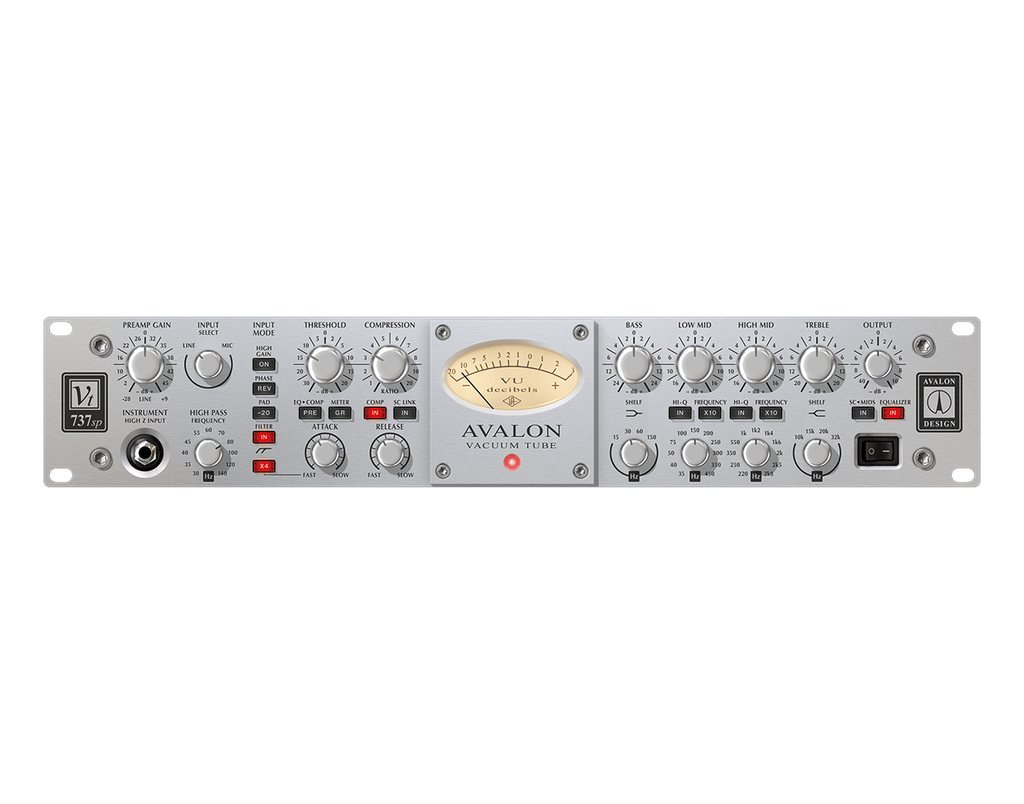
The Avalon VT-737 Tube Channel Strip is a channel strip plug-in from Universal Audio (UA). UA describes it as an emulation of the Avalon VT-737 hardware, covering its class-A tube amplifier section, LED-style optical compressor and discrete four-band EQ.
One plug-in holds a mic preamp, compressor and EQ. The structure is meant for vocals, bass, acoustic guitar and voice-over, handling the chain from input to finish together.
It supports UA's Unison technology. With an Apollo audio interface you can track in real time through the plug-in, using the matched impedance and gain behavior of the original hardware's mic and line inputs.
A purchase includes both the UAD Native version, which runs on the computer's CPU, and the accelerated version for Apollo and UAD-2 hardware. It can be used as a Native plug-in without any UA hardware.
Key features
Class-A tube amplifier section
The tube amplifier section of the original VT-737 is emulated for use on vocals, bass and other tracks. UA says it adds the gloss and presence associated with Avalon.
Optical compressor
An LED-style optical compressor that UA describes as gentle and suited to voices and bass. The maker also suggests stacking it again at mixdown to keep a vocal under control in a dense mix.
Four-band EQ with 32k air band
A discrete four-band EQ with a 32 kHz air band at the top. The EQ can sit before or after the compressor, and the mid bands can work as sidechain filters.
Unison support
On Apollo, the input stage is matched to the impedance and gain structure of the original hardware's preamp. It may suit anyone who wants to hear the plug-in while tracking.
Artist presets
Presets from Eric J Dubowsky, Hector Delgado, Michael Brauer and others are included, which may serve as starting points.
Native and Apollo/UAD-2 versions
The UAD Native version loads in a supported DAW with no UA hardware. The accelerated version for Apollo interfaces and UAD-2 is also included in the purchase.
Specifications
| Item | Details |
|---|---|
| Type | Channel strip (preamp, compressor, EQ) |
| Plug-in formats | VST / VST3 / AU / AAX |
| Supported OS | macOS (Big Sur 11 to Tahoe 26) / Windows 10 and 11 (64-bit) |
| Processors | Intel, AMD, Apple silicon |
| Requirements | Internet connection, free iLok account, UA Connect app (free) |
| Versions included | UAD Native / Apollo and UAD-2 |
What is included and system requirements
- UAD Native version (UADx)
- Accelerated version for Apollo and UAD-2
- Artist presets
How to use it
- Buy from the UA site or Plugin Boutique and register the license to a free iLok account.
- Install the plug-in with UA Connect.
- Open your DAW and load the plug-in as VST3, AU or AAX.
- Insert it on a vocal or bass track.
- Pick a preset as a starting point.
- Adjust the optical compressor threshold and amount of reduction.
- Adjust the EQ bands, and try placing the EQ before or after the compressor.
- If you own an Apollo, load it in a Unison slot and try tracking through it.
Where it may come in handy
Home vocal recording
With an Apollo, you might track through Unison to try the preamp character.
Voice-over and streaming
It may suit voice recording where you want compressor and EQ in a single plug-in.
Mixing bass and acoustic guitar
You could steady a part with the compressor and shape definition with the EQ in a crowded mix.
Who it may suit
- People who want vocal or bass processing in one plug-in
- Apollo owners who want to try tracking with Unison
- Those interested in plug-ins that emulate hardware
Good to know before you buy
- Tracking with Unison requires a supported Apollo audio interface.
- The Native version needs a free iLok account and the UA Connect app.
- UA sometimes runs sales, so check the current price before buying.
Price
Please check the official page for the price.
See Avalon VT-737 Tube Channel Strip on the product page
More of the same kind
We have introduced 51 channel strips. Here are some of the others.
- AudioThing Space Strip
- McDSP Channel G
- Waves Abbey Road EMI TG12345 Channel
- Waves CLA MixHub
- Metric Halo ChannelStrip v4
- Antelope Audio DRM-60
We have introduced 46 other products from Universal Audio.
- Universal Audio Century Tube Channel Strip
- Universal Audio SSL 4000 E Channel Strip
- Universal Audio Capitol Mastering Compressor
- Universal Audio Empirical Labs FATSO Tape Simulator
- Universal Audio Opal Morphing Synthesizer
See the full list in Product database: Effects.
Sources: uaudio.com pluginboutique.com (checked 2026-10-27)










Comments