
Disclosure: This page may contain affiliate links. Prices were checked on the date shown and may change.
An introduction to Waves S1 Stereo Imager, based on information from the maker and distributors: what it does, how to use it and who it may suit. It is not scored.
Create a massive spread of background vocals or layered guitars. Push reverb and delay further away from the center. Tilt the stereo image.
— Waves official site
What is S1 Stereo Imager?
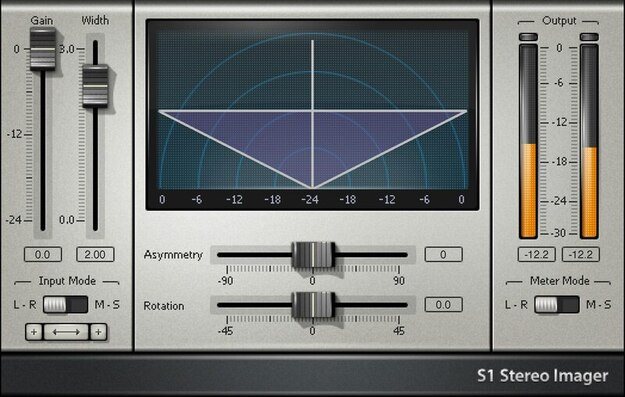
S1 Stereo Imager is a set of three Waves plugins for adjusting stereo width, position and imaging. Plugin Boutique’s description gives uses such as spreading background vocals or layered guitars, pushing reverb and delay away from the center, and tilting the stereo image.
The three are S1 Imager, S1 Shuffler and S1 MS Matrix, a mid-side utility. S1 Imager adjusts the imaging of stereo mixes, while S1 Shuffler is described as also widening bass while retaining mono compatibility.
The description says it can be used on buses, stereo tracks or even full mixes, and presents it as an alternative to panning that gives more flexibility at mixdown.
Formats are VST, AU and AAX on macOS and VST and AAX on Windows. It may help when you want to adjust width and depth quickly. The details are based on Plugin Boutique, since the Waves site could not be read.
Key features
S1 Imager
This plugin adjusts the imaging of stereo mixes, for widening or narrowing the image.
S1 Shuffler
It is described as widening bass as well while retaining full mono compatibility, which may be worth trying when low-end handling matters.
S1 MS Matrix
A utility for mid-side processing, used to work with the center and side components of a stereo signal.
On buses, tracks or full mixes
It can be placed on individual tracks, buses or the full mix, so it may be applied at different stages.
An alternative to panning
The sales page presents it as a powerful alternative to panning that gives more mixdown flexibility.
Correcting unbalanced material
The sales page also lists correcting unbalanced loops and stereo mixes.
Specifications
| Item | Details |
|---|---|
| Type | Stereo imager (set of three) |
| Included | S1 Imager / S1 Shuffler / S1 MS Matrix |
| OS (Mac) | macOS Monterey 12 through Sequoia 15 |
| OS (Windows) | Windows 10 or later |
| Formats | Mac: VST / AU / AAX; Windows: VST / AAX |
What is included and system requirements
- S1 Imager
- S1 Shuffler
- S1 MS Matrix
- Supported: macOS Monterey 12 through Sequoia 15 (VST / AU / AAX); Windows 10 or later (VST / AAX)
How to use it
- After purchase, install the plugins following the instructions provided.
- Rescan plugins in your DAW.
- Insert S1 Imager on the track or bus whose width you want to adjust.
- Change the width a little at a time while listening.
- Try S1 Shuffler if you want to widen the bass too.
- Use S1 MS Matrix when you want to work in mid and side.
- Fold to mono and check that the sound does not thin out.
- Balance the result within the whole mix.
Where it may come in handy
Spreading backing vocals
Stacked backing vocals could be widened to leave space around the lead vocal.
Organizing layered guitars
It may be worth trying to even out the width of layered guitar parts.
Depth for reverb and delay
The sales page lists pushing reverb and delay returns away from the center.
Final touch on the whole mix
It can also be used on the master bus for a slight width adjustment, together with a mono check.
Who it may suit
- Those who want to adjust width by means other than panning
- Anyone who wants to try mid-side processing easily
- Users working on the spread of backing vocals or guitars
- Mixers who want to add width while minding the bass
Good to know before you buy
- Details are based on the Plugin Boutique description.
- Widening too far can change the impression when listened to in mono.
Price
Please check the official page for the price.
See S1 Stereo Imager on the product page
More of the same kind
Other introduction articles of the same kind.
- AudioThing Frostbite 2
- Hush Hush Pro
- LEWITT Space Replicator Essential
- Harrison Consoles Drum Flow
- NUGEN Audio NUGEN Audio Monofilter Elements
- FLUX:: Alchemist
We have introduced 215 other products from Waves.
- Waves eMo Generator
- Waves MultiMod Rack
- Waves InPhase
- Waves CLA EchoSphere
- Waves Clarity Vx DeReverb Pro
See the full list in Product database: Effects.
Sources: pluginboutique.com (checked 2026-10-27)










Comments