
Disclosure: This page may contain affiliate links. Prices were checked on the date shown and may change.
An introduction to MeldaProduction MCompare, based on information from the maker and distributors: what it does, how to use it and who it may suit. It is not scored.
Press one button and the plugin quickly crossfades between your track and whatever track you choose.
— MeldaProduction official site
What is MCompare?
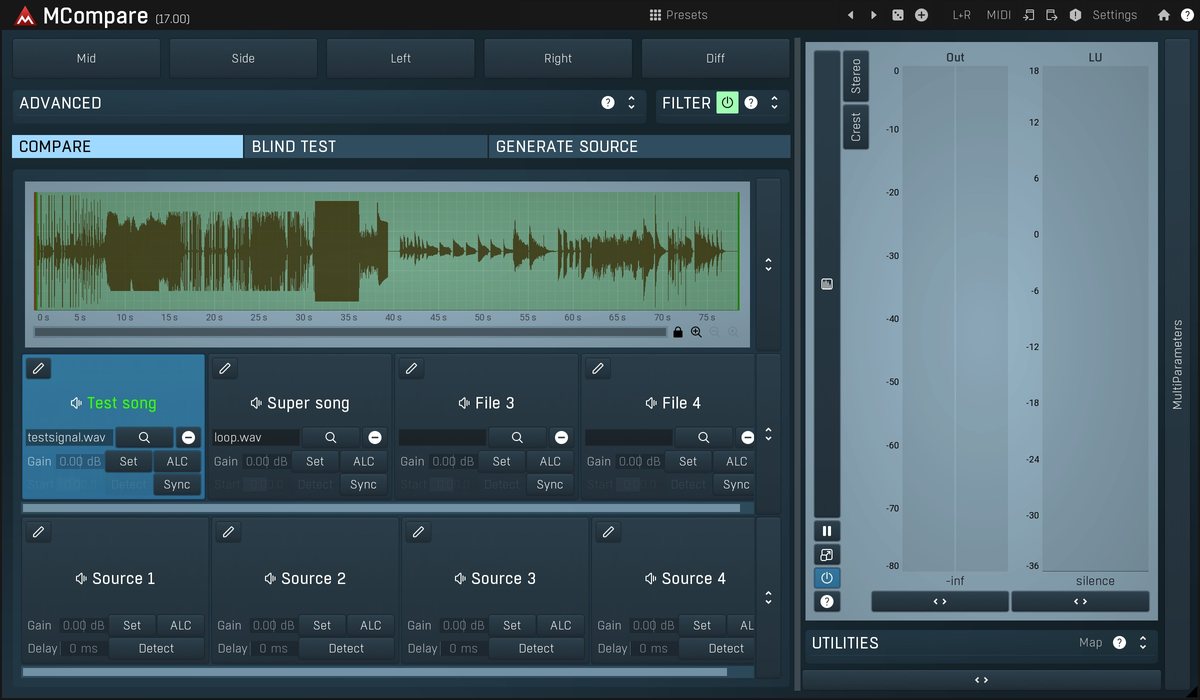
MCompare is a reference A/B comparison plugin from MeldaProduction. It lets you quickly compare your mix or master with reference audio such as commercial tracks, or with earlier stages of your own processing.
Pressing a button crossfades between your track and the one you choose. Switching to a different reference is another button press.
Because louder audio tends to be judged as better, it can automatically match the loudness of the reference to your own track. The aim is to reduce judgement errors caused by level differences.
It can also compare against intermediate stages of a mastering chain or against the dry mix, with latency compensation. Several comparison sources can be handled in a single instance.
Key features
One-button crossfade
It crossfades between your track and the reference. The comparison takes few steps and saves you from rearranging tracks in the DAW each time.
Automatic loudness matching
The loudness of the reference is matched to your track. It helps when you want to compare without the effect of level differences.
Comparison with processing stages
You can compare with the dry mix, intermediate stages of a mastering chain or different versions of the chain. Latency is compensated.
M/S and per-channel handling
It supports mid/side, separate left and right, mid alone, side alone, and up to 8 channels of surround. It can also be used to listen in mono or to the side signal alone.
MIDI controller assignment
With MIDI Learn, parameters can be controlled from a MIDI controller or keyboard. One possible use is assigning reference switching to a hardware button.
Resizable GUI
The interface can be freely resized and restyled. It is drawn on the GPU and can show meters and time graphs.
Specifications
| Item | Details |
|---|---|
| Maker | MeldaProduction |
| Type | Reference comparison (A/B) plugin |
| Processing | 64-bit, no sampling-rate limit |
| Channels | Stereo, M/S, separate left/right, up to 8-channel surround |
| Formats | VST, VST3, AU, AAX |
| Supported OS | Windows 8/10/11 (64-bit); macOS 10.14 or later (native Apple silicon support) |
| Authorization | License file (no dongle or internet access required) |
| Updates | Free updates after purchase (stated by the maker) |
What is included and system requirements
- MCompare (VST, VST3, AU, AAX)
- System requirements: Windows 8/10/11 (64-bit), macOS 10.14 or later
- A trial version is available (a free trial can be downloaded via Plugin Boutique)
How to use it
- Create a MeldaProduction account and sign in with MPluginManager.
- Register the purchased license and install MCompare.
- Insert MCompare on the track you want to compare, such as the master.
- Load the reference audio files you want to compare against.
- Switch between your track and the reference with the buttons.
- Enable loudness matching to reduce the effect of level differences.
- Switch to the dry mix or intermediate stages of the chain with the buttons.
- If needed, switch to M/S or mono and compare again.
Where it may come in handy
Comparing with reference tracks
It may be useful when you want to compare the tonal balance of your song with a favourite track at the same loudness.
Checking a mastering chain
It could be used to compare the mix before and after processing with level differences reduced.
Checking mono and side content
It may be worth trying when you want to listen to mono or side components to check stereo image and phase.
Who it may suit
- Those who finish mixes and masters while comparing with reference tracks
- Users who want to avoid loudness illusions when judging
- People who want to switch comparisons from a MIDI controller
- It may not be needed by those who work by ear without reference tracks
Good to know before you buy
- MeldaProduction licenses are per person and use license files.
- The maker states that updates after purchase are free.
- A free trial is available.
Price
Please check the official page for the price.
See MCompare on the product page
More of the same kind
Other introduction articles of the same kind.
- W. A. Production Detroubler
- United Plugins JMG Sound Expanse 3D
- Kuassa Efektor Harmonitron
- Blue Cat Audio Blue Cat's Chorus
- W. A. Production Zqueezer
- Slate Digital Fresh Air
We have introduced 32 other products from MeldaProduction.
- MeldaProduction MDrumCleaner
- MeldaProduction MMorph
- MeldaProduction MStereoGenerator
- MeldaProduction MAmp
- MeldaProduction MCenter
See the full list in Product database: Effects.
Sources: meldaproduction.com pluginboutique.com (checked 2026-10-27)










Comments