
Disclosure: This page may contain affiliate links. Prices were checked on the date shown and may change.
An introduction to United Plugins (JMG Sound) Expanse 3D, based on information from the maker and distributors: what it does, how to use it and who it may suit. It is not scored.
This 3Dimension expander will make your sounds deeper, wider and bigger.
— United Plugins (JMG Sound) official site
What is Expanse 3D?
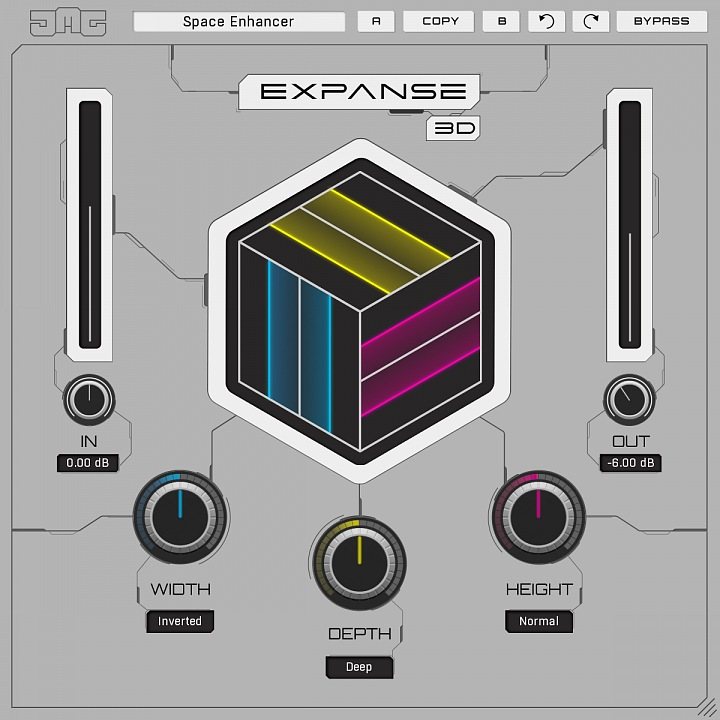
Expanse 3D is a space enhancer made by JMG Sound and distributed by United Plugins. Using psychoacoustic knowledge, it is introduced as a 3-dimension expander that makes sounds deeper, wider and bigger.
It is described as combining analogue-type saturation, spectral phase offsetting, re-synthesis, intricate delay networks and more. It can be used for mixing, mastering and sound design to glue sounds together and create contrast between them.
There are controls for three dimensions: Width, Depth and Height, each driven by a different process. Artist comments on the page also describe them as knobs that add width, height and depth.
It has zero-phase-shift filters, up to 8x oversampling, 64-bit processing and auto gain. Activation uses a license file, without iLok, dongle or internet connection.
Key features
Get Wider
Spectral phase processing creates width while remaining natural. Bass is kept tight, stereo is reduced in the sub, and width increases toward the highs. It is mono-compatible and can generate stereo from mono.
Get Deeper
Delay networks with channel and phase processing enhance the perception of depth. It adds definition to the front and extends the back, and may help glue multiple elements together.
Get Higher
Rather than boosting existing frequencies like a traditional EQ, it generates additional harmonics to extend lows and highs. It is described as helping low frequencies be perceived on speakers less able to reproduce them.
Analogue-style saturation
Each process includes saturation modelled on analogue distortion, considering harmonic distribution, dynamic consistency, non-linear randomness and anti-aliasing. It suits adding warm colour.
Zero-phase filters
Processing is applied per band with high-quality filters that cause no phase shift or latency, and the design is described as suitable for mastering.
Auto gain
A function matches loudness before and after processing. It may help when you want to compare the spatial change without being misled by level.
High-quality processing and low-CPU features
It offers 64-bit internal processing, any sampling rate, up to 8x oversampling, click-free smart bypass, and a sleep mode that uses virtually no CPU on silence.
Specifications
| Item | Details |
|---|---|
| Maker | JMG Sound / United Plugins |
| Type | Space enhancer |
| Processes | Width / Depth / Height |
| Internal processing | 64-bit, any sampling rate |
| Oversampling | Up to 8x |
| Formats (Mac) | VST2 / VST3 / AAX / AU (64-bit only) |
| Formats (Windows) | VST2 / VST3 / AAX |
| OS (Mac) | macOS 10.10 and later (M1 / Big Sur supported) |
| OS (Windows) | Windows 8 to 11 |
| CPU | Intel/AMD with SSE2 |
| Authorization | License file (no iLok, dongle or internet needed) |
| Trial | 15 days, no limits |
| Updates | Free for life |
What is included and system requirements
- Expanse 3D plugin
- 15-day unlimited trial (official)
- Mac: VST2 / VST3 / AAX / AU
- Windows: VST2 / VST3 / AAX
- Free updates (per the official page)
How to use it
- Install the trial from the official site, or buy and receive a license file.
- Insert Expanse 3D on a track, bus or master in your DAW.
- First raise Width slightly and listen, including a mono-compatibility check.
- Add Depth and check how front-to-back positions change.
- Explore the extension of lows and highs with Height.
- Turn on auto gain and compare with levels matched.
- On the master, start with small amounts and check overall cohesion.
- Adjust oversampling and look at the balance between sound and CPU load.
Where it may come in handy
Depth on a drum bus
User comments include an example of inserting it on a drum bus to add depth. It may be worth trying when exploring kick presence.
Cohesion on the master
Using a small amount on the master to place everything in a shared space is one use described.
Vocals in a breakdown
When you want a vocal to feel larger in a breakdown, it may be worth trying as a way of creating depth without relying on reverb.
Creating contrast between tracks
The official page describes separating track positions, for example by widening two sounds with one inverted.
Who it may suit
- Those who want to add depth and width to a mix
- Those who want to create space by means other than reverb
- Those looking for phase-clean processing that can also be used in mastering
- Those who want to try the 15-day trial before buying
Good to know before you buy
- Activation uses a license file; no iLok, dongle or internet connection is needed.
- The official trial lasts 15 days and is described as having no saving limits or interruptions.
- Mac is 64-bit only, while Windows supports 32-bit and 64-bit.
- Plugin Boutique shows a monthly payment option; check the terms before purchase.
How it differs from similar products
We do not pick a winner; the official figures are placed side by side.
W. A. Production SphereQuad
Expanse 3D is a space enhancer that shapes width, depth and height with psychoacoustic processing, while SphereQuad builds movement with flanger, phaser, chorus and a sequencer.
Price
$109 (Plugin Boutique, checked 2026-10-27). Prices can vary by region and promotion, so check the official page before buying.
See Expanse 3D on the product page
More of the same kind
Other introduction articles of the same kind.
- NoiseWorks VoiceAssist
- UJAM Finisher RETRO
- Audified RZ062 Equalizer
- United Plugins Electrum Core
- MeldaProduction MStereoGenerator
- Rhodes Vari-Amp
See the full list in Product database: Effects.
Sources: unitedplugins.com pluginboutique.com (checked 2026-10-27)










Comments