
Disclosure: This page may contain affiliate links. Prices were checked on the date shown and may change.
An introduction to MeldaProduction MAmp, based on information from the maker and distributors: what it does, how to use it and who it may suit. It is not scored.
What is MAmp?
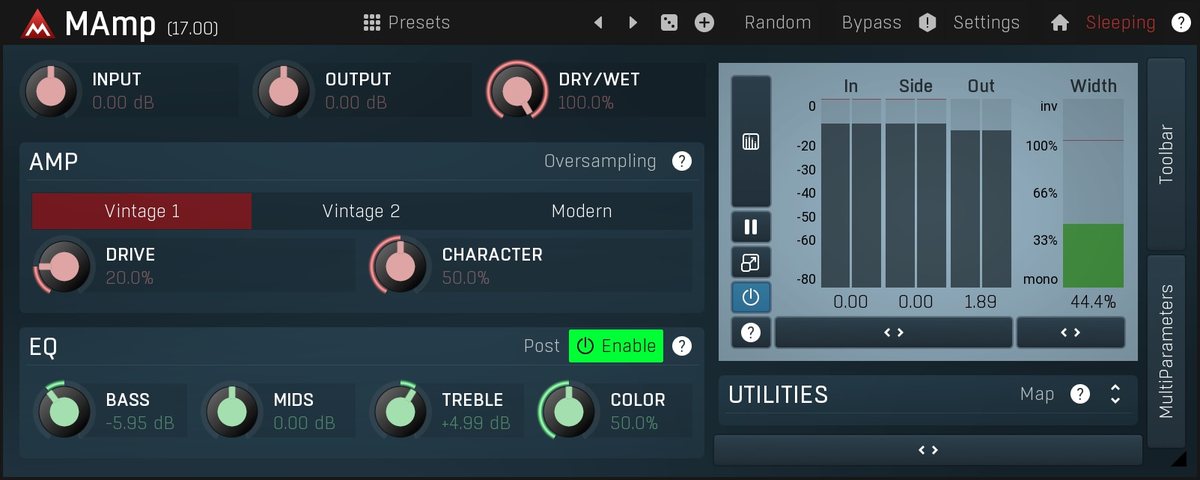
MAmp is a vintage-style amp plugin from MeldaProduction. The official page says it covers everything from soft saturation to creative distortion.
Its distortion algorithm comes from the company's MVintageRotary. It is described as inspired by analogue components while adding digital processing features.
Modulators can automatically change settings, such as switching a rotary effect between slow and fast or adding distortion when you play louder.
The Plugin Boutique page lists M/S processing, up to 8-channel surround, 1x to 16x up-sampling, MIDI learn and preset management.
Key features
Vintage-style distortion
An algorithm from MVintageRotary covers light saturation to heavy distortion, and may be worth trying on synths and drums too.
Modulators
Rotary speed or drive can change automatically, for example in response to playing dynamics.
Multichannel processing
M/S, single-channel and up to 8-channel surround are supported.
Quality helpers
Automatic gain compensation, a safety limiter and 1x to 16x up-sampling are included.
Presets and MIDI
Preset management with online exchange and MIDI learn are available, and updates are described as free.
Specifications
| Item | Details |
|---|---|
| Formats | VST / VST3 / AU / AAX |
| OS | Windows 8, 10, 11 (64-bit) / macOS 10.14 or later |
| Processing | M/S, up to 8 channels, up-sampling 1x to 16x |
| Trial | Free trial available |
What is included and system requirements
- MAmp plugin
- No dongle or internet needed for activation, per the listing
- Native Apple Silicon support
How to use it
- Download the free trial and try it.
- Install it and load the plugin in your DAW.
- Pick a preset.
- Adjust the drive and tone controls.
- Set up modulators for movement.
- Save your settings as a preset.
Where it may come in handy
Guitar distortion
It may add light saturation or distortion to guitar.
Coloring synths and keys
It may be tried for adding harmonics.
Drum bus texture
It may be used to lightly distort a drum group.
Who it may suit
- MeldaProduction plugin users
- Those who want a distortion for more than guitar
- Users who like modulation-driven movement
Good to know before you buy
- The official page lists $44 and Plugin Boutique lists $43.
- Detailed system requirements are on a separate page of the official site.
Price
$43 (Plugin Boutique, checked 2026-10-27). Prices can vary by region and promotion, so check the official page before buying.
More of the same kind
Other introduction articles of the same kind.
- United Plugins Electrum
- NUGEN Audio Monofilter
- AudioThing Megaphone
- Wave Alchemy Tapewave
- Waves S1 Stereo Imager
- Crickets Audio Strata
We have introduced 32 other products from MeldaProduction.
- MeldaProduction MCenter
- MeldaProduction MMatcher
- MeldaProduction MStereoGenerator
- MeldaProduction MMicSim
- MeldaProduction MTrackAlign
See the full list in Product database: Effects.
Sources: meldaproduction.com pluginboutique.com (checked 2026-10-27)










Comments