
Disclosure: This page may contain affiliate links. Prices were checked on the date shown and may change.
An introduction to Blue Cat Audio Blue Cat's Oscilloscope Multi, based on information from the maker and distributors: what it does, how to use it and who it may suit. It is not scored.
it lets you visualize the content of several audio tracks on the same screen and compare them thanks to its X-Y view.
— Blue Cat Audio official site
What is Blue Cat's Oscilloscope Multi?
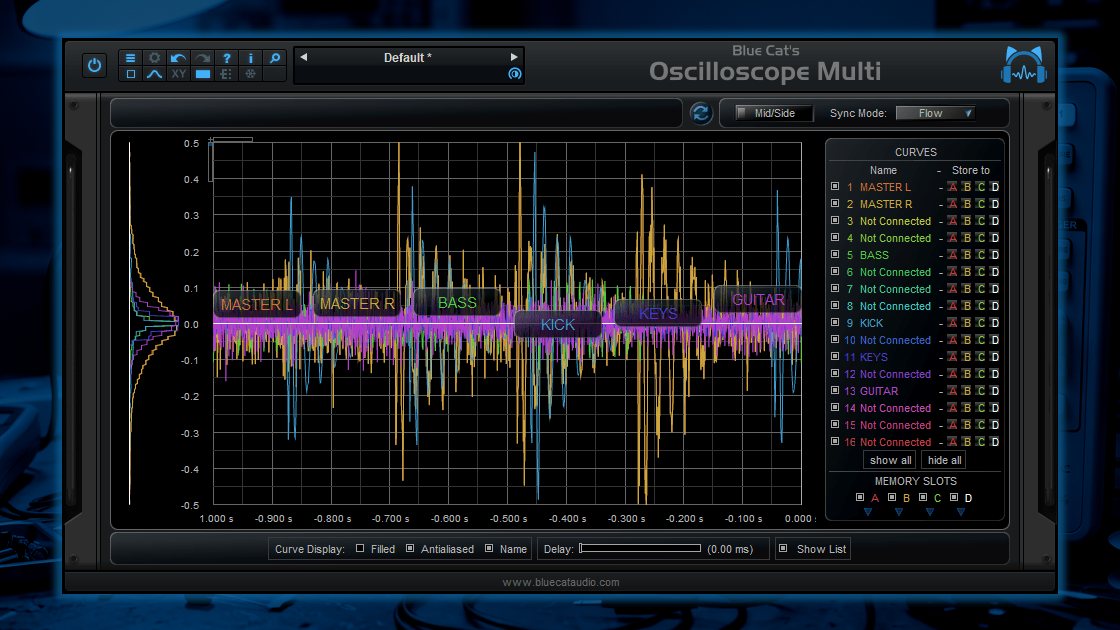
Blue Cat's Oscilloscope Multi is a waveform display plug-in from Blue Cat Audio in France. Like a hardware oscilloscope it lets you see the waveform of audio, and the maker highlights that waveforms from several tracks can be drawn on one screen for comparison. It is a measurement tool for checking the state of the sound, not an effect that changes it.
Waveforms can be extracted as left/right or as mid/side. Several synchronisation methods are provided, and the display can be watched in loop, flow and trigger modes. The maker says zoom and measurement functions let you enlarge details and read values from the waveform.
For checking phase, a two-channel X-Y (Lissajous) view is included. It can be used to look for phase cancellation before and after an effect, or while recording with several microphones. A histogram view shows the distribution of values in the waveform and gives a rough idea of the average peak level.
Four memory slots store waveforms so that different settings or different parts of a song can be compared quickly. This article organises the functions, usage and suitable situations from the maker and retailer information. No score and no impressions of sound are given.
Key features
Compare the waveforms of several tracks
Gathers the waveforms from instances placed on different tracks into one display, using a data-sharing mechanism that supports multi-core processors. This is for comparing differences between tracks, and each curve can be named for easier sharing.
Loop, flow and trigger display modes
Waveforms can be watched in loop mode, a flowing display, or trigger mode that captures the signal. You can switch between them to check the shape of a short waveform or to follow a longer change.
X-Y (Lissajous) phase scope
The two-channel X-Y view helps look for phase cancellation and mono compatibility problems. It can be placed between tracks or inside an effect chain to check.
Latency compensation to align waveforms
A latency compensation function aligns the waveforms of tracks that have delays. It suits comparing the waveform before and after a plug-in to check for timing shifts caused by processing.
Histogram and four memory slots
The histogram shows the distribution of waveform values and gives an idea of the average peak level. Four memory slots store waveforms for before-and-after comparison when settings change.
Common Blue Cat features
Includes MIDI control and automation, MIDI Learn, processing that shuts down on silence to save CPU, noiseless bypass, undo/redo and preset management. The interface supports skins and adjustable window opacity.
Specifications
| Item | Details |
|---|---|
| Type | Waveform display (oscilloscope) plug-in |
| Displays | Waveform (loop / flow / trigger), X-Y scope, histogram |
| Channels | Stereo (L/R) or mid/side |
| Formats | VST / VST3 / AU / AAX (Windows: VST / VST3 / AAX) |
| OS | Mac: Intel or Apple Silicon, Mac OS 10.9 or newer / Windows: Vista to 11 |
| Demo | Available (two instances; freezes for a few seconds about every 45 seconds) |
| Latest version | V2.44 (2025/09/08) |
What is included and system requirements
- Oscilloscope Multi plug-in (VST / VST3 / AU / AAX)
- Preset management
- Also included in the Analysis Pack, All Plugins Pack, Crafters Pack and Multi Pack bundles (per the official site)
How to use it
- Register the serial from your Plugin Boutique account or the official site and download the installer.
- Run the installer and choose the plug-in formats to install.
- In your DAW, insert Oscilloscope Multi on a track whose waveform you want to see.
- Insert it on the other tracks to compare and check the waveforms shown in the same group.
- Select a display mode (loop, flow or trigger) and zoom in for detail when needed.
- Switch to the X-Y view to check phase, choosing L/R or M/S operation as needed.
- Use latency compensation to align the waveforms of tracks that are delayed.
- Store waveforms you want to compare in the memory slots.
Where it may come in handy
Checking phase when recording with several microphones
It could be used to overlay the waveforms of microphones, such as drum overheads and snare, and check phase in the X-Y view. It may help when looking for the cause of a thinned-out sound.
Comparing before and after a plug-in
Placing it before and after an effect and overlaying the waveforms may suit checking level or timing differences. Stored memories also allow comparison between settings.
Mono compatibility check
At the finishing stage of a mix, it may be used to see whether anything cancels when summed to mono, which may suit people thinking about streaming or phone playback.
Who it may suit
- People who want to check waveforms and phase visually while recording or mixing.
- People who want to compare the waveforms of several tracks on one screen.
- People who want to confirm visually what changes before and after an effect.
Good to know before you buy
- It is a display and measurement plug-in, not an effect that changes sound.
- The demo is limited to two instances per session and freezes for a few seconds about every 45 seconds.
- System requirements on Plugin Boutique may differ slightly from the maker's site, so check the official page before buying.
How it differs from similar products
We do not pick a winner; the official figures are placed side by side.
Blue Cat's FreqAnalyst Multi
Both belong to Blue Cat's 'Multi' series. Oscilloscope Multi compares waveforms on the time axis and phase, while FreqAnalyst Multi compares the strength by frequency (spectrum) across several tracks.
Price
$49 (Blue Cat Audio official site, checked 2026-10-27). Prices can vary by region and promotion, so check the official page before buying.
See Blue Cat's Oscilloscope Multi on the product page
More of the same kind
We have introduced 14 meters and analyzers. Here are some of the others.
- Voxengo SPAN
- Antelope Audio The Judge
- NUGEN Audio DialogCheck
- TBProAudio dpMeter5
- iZotope Tonal Balance Control 3
- MAAT 2BC multiCORR
We have introduced 21 other products from Blue Cat Audio.
- Blue Cat Audio Blue Cat Audio FreqAnalyst Multi
- Blue Cat Audio Blue Cat's FreqAnalyst Pro
- Blue Cat Audio Blue Cat's PolyVibe
- Blue Cat Audio Blue Cat's Multi Pack
- Blue Cat Audio Liny EQ
For a side-by-side comparison scored on the same criteria, see our comparison of meters and analyzers.
See the full list in Product database: Effects.
Sources: bluecataudio.com pluginboutique.com (checked 2026-10-27)










Comments