
Disclosure: This page may contain affiliate links. Prices were checked on the date shown and may change.
An introduction to MAAT 2BC multiCORR, based on information from the maker and distributors: what it does, how to use it and who it may suit. It is not scored.
A multiband correlation meter with essential metering and monitoring functions.
— MAAT official site
What is 2BC multiCORR?
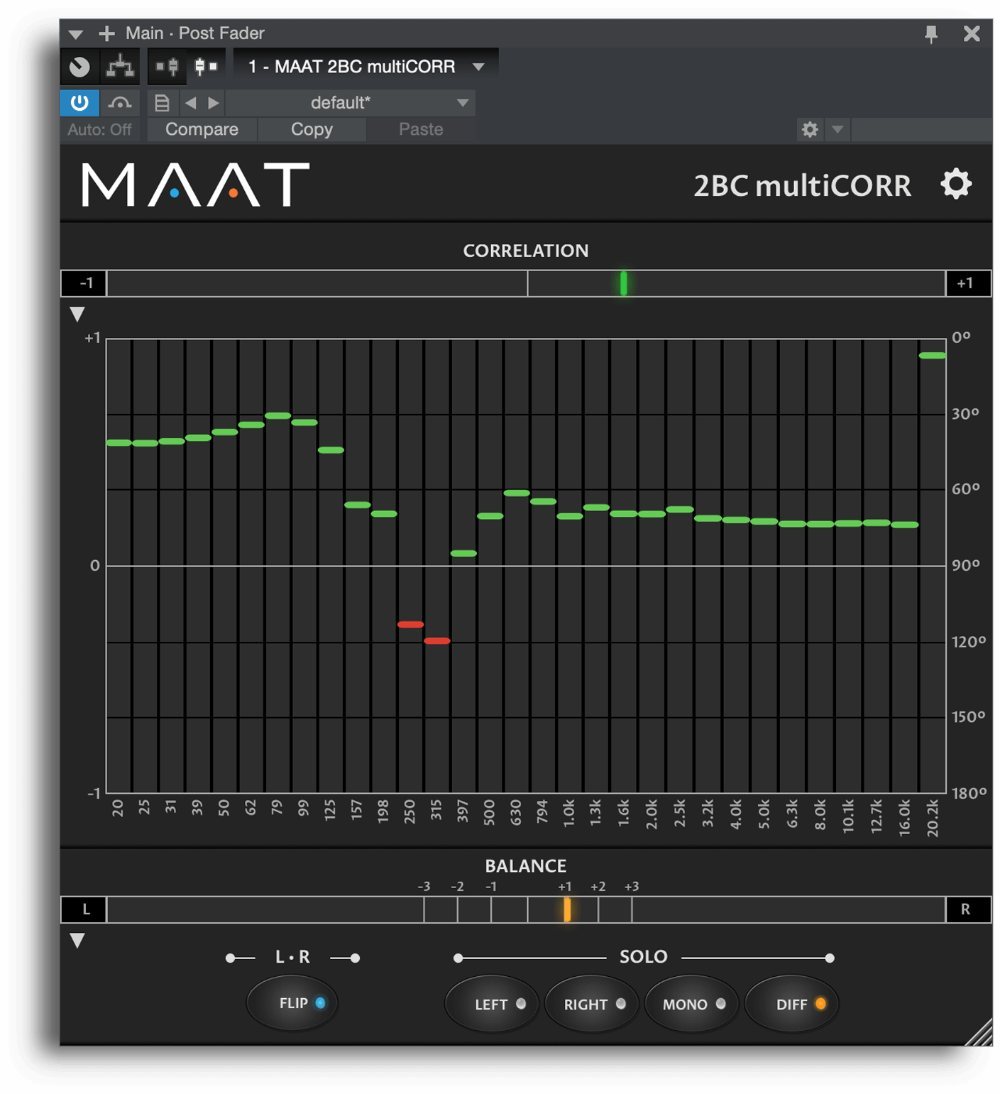
2BC multiCORR is a multiband phase-correlation meter from MAAT. A regular stereo correlation meter shows a single value for the whole signal, whereas this one shows the left/right relationship per frequency band, which suits looking for cancellation in specific ranges.
According to the official description, it combines the functions of MAAT's free 2BusControl monitor controller with a third-octave, 31-band correlation meter. It is positioned for cases where kick and bass are mono and highly correlated while strings, hi-hats or vocals are partly out of phase.
Instead of the cosine scale derived from analog meters, it uses MAAT's trueLinear scale. A left/right balance meter and a broadband correlation meter are included, along with five monitor controls (Left-Only, Right-Only, Mono L+R, Diff L-R and Flip) that help narrow down where an issue sits.
It supports AU, VST2, VST3 and AAX on Windows and macOS and includes a standalone version for use outside a DAW. The official page suggests placing it in the last slot of the master bus.
Key features
31-band correlation
Left/right correlation is shown per band, which may help find a range that is out of phase even when the overall reading looks fine.
Fine low-end resolution
Per the official page, four bands cover the bottom octave, six more reach 200 Hz and three cover 200 to 400 Hz, which suits low-end checks for vinyl cutting or small speakers.
trueLinear scale
A linear scale replaces the usual cosine scale, designed by MAAT to match perception more closely.
Stereo balance and overall correlation
A balance meter and a broadband correlation meter are included, which may help check for excessive panning or widening.
Five monitor controls
Left-Only, Right-Only, Mono (L+R), Diff (L-R) and Flip are one-button switches for checking one-sided problems or mono compatibility.
Collapsible, resizable UI
The interface can be collapsed to the needed sections and resized.
Specifications
| Item | Details |
|---|---|
| Type | Multiband correlation meter and monitor control |
| Bands | 31 |
| Formats | AU, VST2, VST3, AAX (Mac/Win), standalone |
| Sample rates | 44.1 to 384 kHz |
| OS | macOS 10.9 or later (Universal Binary), Windows |
| License | Perpetual (one-time purchase) |
What is included and system requirements
- Plug-ins (AU, VST2, VST3, AAX)
- Standalone version (a virtual audio device is usually needed; the official page names free tools VB-CABLE for Windows and BlackHole for macOS)
- User manual (PDF)
How to use it
- Run the installer and rescan plug-ins in the DAW.
- Insert 2BC multiCORR in the last slot of the master bus.
- Play the song and look for bands with low correlation, meaning left and right are close to opposite phase.
- Switch to Left-Only or Right-Only to find which channel causes the issue.
- Switch to Mono (L+R) and listen for elements that disappear.
- Use Diff (L-R) to listen to the side difference.
- Use Flip to swap channels and check placement.
- Go back to the source track and adjust EQ or stereo processing for the problem range.
Where it may come in handy
Mixing with mono playback in mind
For songs likely to be heard on mono devices such as smart speakers, it may help confirm that no band disappears.
Checking stereo widening
After applying a stereo widener, it may show whether low-frequency correlation has dropped.
Checking stereo-mic recordings
It may be useful for checking a stereo-pair recording for out-of-phase low end during tracking.
Preparing a vinyl master
The official page notes that large out-of-phase low-frequency content is difficult for lacquer cutting, and the meter may help check for it.
Who it may suit
- People concerned about sounds vanishing in mono playback
- Mixers who use a lot of stereo processing
- Engineers checking phase of stereo mics or ambience
- Anyone who wants a meter on the master bus
Good to know before you buy
- It is a meter and monitor-control tool and does not process the sound.
- Measuring a DAW's output in the standalone version requires a virtual audio device.
How it differs from similar products
We do not pick a winner; the official figures are placed side by side.
MAAT DRMeter MkII
2BC multiCORR shows 31-band phase correlation, while DRMeter MkII measures loudness and DR, so what they display differs.
Price
$49 (MAAT official site, checked 2026-10-27). Prices can vary by region and promotion, so check the official page before buying.
See 2BC multiCORR on the product page
More of the same kind
We have introduced 14 meters and analyzers. Here are some of the others.
- Voxengo SPAN
- TBProAudio dpMeter5
- Waves VU Meter
- Blue Cat Audio Blue Cat Audio FreqAnalyst Multi
- Waves Dorrough Stereo
- Awesonix Simple Meter
We have introduced 9 other products from MAAT.
For a side-by-side comparison scored on the same criteria, see our comparison of meters and analyzers.
See the full list in Product database: Effects.
Sources: maat.digital pluginboutique.com (checked 2026-10-27)










Comments