
Disclosure: This page may contain affiliate links. Prices were checked on the date shown and may change.
An introduction to LEWITT Space Replicator, based on information from the maker and distributors: what it does, how to use it and who it may suit. It is not scored.
This powerful plugin lets you experience real spaces on your headphones as if you were there – be it a million-dollar mixing studio or a car.
— LEWITT official site
What is Space Replicator?
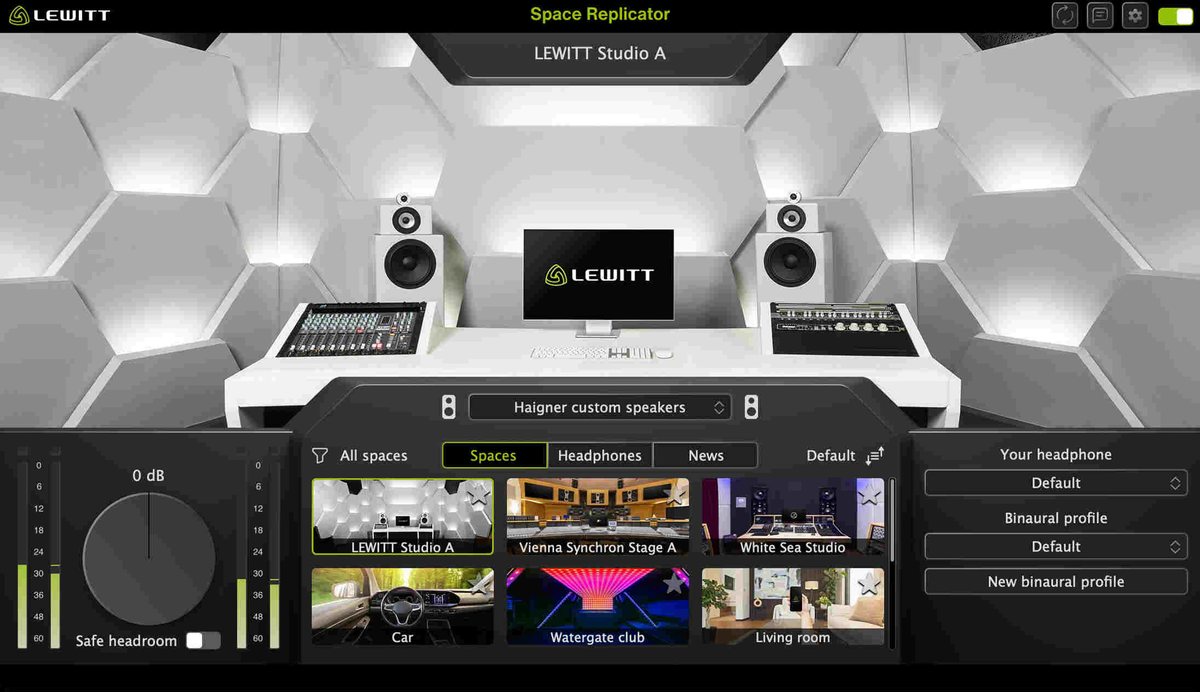
Space Replicator is a plug-in from LEWITT that reproduces how real spaces sound, over headphones. It captures spaces such as mixing studios, a car, clubs, a living room and a kitchen at high resolution so you can hear a speaker-like placement through headphones.
It is aimed at people who want to judge how a mix sounds on speakers without relying on their own room, and who want to check how a mix translates in a car, on a phone or on a TV before exporting. The official page also lists a mixing room built to European Broadcasting Union standards and an analytic room.
You can pick from more than 800 headphone compensation profiles to correct each model's frequency response (the official site says 800+; an older Plugin Boutique text says 600+). A Transparent profile for mixing and simulations of common earbuds and headphones are also available.
A personalised binaural profile can be created in the plug-in through a simple training process. Per-room EQ, ambience control, output EQ, a balance slider and user presets are included, and version 2.0 adds standalone operation without a DAW.
Key features
Real spaces over headphones
Captured spaces such as studios, a car, clubs, a living room and a kitchen can be heard through headphones, which may help when you cannot use speakers.
Mix translation checks
You can check how a mix sounds in a car, club, on phones, laptops or TVs. LEWITT stresses that these use virtual acoustic spaces rather than simple EQ curves.
800+ headphone compensations
Choose your headphone model to compensate its frequency response, so you may be able to start without buying new headphones.
Personalised binaural profile
A short in-plug-in training process creates a profile for your ears and tunes how the spaces are rendered.
Room EQ and output EQ
Per-room EQ and ambience control, an overall output EQ, a headphone compensation mix and a left/right balance are adjustable.
Standalone operation
From version 2.0 it also runs without a DAW, and zero-latency operation in the DAW version is listed among the updates.
Specifications
| Item | Details |
|---|---|
| Plug-in formats | VST3 (Win, Mac), AAX (Win, Mac), AU (Mac) |
| Supported OS | Windows 10 or later, macOS (Intel and Apple silicon, tested from macOS 12) |
| Standalone | Requires macOS 14.2 or later (per LEWITT) |
| Headphone compensation | 800+ profiles (per LEWITT) |
| Licensing | No iLok required |
| Editions | Essential and Standard (as selectable on the official page) |
What is included and system requirements
- Space Replicator plug-in (VST3 / AAX / AU)
- Virtual spaces (studios, a car, clubs, a living room and more; the number varies by edition)
- Headphone compensation profiles (800+)
- Headphone simulations
- A free trial is offered (per the official page)
How to use it
- Create a LEWITT account and register the licence code.
- Download the installer and open the plug-in in a DAW or as standalone.
- Choose your headphone model to apply compensation.
- If needed, run the binaural profile training.
- Pick a mixing room and adjust as if listening on speakers.
- Switch to spaces such as a car, phone or TV to check how it translates.
- Adjust room EQ and output EQ to taste and save a user preset.
Where it may come in handy
Mixing on headphones
In a room with acoustic problems, you might use it to approximate how a mix sounds on speakers.
Checks before export
Switching to a car, phone or TV space may serve as a last check before exporting.
Checking for club playback
You could audition how a mix sounds on the floor or in the DJ booth of a club space.
Working away from the studio
When working only on headphones, it may help keep a sense of a speaker environment.
Who it may suit
- People mixing on headphones in rooms with acoustic issues
- Those who want to check translation in a car or on a phone before export
- Users who want to keep using the headphones they own
- Producers making music for DJs and clubs
Good to know before you buy
- Editions such as Essential and Standard differ in the number of spaces and headphone simulations, so check which edition you are buying.
- The Plugin Boutique text describes version 2.0 and lists 600+ headphone profiles versus 800+ on the official site.
- Standalone requires macOS 14.2 or later.
- It compensates headphone response and simulates spaces, and may not match real speakers exactly.
- No iLok is required.
Price
Please check the official page for the price.
Prices differ by edition and could not be confirmed on the official site, so none is listed.
See Space Replicator on the product page
More of the same kind
Other introduction articles of the same kind.
- Waves Clarity Vx DeReverb
- Klevgrand STARK
- Cockos ReaFIR ReaPlugs
- Waves Greg Wells PianoCentric
- Metric Halo SpectraFoo
- Metric Halo / Make Believe David’s 2Bus
We have introduced 12 other products from LEWITT.
- LEWITT Space Replicator Free
- LEWITT Space Replicator Essential
- LEWITT LCT 441 FLEX
- LEWITT LCT 640 TS
- LEWITT PURE TUBE
See the full list in Product database: Effects.
Sources: lewitt-audio.com pluginboutique.com (checked 2026-10-27)










Comments