
Disclosure: This page may contain affiliate links. Prices were checked on the date shown and may change.
An introduction to Fiedler Audio armada, based on information from the maker and distributors: what it does, how to use it and who it may suit. It is not scored.
armada lets you load your favourite VST3 effects on anything, from mono and stereo up to 128 channels.
— Fiedler Audio official site
What is armada?
armada is a plug-in wrapper from Fiedler Audio. You load your usual VST3 effects inside it, and it lets those effects run on multichannel material such as Dolby Atmos or Ambisonics, not only on mono and stereo tracks.
According to the maker, it covers everything from mono and stereo up to 128 channels. Formats named on the official page include 9.1.6, NHK 22.2, Auro 3D, Eclipsa and Higher Order Ambisonics (HOA).
It is offered as VST3, AU, AAX and OBAM. You can insert it in a DAW, or load it into the master channel of Fiedler Audio's own Dolby Atmos Composer and Mastering Console. The official page presents processing a whole Dolby Atmos mix with a VST3 effect in a single instance as one of its main points.
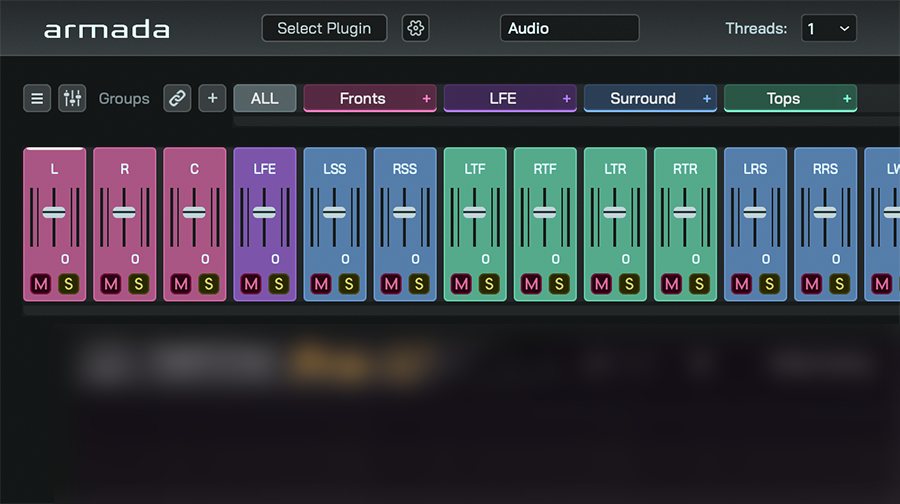
It also has global groups that link several armada instances and share sidechain signals, channel-grouping presets and multithreaded processing. It is a tool for people who want to keep using the VST3 plug-ins they already own in immersive work.
Key features
Load effects on multichannel formats
It lets a VST3 effect run on material from mono up to Dolby Atmos and HOA. It may help when you want to bring a stereo-oriented plug-in into immersive work.
Processing a whole Atmos mix
Loaded as an OBAM plug-in in Dolby Atmos Composer or Mastering Console, it passes the whole Atmos mix through a VST3 effect in one instance. That fits the finishing stage, when you want one processor over the full mix.
Global sidechaining
Global groups link the sidechain across any number of armada instances, and a sidechain mixer sets what reaches the loaded plug-in. The external sidechain input handles up to 64 channels, depending on the DAW.
Channel grouping and presets
Channels can be grouped so each group gets its own effect settings. Groupings can be saved as presets and reused across sessions.
Channel mixer
A channel mixer adjusts the output, so the processed signal can be balanced per channel. It gives you a place to check the multichannel output balance at the end.
Multithreaded processing
Demanding VST3 plug-ins can load the CPU heavily across many channels, so the number of threads can be set per instance to suit the session.
Specifications
| Item | Details |
|---|---|
| Type | Immersive VST3 wrapper for effects |
| Channels | Mono up to 128 channels (9.1.6, NHK 22.2, Auro 3D, Eclipsa, HOA and more) |
| Plug-in formats | Mac: VST3 / AU / AAX / OBAM, Windows: VST3 / AAX / OBAM |
| External sidechain input | Up to 64 channels (depends on the DAW) |
| License | Perpetual license (the official site also offers Rent to Own) |
What is included and system requirements
- armada itself (installer from the Fiedler Audio download page)
- Mac: macOS 12 to 26.x, Intel 2 GHz or faster (SSE3) or Apple Silicon, 4 GB RAM or more, 1440 x 900 display or larger, OpenGL 3.3 or newer
- Windows: Windows 10 / 11, Intel 2 GHz or faster (SSE3), 4 GB RAM or more, 1440 x 900 display or larger, OpenGL 3.3 or newer
- Plug-in formats: Mac VST3 / AU / AAX / OBAM, Windows VST3 / AAX / OBAM
- Activated with a license code (shown in your Plugin Boutique account if you buy there)
How to use it
- Create an account on the Fiedler Audio download page and get the armada installer.
- Open the installer and follow the on-screen steps.
- Open your DAW and rescan plug-ins if needed.
- Insert armada on a multichannel track or on the master channel.
- Load the VST3 effect you want to use inside armada.
- Split the channels into groups and adjust the effect settings per group.
- To use sidechain, link instances with a global group and pick the signal to send in the sidechain mixer.
- Enter the license code you received to activate it.
Where it may come in handy
Finishing a Dolby Atmos project
Loading the OBAM version in the master channel of Dolby Atmos Composer may let you pass the whole mix through VST3 plug-ins you already own. That could suit a final balancing pass.
Surround and immersive post-production
It could be a candidate when you want to apply the same effect to material in different speaker layouts such as 9.1.6 or NHK 22.2.
Ambisonics projects
For HOA material, you may be able to try VST3 effects by placing armada in the chain.
Reusing stereo plug-ins
It may help when you bought a VST3 with stereo in mind and want to use it in a multichannel session too.
Who it may suit
- People starting to make Dolby Atmos or other immersive work
- People who want to use VST3 effects they already own on multichannel material
- Users of Dolby Atmos Composer or Mastering Console
- People working on surround post-production
Good to know before you buy
- armada is a wrapper for effects and does not generate sound itself. You need the VST3 plug-ins separately.
- How a loaded VST3 behaves on many channels depends on that plug-in. Trying the trial first is the safer route.
- The external sidechain input is up to 64 channels, but the usable number depends on the DAW.
- The official site also lists Rent to Own with 3, 6 or 12 monthly payments.
- A download / trial is available on the official site.
Price
$249 (Fiedler Audio official site, checked 2026-10-27). Prices can vary by region and promotion, so check the official page before buying.
See armada on the product page
More of the same kind
Other introduction articles of the same kind.
- MeldaProduction MStereoGenerator
- Waves OneKnob Wetter
- Bogren Digital Ampknob BDM 800 Badboy
- W. A. Production MixBoss
- Sound Particles Density
- Waves Enigma
We have introduced 4 other products from Fiedler Audio.
- Fiedler Audio Dolby Atmos Composer
- Fiedler Audio Spacelab Interstellar
- Fiedler Audio Mastering Console
- Fiedler Audio gravitas MDS
See the full list in Product database: Effects.
Sources: fiedler-audio.com pluginboutique.com (checked 2026-10-27)










Comments