
Disclosure: This page may contain affiliate links. Prices were checked on the date shown and may change.
An introduction to Digital Brain Instruments Podcaster, based on information from the maker and distributors: what it does, how to use it and who it may suit. It is not scored.
Podcaster allows using a computer and any audio interface instead of a hardware mixer to manage your audio broadcasting and recording needs.
— Digital Brain Instruments official site
What is Podcaster?
Podcaster is a 64-bit standalone application from Digital Brain Instruments. It is described as software for streaming, podcasting, online radio, talk shows, dialogue recording and small broadcasting events. It runs as its own program rather than being loaded inside a DAW.
According to the Plugin Boutique listing, it lets a computer and any audio interface take the place of a hardware mixer for managing broadcast and recording audio. The idea is that several microphones can be mixed and sent to a stream or a recording from one piece of software.
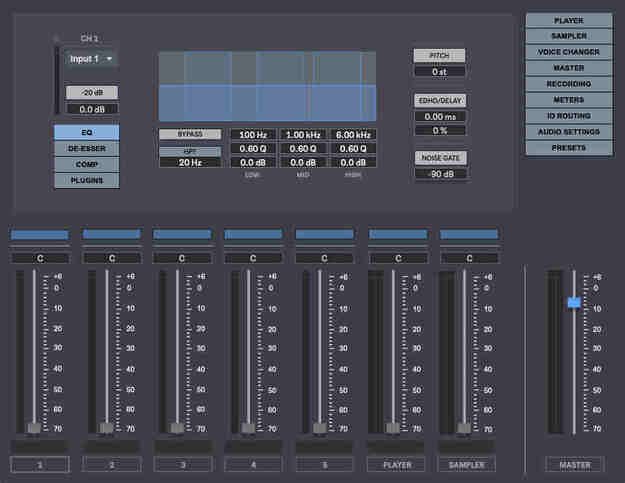
It offers up to five mono inputs and two stereo inputs. Each channel has a 3-band equalizer, a de-esser, a compressor and two plug-in slots, so the voice of each participant can be shaped separately in a multi-person session.
The program also includes a built-in audio player, a voice-changer engine with eight preset effects that work in real time, and a dedicated metering section. The stereo master and individual channels can be recorded separately, and the program can be controlled from a MIDI device. It supports Windows 8 or later and macOS on Intel and Apple Silicon.
Key features
Up to 5 mono and 2 stereo inputs
Five mono and two stereo inputs can be handled at once. A set-up with several microphones plus a stereo input for music is possible, with level balancing similar to a hardware mixer.
Per-channel voice processing
Each channel carries a 3-band EQ, de-esser and compressor. Muddiness, sibilance and level differences can be adjusted separately for each speaker.
Two plug-in slots per channel
Every channel has two plug-in slots for third-party effects. They can be used to add processing that the built-in EQ, de-esser and compressor do not cover.
Built-in audio player
A playback section is included for jingles and sound effects, so audio can be triggered during a show without opening another application.
Voice changer
Eight pre-designed effects change the voice in real time. This may be useful when a speaker wants to stay anonymous or when a segment needs a different vocal character.
Recording and metering
The stereo master and individual channels can be recorded, and a dedicated metering section shows levels while you work. Separate tracks make it possible to edit each voice afterwards.
MIDI control
Podcaster can be operated from a MIDI device. Assigning a controller with faders and buttons may allow levels and mutes to be handled without watching the screen.
Specifications
| Item | Details |
|---|---|
| Type | Standalone (64-bit) |
| Inputs | Up to 5 mono + 2 stereo |
| Channel processing | 3-band EQ, de-esser, compressor, 2 plug-in slots |
| Voice changer | 8 effects |
| Recording | Stereo master and individual channels |
| OS | Windows 8 or later (64-bit, multicore) / macOS 10.11.6 or later (Intel) / macOS 11 or later (Apple Silicon) |
| RAM | 4 GB or more |
What is included and system requirements
- Podcaster standalone application
- Built-in audio player
- Eight voice-changer effects
- Supported systems: Windows 8 or later (64-bit), macOS 10.11.6 or later (Intel), macOS 11 or later (Apple Silicon), 4 GB RAM or more
How to use it
- After purchase, double-click the downloaded ZIP file to extract it.
- Open the standalone application icon in the extracted folder.
- Select your audio interface and assign the microphones to input channels.
- Adjust the 3-band EQ, de-esser and compressor for each channel.
- If needed, load your own effects into the plug-in slots.
- Load jingles or sound effects into the built-in player.
- Check the meters and set the master level.
- Start recording, or send the master output to your streaming software.
Where it may come in handy
Podcast recording
It may suit shows with several speakers where EQ and compression need to be set per person. Because channels can be recorded individually, each voice can be handled separately during editing.
Online radio and streaming
Voices can be balanced while jingles and effects play from the built-in player. It may be a candidate for people who want to build a set-up on a computer without buying a hardware mixer.
Interviews and conversations
The host and guest can be assigned to separate inputs, with the de-esser used to tame sibilance before recording.
Vocal effects
The eight voice-changer effects may be used to change the character of a voice for particular segments of a show.
Who it may suit
- People who want to run a show with a computer and audio interface instead of a hardware mixer
- People who want to shape several voices with per-channel EQ and compression
- People who want to play music and effects from the same application while recording
Good to know before you buy
- It is a standalone application, not a DAW plug-in.
- An audio interface is required.
- Supported systems: Windows 8 or later (64-bit), macOS 10.11.6 or later (Intel), macOS 11 or later (Apple Silicon), with 4 GB RAM or more.
- The Plugin Boutique page shows a free trial option, which can be used to check operation before purchase.
Price
Please check the official page for the price.
See Podcaster on the product page
More of the same kind
Other introduction articles of the same kind.
- Logitech G Blue BLUE VO!CE
- Auphonic Auphonic
- Waves SuperRack Performer
- Elgato Wave Link
- OBS Project OBS Studio
- Cleanvoice Cleanvoice AI
We have introduced 8 other products from Digital Brain Instruments.
- Digital Brain Instruments Digital Brain Instruments Spacelab
- Digital Brain Instruments DSP Manager 2
- Digital Brain Instruments Voxpat Pro
- Digital Brain Instruments Oscar
- Digital Brain Instruments Digital Brain Instruments cMixer
See the full list in Product database: Streaming and recording software and others.
Sources: pluginboutique.com (checked 2026-10-27)










Comments