
Disclosure: This page may contain affiliate links. Prices were checked on the date shown and may change.
An introduction to Waves Clarity Vx DeReverb Pro, based on information from the maker and distributors: what it does, how to use it and who it may suit. It is not scored.
Welcome to a faster and smoother workflow for dereverbing dialogue & vocals.
— Waves official site
What is Clarity Vx DeReverb Pro?
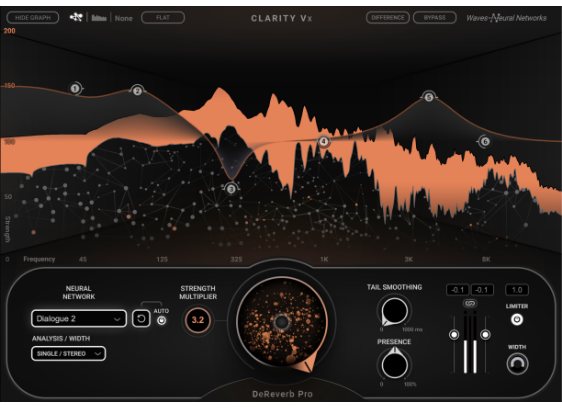
Clarity Vx DeReverb Pro is a plug-in in Waves' Clarity series that removes reverb from voice. It uses AI (Waves Neural Networks) to reduce room sound mixed into dialogue and vocals in real time.
Compared with Clarity Vx DeReverb in the same series, the Pro version adds 6 processing bands, reduction up to 200%, Tail Smoothing and a Presence control. Waves states that Clarity Vx DeReverb is included with the Pro version.
You can apply dereverb to problem frequency ranges and listen to what is being removed. Examples given include tightening early reflections on ADR takes, curbing long tails on location recordings and taming reverb tails baked into a vocal.
Separate neural networks are provided for dialogue (speech) and sung vocals. It runs as a plug-in in a DAW, and its parameters can be automated.
Key features
6 processing bands
The spectrum is split into 6 bands, and you choose where and how much dereverb is applied. It suits cases where certain ranges sound too reverberant.
Reduction up to 200%
The amount can be raised up to 200%, as stated by Waves. You can try it on heavily reverberant material when the normal range is not enough.
Tail Smoothing
It smooths the reverb tail so dialogue can match the space seen in the picture. It can help when matching material recorded in different places.
Solo, bypass and delta
Toggles for solo, bypass and delta let you hear what is being removed, which helps check that you are not taking too much.
Presence control
A control to restore the natural frequencies of the voice. It can be used when the voice feels thinner after dereverb.
Dedicated networks for speech and vocals
Separate neural networks are provided for speech and sung vocals, so you can switch according to the material.
Real-time workflow
It works in real time and its parameters can be automated, so you can adjust while listening in context.
Specifications
| Item | Details |
|---|---|
| Type | AI voice dereverb plug-in |
| OS | Mac: macOS 12 Monterey to 15 Sequoia, Windows: Windows 10 or later |
| Plug-in formats | Mac: VST / AU / AAX, Windows: VST / AAX (as listed by Waves; Waves Japan lists AAX Native, AudioSuite, Audio Units and VST3) |
| Processing bands | 6 bands |
| Reduction | Up to 200% |
| License | Perpetual license / subscription (Waves Japan) |
What is included and system requirements
- Clarity Vx DeReverb Pro itself
- Clarity Vx DeReverb (Waves states it is included with the Pro version)
- Supported OS: macOS Monterey 12, Ventura 13, Sonoma 14, Sequoia 15 / Windows 10 or later
- Mac: VST / AU / AAX, Windows: VST / AAX (as listed by Waves)
How to use it
- Install via Waves Central or similar and activate the license.
- In your DAW, insert the plug-in on the dialogue or vocal track you want to dry up.
- Choose the dialogue or the vocal network to match the material.
- While playing, raise the dereverb amount a little at a time.
- Choose and adjust only the bands where the reverb bothers you.
- Use solo, bypass and delta to hear what is removed and check you are not taking too much.
- If the voice seems thin, adjust Presence.
- To match picture, shape the reverb tail with Tail Smoothing.
Where it may come in handy
Dialogue editing for video
You may be able to try it for tightening early reflections on ADR or curbing long tails on location recordings.
Home-recorded narration and vocals
It could be used to tidy recordings where the room sound bothers you before mixing.
Adjusting baked-in reverb
It may be a candidate when you want to shape the reverb tail already mixed into a vocal.
Matching material recorded in different places
Tail Smoothing could be used to bring the sense of space of dialogue from different locations closer together.
Who it may suit
- Video and streaming creators who want to tidy reverb in speech and narration
- People bothered by room sound in home recordings
- Post-production engineers working with ADR or location sound
- People who want finer control than Clarity Vx DeReverb in the same series
Good to know before you buy
- Because it uses AI, results vary with the material and settings. Use the delta function to check you are not removing too much.
- Supported DAWs and OS for Waves V17 products are listed in the Waves Japan requirements table.
- Besides the perpetual license, Waves Japan also lists a subscription option.
- Waves prices change over time and a sale is currently shown, so check the store page before buying.
How it differs from similar products
We do not pick a winner; the official figures are placed side by side.
Clarity Vx DeReverb
Waves Japan describes Clarity Vx DeReverb Pro as a more powerful version of its smaller sibling, Clarity Vx DeReverb. The Pro version has 6 processing bands and reduction up to 200%, and Clarity Vx DeReverb is included with it.
Price
Please check the official page for the price.
See Clarity Vx DeReverb Pro on the product page
More of the same kind
Other introduction articles of the same kind.
- Crickets Audio Strata
- Karanyi Sounds Playmod
- Slate Digital Infinity Horizon
- Eventide Eventide Rotary Mod
- MeldaProduction MTrackAlign
- MeldaProduction MConvolutionMB
We have introduced 215 other products from Waves.
See the full list in Product database: Effects.
Sources: wavesjapan.jp pluginboutique.com (checked 2026-10-27)










Comments