
Disclosure: This page may contain affiliate links. Prices were checked on the date shown and may change.
An introduction to MeldaProduction MTrackAlign, based on information from the maker and distributors: what it does, how to use it and who it may suit. It is not scored.
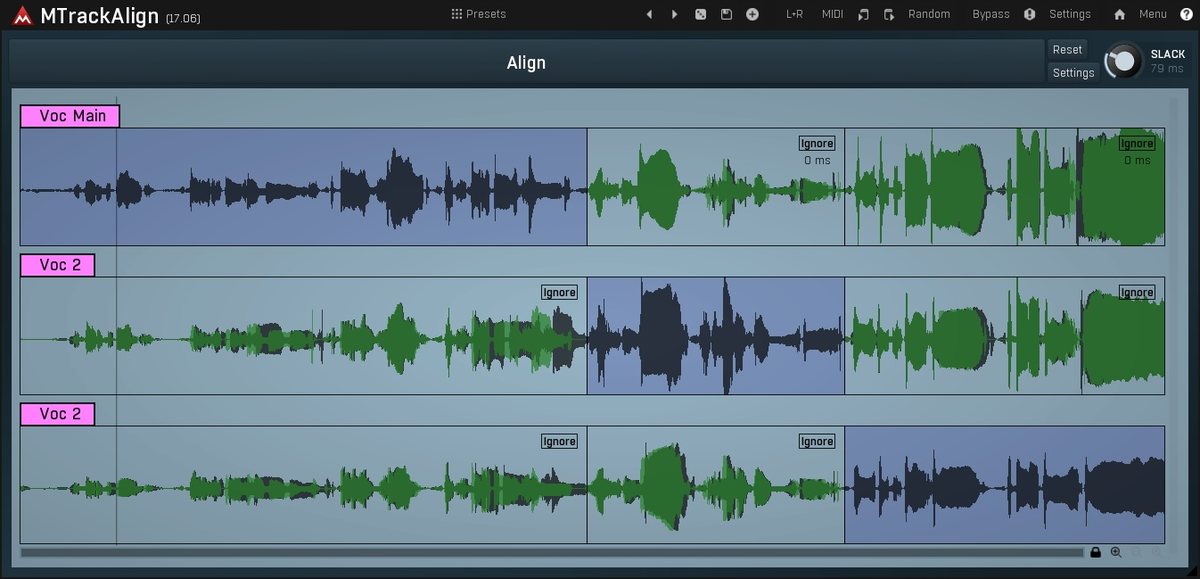
MTrackAlign allows you to time-align multiple audio tracks with a guide track, saving you countless hours of manual editing.
— MeldaProduction official site
What is MTrackAlign?
MTrackAlign is a plug-in from MeldaProduction of the Czech Republic that aligns the timing of several audio tracks to a guide track. It is built on ARA (Audio Random Access), so it analyses whole clips on the DAW timeline.
The described workflow is to select the clips to be aligned on the timeline, choose a guide if needed and process with one click. The product page states there are no complex settings and no lengthy rendering waits.
Suggested uses include timing layered vocals such as backing vocals and harmonies, double-tracked guitars or synth basses, tightening rhythm sections, and conforming ADR dialogue to the original production audio for lip-sync.
The official note says it works on ARA-supported systems and is not compatible with FL Studio, Ableton Live or Bitwig. Compatibility with the DAW in use should be confirmed before buying.
Key features
Alignment to a guide track
A guide track is chosen and the timing of other tracks is matched to it. The product page gives the example of aligning backing vocals to a lead vocal.
One-click processing
Selecting clips and clicking is described as enough to process them, which may reduce manual chopping and crossfading.
Whole-clip analysis through ARA
Clips on the timeline are analysed as a whole without playback, and the ARA 2 integration is described as supporting a non-destructive workflow.
Tidying vocal stacks
Consonants, syllables and breaths in backing or harmony parts are aligned to the lead, according to the product page.
Tightening rhythm sections
A guide take, such as the tightest guitar or bass, can be used to align other performances.
Post-production and field recording
ADR lip-sync, aligning audio from several microphones and syncing Foley are listed among the uses.
Specifications
| Item | Details |
|---|---|
| Type | ARA audio alignment plug-in |
| Compatibility | ARA-supported DAWs (not FL Studio, Ableton Live or Bitwig) |
| Supported applications | Cubase / Nuendo, Studio One, Logic Pro, Reaper, Samplitude, Pro Tools (beta) |
| Windows formats | VST / VST3 / AAX (64-bit, Windows 8 / 10 / 11) |
| macOS formats | VST / VST3 / AU / AAX (macOS 10.14 or newer, native Apple Silicon) |
What is included and system requirements
- MTrackAlign plug-in (Windows / Mac)
- A free trial is offered on the official site
- Per-DAW instructions on the official site
How to use it
- Check on the official list whether the DAW supports ARA.
- Install the plug-in and confirm that the DAW loads it.
- Place the audio clips to be aligned on the timeline.
- Select the clips and assign MTrackAlign as the ARA plug-in.
- Specify the guide track or clip.
- Run the alignment and play the result to check it.
- Fix any remaining spots by hand.
Where it may come in handy
Backing vocals and harmonies
Layered parts could be aligned to the lead vocal to reduce timing variations.
Double-tracked guitars
The take with the closest timing could be used as the guide to align the other layers.
Dialogue replacement
The product page describes using on-set audio as the guide to conform studio-recorded replacement dialogue.
Who it may suit
- Users who spend time aligning layered recordings by hand
- Users of ARA-capable DAWs such as Cubase, Studio One, Logic Pro or Reaper
- Users who work on dialogue replacement for video
Good to know before you buy
- It works in ARA-capable DAWs; it cannot be used in FL Studio, Ableton Live or Bitwig.
- A free trial can be tried from the official site.
- The official page lists Pro Tools support as beta.
Price
Please check the official page for the price.
See MTrackAlign on the product page
More of the same kind
Other introduction articles of the same kind.
- NUGEN Audio LM-Correct
- IK Multimedia T-RackS Leslie
- Waves NLS Non-Linear Summer
- Wave Alchemy Tapewave
- Waves Eddie Kramer Effects Channel
- McDSP SA-2 Dialog Processor v7
We have introduced 32 other products from MeldaProduction.
- MeldaProduction MDrumCleaner
- MeldaProduction MMatcher
- MeldaProduction MCompare
- MeldaProduction MStereoGenerator
- MeldaProduction MeldaProduction MRingModulatorMB
See the full list in Product database: Effects.
Sources: meldaproduction.com pluginboutique.com (checked 2026-10-27)










Comments