
Disclosure: This page may contain affiliate links. Prices were checked on the date shown and may change.
An introduction to Waves Playlist Rider, based on information from the maker and distributors: what it does, how to use it and who it may suit. It is not scored.
Set the mixer input levels, load the master bus with Playlist Rider, and let it ride the output to your target level.
— Waves official site
What is Playlist Rider?
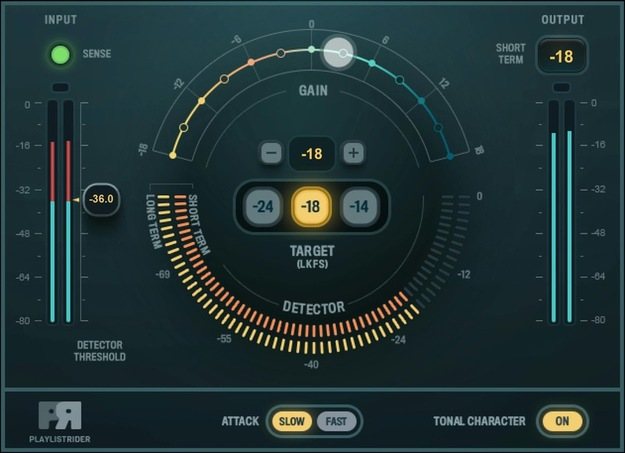
Playlist Rider is a level-control plug-in from Waves for broadcast and streaming. It keeps the output volume close to a target level when several audio feeds take turns, such as live broadcasts, podcasts, panel discussions, theater work and pre-show music.
The workflow is to set the mixer input levels first and then load Playlist Rider on the master bus. The plug-in then raises and lowers the output level on its own to approach the chosen target. It plays the role of an assistant who would otherwise move the fader by hand.
Three target levels are offered: -24, -18 and -14 LKFS. The threshold is variable, and the product page says the design keeps the sound natural rather than heavily compressed. Low-level sections such as fades can be excluded from detection.
A tone shaper is available to smooth out tonal differences between feeds, and the attack time can be set to fast or slow. The product is described as a good match for Waves eMotion LV1 and the SuperRack plug-in host. It runs in real time and supports multipoint touch.
Key features
Three target levels
Choose -24, -18 or -14 LKFS and the output is steered toward it. Having a fixed target may make it easier to work toward the loudness a platform or broadcast spec asks for.
Dynamic level riding
The output level is ridden toward the target. Because the threshold is variable, it is designed to avoid a squashed, over-compressed sound. It may help when speakers or tracks change.
Excluding low-level sections
Quiet parts such as fades can be left out of detection. This may be useful when you do not want the gain to rise during song endings or near-silent moments.
Fast or slow attack
The attack time can be switched between fast and slow, so you can choose a quicker response for speech or a slower one for music.
Optional tone shaper
This option smooths tonal differences between feeds. It may be worth trying on a show where microphones and recording conditions vary from segment to segment.
Real-time and touch-friendly
Processing runs in real time and multipoint touch is supported, which suits touch-based mixers such as eMotion LV1.
Specifications
| Item | Details |
|---|---|
| Type | Level control for broadcast and streaming |
| Target levels | -24 / -18 / -14 LKFS |
| Mac | macOS Monterey 12, Ventura 13, Sonoma 14, Sequoia 15 (VST / AU / AAX) |
| Windows | Windows 10 or later (VST / AAX) |
What is included and system requirements
- Playlist Rider plug-in
- Supported OS: macOS 12 to 15, Windows 10 or later
- Formats: VST / AU / AAX on Mac, VST / AAX on Windows
- A Waves account is used to manage the license
How to use it
- Create a Waves account and activate the license for the purchased product.
- In your mixer or DAW, set each feed's input level so they are not far apart.
- Insert Playlist Rider on the master bus.
- Pick a target level from -24, -18 and -14 LKFS.
- Choose fast or slow attack to suit the material.
- If you want quiet parts such as fades left out, adjust the detector settings.
- If tonal differences bother you, switch the tone shaper on and compare.
Where it may come in handy
Podcasts and streams
It may help even out overall volume on shows where several speakers and background music take turns.
Panels and events
It may be worth trying when speakers have different voice levels and you want to smooth the output.
Pre-show music and house music
It may reduce how often you touch the fader by bringing track-to-track level differences closer to a target.
Who it may suit
- People who want the output of a stream or broadcast to stay near a set loudness
- People who want to manage podcast or event audio with fewer manual moves
- Users of Waves eMotion LV1 or SuperRack
Good to know before you buy
- The target is chosen from three fixed levels: -24, -18 and -14 LKFS.
- A Waves account is needed for license activation.
- Supported systems are macOS 12 to 15 and Windows 10 or later.
- AAX and VST are available on both systems; AU is Mac only.
Price
Please check the official page for the price.
See Playlist Rider on the product page
More of the same kind
Other introduction articles of the same kind.
- Lese Fletcher
- Blue Cat Audio Blue Cat's Re-Guitar
- Dreamtonics Vocoflex
- Tone Empire LAM16 Preamp
- Solid State Logic SSL Fusion HF Compressor
- BEATSURFING CHEat code
We have introduced 215 other products from Waves.
- Waves Nx Ocean Way Nashville
- Waves Curves Equator
- Waves Center
- Waves Eddie Kramer Guitar Channel
- Waves InPhase LT
See the full list in Product database: Effects.
Sources: pluginboutique.com (checked 2026-10-27)










Comments