
Disclosure: This page may contain affiliate links. Prices were checked on the date shown and may change.
An introduction to Waves Curves Equator, based on information from the maker and distributors: what it does, how to use it and who it may suit. It is not scored.
Curves Equator is a smarter resonance suppression plugin.
— Waves official site
What is Curves Equator?
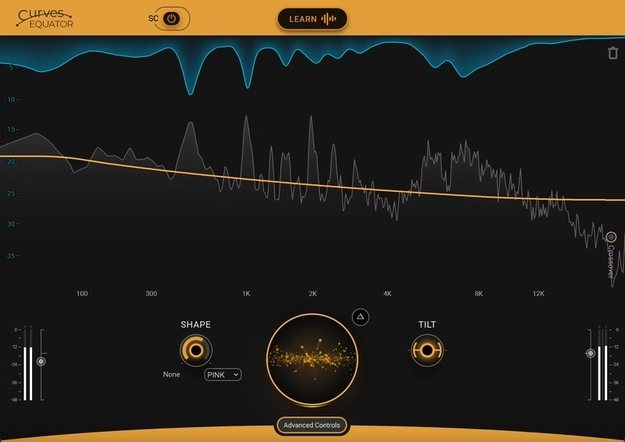
Curves Equator is a resonance-suppression plug-in from Waves. It can be used on a full mix, vocal, instrument or sample, aiming to remove problematic frequencies, fix resonances and balance inconsistencies.
One feature is that it can learn your content and build a personalized suppression curve, which Waves says helps avoid overprocessing.
Another is frequency unmasking: it learns the sidechain of a clashing source and dynamically applies the inverse curve to the part you are mixing.
Equator is the first of the Curves Spectral Series, described as a step in the evolution of self-driving EQs. It supports VST, AU and AAX on Mac and VST and AAX on Windows.
Key features
Resonance suppression
Removes problematic frequencies and resonances and balances inconsistencies on mixes, vocals, instruments and samples.
Learned suppression curve
Learns your content to create a personalized curve that helps avoid overprocessing.
Frequency unmasking
Learns the sidechain of a clashing source and applies the inverse curve dynamically.
First in the Spectral Series
The first plug-in of the Curves Spectral Series of self-driving EQs.
Works on full mixes
It can be used on mixes as well as single tracks.
Specifications
| Item | Details |
|---|---|
| Type | Resonance suppression / unmasking |
| Mac OS | macOS Monterey 12 to Sequoia 15 |
| Windows OS | Windows 10+ |
| Formats | Mac: VST / AU / AAX; Windows: VST / AAX |
What is included and system requirements
- Curves Equator plug-in
- Mac: VST / AU / AAX
- Windows: VST / AAX
How to use it
- Install via Waves Central.
- Insert it on the target track or bus.
- Play the material so it can learn.
- Raise suppression gradually.
- Compare with bypass.
- For unmasking, route the clashing track to the sidechain.
- Check for overprocessing.
- Save your settings.
Where it may come in handy
Vocal resonance cleanup
May help tame resonances from the mic or room.
Vocal versus backing
Unmasking could sort out clashing ranges.
Mix-bus finishing
Light use on a bus may even out balance.
Sample cleanup
May suit tidying up troublesome ranges in samples.
Who it may suit
- Those who want automatic resonance control
- People sorting out masking between tracks
- Users who want less manual EQ work
Good to know before you buy
- Waves products are managed through Waves Central.
Price
Please check the official page for the price.
See Curves Equator on the product page
More of the same kind
Other introduction articles of the same kind.
- United Plugins United Plugins VoxDucker
- FLUX:: Alchemist
- McDSP SA-2 Dialog Processor v7
- Bogren Digital Ampknob BDM 800 Badboy
- McDSP Analog Channel HD v7
- Blue Cat Audio Blue Cat's Remote Control
We have introduced 215 other products from Waves.
See the full list in Product database: Effects.
Sources: pluginboutique.com (checked 2026-10-27)










Comments