
Disclosure: This page may contain affiliate links. Prices were checked on the date shown and may change.
An introduction to Waves Sub Align, based on information from the maker and distributors: what it does, how to use it and who it may suit. It is not scored.
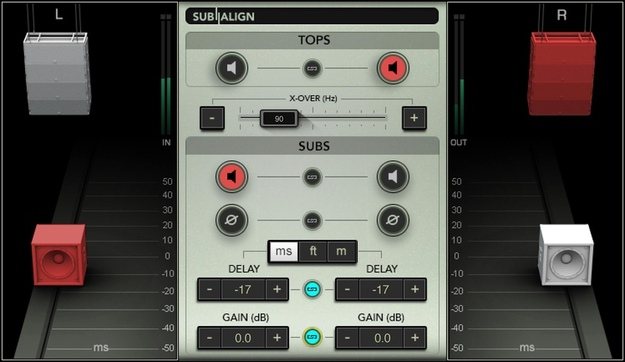
Sub Align inserts in your master bus, and moves the subs virtually in relation to the tops.
— Waves official site
What is Sub Align?
Sub Align is a PA-oriented alignment plug-in from Waves. It is meant for small venues where subwoofers and top speakers are placed separately, to reduce muddy bass.
It is inserted on the master bus and virtually moves the subs relative to the tops. Distance can be set in milliseconds, feet or meters.
It can be used when you cannot access the house system's settings, since the adjustment happens on your own output. It suits both mono and stereo PA systems.
It supports VST, AU and AAX on Mac, and VST and AAX on Windows.
Key features
Sub and top alignment
It aligns the phase of subs and tops to reduce muddy bass in venues where speaker placement was not set for sound.
Virtual movement
Instead of physically moving subs, it creates the equivalent time offset, set in milliseconds, feet or meters.
No access to house settings needed
It can help when you cannot reach the house system, as everything is done on your own master bus.
Mono and stereo
It works with both mono and stereo PA systems.
Specifications
| Item | Details |
|---|---|
| Type | PA sub and top alignment |
| Formats (Mac) | VST, AU, AAX |
| Formats (Windows) | VST, AAX |
| Mac | macOS 12 Monterey, 13 Ventura, 14 Sonoma, 15 Sequoia |
| Windows | Windows 10 or later |
| Distance units | Milliseconds, feet, meters |
What is included and system requirements
- Sub Align plug-in
- Supported: Mac (VST/AU/AAX), Windows (VST/AAX)
How to use it
- After purchase, install via Waves Central.
- Insert Sub Align on the master bus of your live host.
- Check how the subs and tops are positioned in the PA.
- Choose the distance unit.
- Adjust the value and listen to how the bass changes.
- Review the setting for a mono or stereo PA at the venue.
Where it may come in handy
Small-venue gigs
It may help in venues where sub and top positions were not chosen for sound.
Rehearsal checks
It could be used to tune how the bass sounds before a show.
Your own PA
It may suit setups where moving the subs is difficult.
Who it may suit
- Musicians performing through a PA
- People playing venues with separate subs and tops
- People who use a DAW or live host for master processing
Good to know before you buy
- It is used on the master bus.
- The actual effect depends on the venue layout.
- The maker's page could not be read, so the details follow the Plugin Boutique product page.
Price
Please check the official page for the price.
See Sub Align on the product page
More of the same kind
Other introduction articles of the same kind.
- TAQS.IM MicroToner
- IK Multimedia T-RackS Leslie
- Leapwing Audio CenterOne 3
- Eventide H9 Plug-in Series Bundle
- W. A. Production ChopBeast 2
- Solid State Logic SSL autoDYN
We have introduced 215 other products from Waves.
- Waves Bass Rider
- Waves Renaissance Bass
- Waves CLA Drums
- Waves TRACT SPL Meter
- Waves Abbey Road Reel ADT
See the full list in Product database: Effects.
Sources: pluginboutique.com (checked 2026-10-27)










Comments