
Disclosure: This page may contain affiliate links. Prices were checked on the date shown and may change.
An introduction to AIR Music Technology Tape Saturator, based on information from the maker and distributors: what it does, how to use it and who it may suit. It is not scored.
Tape Saturator is an authentic recreation of classic analog tape saturation. Timeless warmth and harmonic character meet modern mixing and mastering control.
— AIR Music Technology official site
What is Tape Saturator?
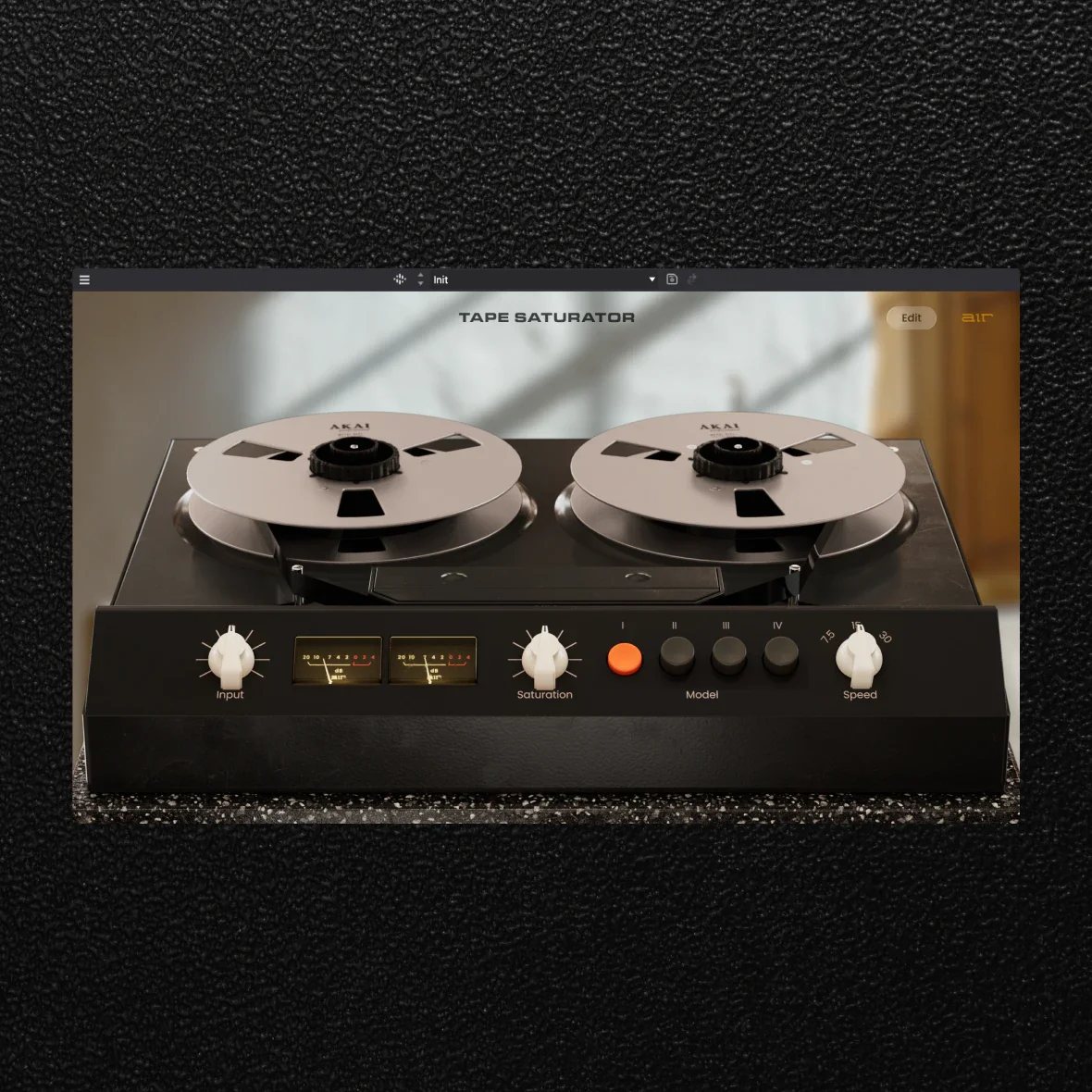
Tape Saturator is a tape-saturation plug-in from AIR Music Technology. It is designed to add the harmonics, gentle compression and softened edges associated with recording to analog tape, and is aimed at mixing and mastering work inside a DAW.
At its core are four saturation models. According to the official description, each is inspired by a classic tape response, and together they let you adjust subtle compression, harmonic richness and transient smoothing. A tape-condition control moves the sound from a near-pristine tape to a heavily aged one.
The plug-in also offers the movement and flaws associated with tape. Wow, flutter, dropout and noise can each be adjusted, which may help when a digital signal sounds too clean and needs some motion. Tape speed can be changed too, shifting the character from darker and fuller toward brighter and more focused saturation.
Auto gain make-up, clipping-type selection and tone shaping are also included. It is offered as an effect for AkaiPro MPC standalone hardware and MPC Desktop as well as for major DAWs. A separate bundle combines it with Tape Echo and Tape Double Track.
Key features
Four saturation models
You can choose among four models inspired by tape responses. They change how much gentle compression and added harmonics you hear, so you can match the texture to drums, vocals or other material.
Tape condition control
The condition of the tape can be moved from near-pristine to heavily aged. One control lets you explore everything from light coloration to a rougher, worn texture.
Wow, flutter, dropout and noise
Typical tape imperfections can be added individually. They may be worth trying when you want to give loops or pads some movement.
Tape speed
Changing the speed shifts the saturation from darker and fuller toward brighter and more focused. It offers a way to adjust the character without building a complex chain.
Auto gain and clipping selection
Auto gain make-up helps you compare settings without being misled by level changes. Clipping-type selection and tone shaping are also provided.
MPC and DAW support
The official page lists use in MPC standalone systems, MPC Desktop and major DAWs. Formats are AU, VST, VST3 and AAX.
Specifications
| Item | Details |
|---|---|
| Maker | AIR Music Technology |
| Type | Tape saturation effect |
| Formats | AU / VST / VST3 / AAX (Plugin Boutique lists VST2, VST3, AU) |
| OS | Windows 10 and 11; macOS 14 Sonoma to macOS 26 |
| RAM | 4 GB (8 GB recommended) |
| CPU | Dual-core 2.5 GHz |
What is included and system requirements
- Tape Saturator plug-in
- Formats: AU, VST, VST3, AAX
- Also usable in MPC standalone hardware and MPC Desktop
- A free trial is offered on the official page
How to use it
- After purchase, activate the license with your official account and install the plug-in.
- Load it as an insert effect on a track or bus in your DAW.
- Switch through the four saturation models first to hear how the textures differ.
- Move the tape-condition control to find the amount of wear you like.
- Add wow, flutter or noise in small amounts if you want more movement.
- Use tape speed to lean darker or brighter.
- Turn on auto gain and compare the on and off states at matched level.
Where it may come in handy
Texture on the mix bus
If you want soft harmonics and light compression across the whole mix, a small amount on the bus may change how it holds together.
Drums and vocals
On a single track you can switch models and speed to explore a thicker or brighter direction.
Lo-fi treatment
Stronger tape-condition, wow and flutter settings may help create the feel of an old recording.
Who it may suit
- People who want tape-style texture from a single plug-in
- MPC users who want the same effect in a DAW as well
- Those who want to adjust movement such as wow and flutter
Good to know before you buy
- Activation uses an inMusic Brands account; the user guide says up to three devices can be authorized at once.
- The official site offers a free trial so you can check it before buying.
- Plugin Boutique also lists the Tape Effects Collection, which adds Tape Echo and Tape Double Track.
How it differs from similar products
We do not pick a winner; the official figures are placed side by side.
IK Multimedia Tape Machine 80
Tape Saturator adjusts tape saturation through four models and a tape-condition control. Tape Machine 80 is based on the Studer A80 and offers four tape formulas and a choice of 15 or 30 ips tape speed.
Price
Please check the official page for the price.
See Tape Saturator on the product page
More of the same kind
We have introduced 82 saturation and distortion effects. Here are some of the others.
- Three-Body Technology Nylon
- Safari Audio Rabbit Tape V2
- Newfangled Audio Saturate
- United Plugins DarkFire
- D16 Group Devastor 2
- Eventide MangledVerb
We have introduced 21 other products from AIR Music Technology.
- AIR Music Technology Vocal Distortion
- AIR Music Technology TimewARP 2600
- AIR Music Technology Vacuum Pro
- AIR Music Technology Tape Echo
- AIR Music Technology Ether
For a side-by-side comparison scored on the same criteria, see our comparison of saturation and distortion effects.
See the full list in Product database: Effects.
Sources: airmusictech.com pluginboutique.com (checked 2026-10-27)










Comments