
Disclosure: This page may contain affiliate links. Prices were checked on the date shown and may change.
An introduction to AudioThing Megaphone, based on information from the maker and distributors: what it does, how to use it and who it may suit. It is not scored.
Megaphone is a plugin that emulates an amplified bullhorn / PA loudspeaker.
— AudioThing official site
What is Megaphone?
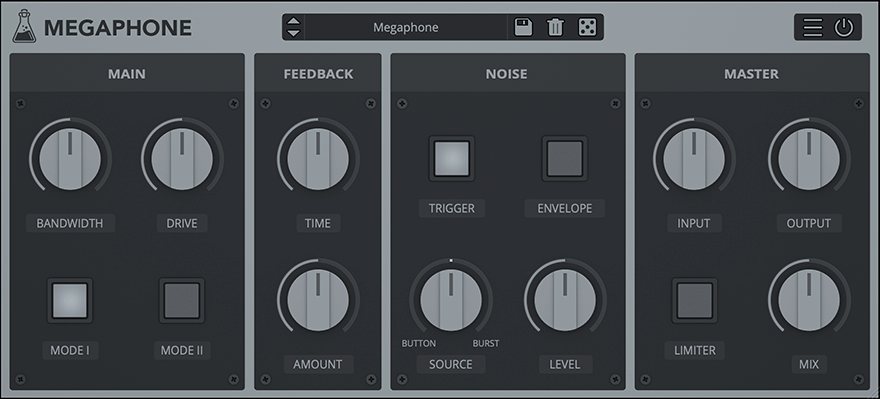
Megaphone is a bullhorn emulation plug-in from AudioThing. It is designed to make any audio source sound as if it is being played through a bullhorn.
There are two loudspeaker models, Mode I and Mode II. Overdrive and bandwidth controls let you adjust the roughness and how narrow the band is.
The feedback section reproduces the reflection and feedback tones that occur when the loudspeaker output is picked up again by the microphone. The official text says feedback tones can be triggered with high-gain sources and a feedback amount above 50 percent.
The noise section offers a button click (Button) and a background noise (Burst). With the envelope enabled, Burst follows the transients of the input. A preset system with a randomizer is also included.
Key features
Two loudspeaker models
Mode I and Mode II let you switch between two loudspeaker characters.
Overdrive and bandwidth
You can adjust the amount of distortion and the narrow bandwidth typical of a loudspeaker.
Feedback / slapback
This reproduces speaker output returning to the microphone, adding a reflection and, at some settings, feedback tones.
Noise (Button / Burst)
You can add the click of enabling the microphone and a background burst noise, balanced with the Source parameter.
Presets and randomizer
Presets are included, and the randomizer helps you explore new settings.
Specifications
| Item | Details |
|---|---|
| Maker | AudioThing |
| Type | Loudspeaker emulation |
| Loudspeaker models | 2 |
| Formats | VST2 / VST3 / AU / AAX / CLAP (Linux: VST2, VST3, CLAP) |
| OS | macOS 10.9 or later, Windows 7 or later, Ubuntu 20.04 or later (64-bit) |
| Activation | One license for up to three computers, no iLok |
What is included and system requirements
- Megaphone plug-in
- Manual (PDF)
- A demo is available (3 seconds of silence every 45 seconds, saving disabled)
How to use it
- Activate the license with your AudioThing account and install the plug-in.
- Load it as an insert on a track in your DAW.
- Switch between Mode I and Mode II.
- Adjust overdrive and bandwidth.
- Add a small amount of feedback and listen to the reflection.
- Enable noise with the Trigger button and set the balance with Source.
- Try the presets and the randomizer.
Where it may come in handy
Dialogue and voice effects
For video or games, it may help depict a voice coming through a loudspeaker.
Vocal effects
Applying it to a vocal in part of a song may add a strong texture.
Processing drums and guitars
On single tracks it may be used to create a rough, band-limited sound.
Who it may suit
- People who want loudspeaker-style voices or sounds
- Those doing sound design for video or games
- Users who want to try lo-fi textures
Good to know before you buy
- The demo has limitations (3 seconds of silence every 45 seconds, saving disabled).
- One license can be authorized on up to three computers.
- The official page is more recent than the Plugin Boutique description and lists CLAP support.
How it differs from similar products
We do not pick a winner; the official figures are placed side by side.
AudioThing Wave Box
Megaphone focuses on two loudspeaker models, feedback and noise, while Wave Box builds distortion from two waveshapers, two LFOs and an envelope follower.
Price
Please check the official page for the price.
See Megaphone on the product page
More of the same kind
Other introduction articles of the same kind.
- Blue Cat Audio Blue Cat's Remote Control
- MAAT LINone
- Zynaptiq UNVEIL
- McDSP SA-2 Dialog Processor
- United Plugins Bassment
- Waves Abbey Road Reel ADT
We have introduced 34 other products from AudioThing.
- AudioThing Lines
- AudioThing Arguments
- AudioThing Speakers
- AudioThing Vinyl Strip
- AudioThing Wave Box
See the full list in Product database: Effects.
Sources: audiothing.net pluginboutique.com (checked 2026-10-27)










Comments