
Disclosure: This page may contain affiliate links. Prices were checked on the date shown and may change.
An introduction to Blue Cat Audio Blue Cat's Remote Control, based on information from the maker and distributors: what it does, how to use it and who it may suit. It is not scored.
Blue Cat's Remote Control is a plug-in and application which lets you control and monitor in real time several MIDI controllable plug-ins or devices from a single customizable user interface.
— Blue Cat Audio official site
What is Blue Cat's Remote Control?
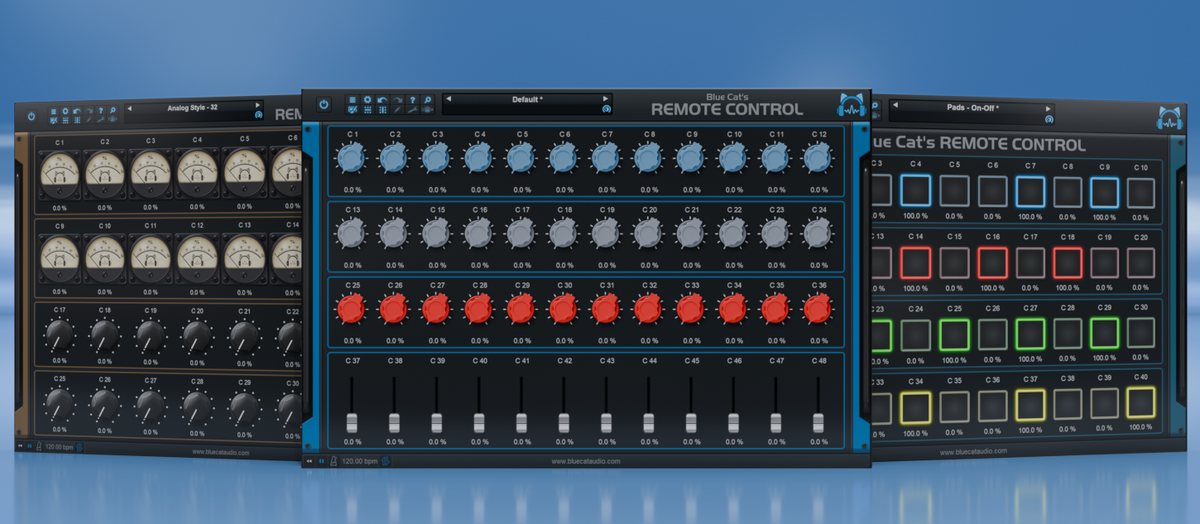
Blue Cat's Remote Control is a plug-in and application for controlling and monitoring several MIDI-controllable plug-ins or devices from one customizable interface. It acts as a virtual control surface.
You pick controls such as switches, faders, joysticks, knobs and meters, then assign a MIDI channel and message to each, and adjust the response curve. It gives you a way to build your own control screen when a plug-in's own interface is hard to use.
For each instance you can choose from 30 built-in skins or let the dynamic grid skin generate a layout. You can also create your own skin using the KUIML language.
Automation lanes can be turned into MIDI messages, settings can be recalled with MIDI messages, and assignments can be made with MIDI learn. Remote Control itself can be driven by MIDI or automation, so it can also remap MIDI messages.
Key features
Virtual control surface
Controls for several plug-ins and external devices can be gathered on one screen, which may help in projects that use many plug-ins.
30 built-in skins
Skins with knobs, faders, switches, joysticks and more are provided.
Dynamic grid skin
This skin generates the layout you need automatically, which suits cases where the number of controls is set.
Automation and MIDI conversion
Automation lanes can become MIDI messages and the reverse. This can drive external hardware from DAW automation.
MIDI learn and response curves
Assignments are made easily with MIDI learn, and response curves can be adjusted.
Undo/redo and presets
Operations can be undone, settings recalled by MIDI messages, and an integrated preset manager is included.
Specifications
| Item | Details |
|---|---|
| Type | MIDI remote control (plug-in / standalone) |
| Skins | 30 built-in plus dynamic grid |
| Formats | AAX, AU, VST, VST3 (Mac); AAX, VST, VST3 (Windows) |
| Mac | Intel or Apple Silicon, macOS 10.9 or newer (64-bit) |
| Windows | SSE2-enabled CPU, Windows Vista or newer (32 or 64-bit) |
| Other | Multitouch support on Windows |
What is included and system requirements
- Blue Cat's Remote Control (plug-in and standalone)
- Supported OS: macOS 10.9 or newer, Windows Vista or newer
- Also included in the All Plugins Pack and the Crafters Pack
How to use it
- Install the demo and check that your DAW loads it.
- Insert Remote Control on a track.
- Choose a skin or build a layout with the dynamic grid.
- Assign a MIDI channel and message to each control.
- Route its output to the MIDI input of the plug-in or device to control.
- Test it, adjust response curves if needed, and save a preset.
Where it may come in handy
Custom plug-in control screens
When a plug-in's own interface is hard to use, you may build a panel that suits you.
Controlling hardware synths
It could drive external device parameters from DAW automation.
Controlling several plug-ins together
It may suit building one screen that moves separate plug-ins at once.
Who it may suit
- People with many MIDI-controllable devices or plug-ins
- Those who want to convert between automation and MIDI
- Anyone who wants a custom control screen
Good to know before you buy
- The targets must be plug-ins or devices that respond to MIDI.
- A free demo exists, so you can check it first.
Price
$49 (Blue Cat Audio official site, checked 2026-10-27). Prices can vary by region and promotion, so check the official page before buying.
See Blue Cat's Remote Control on the product page
More of the same kind
Other introduction articles of the same kind.
- Waves MV2
- Waves Nx Ocean Way Nashville
- Waves NLS Non-Linear Summer
- UJAM Finisher BOOST
- IK Multimedia AmpliTube Fender Collection 2
- Bogren Digital Ampknob BDM 800 Badboy
We have introduced 21 other products from Blue Cat Audio.
- Blue Cat Audio AcouFiend
- Blue Cat Audio Blue Cat's Miaow Wah
- Blue Cat Audio Blue Cat's Re-Guitar
- Blue Cat Audio Blue Cat's StereoScope Pro
- Blue Cat Audio Blue Cat's Connector
See the full list in Product database: Effects.
Sources: bluecataudio.com pluginboutique.com (checked 2026-10-27)










Comments