
Disclosure: This page may contain affiliate links. Prices were checked on the date shown and may change.
An introduction to AudioThing Reels, based on information from the maker and distributors: what it does, how to use it and who it may suit. It is not scored.
Reels is a tape emulation plugin with built-in echo section and tape start and tape stop effect.
— AudioThing official site
What is Reels?
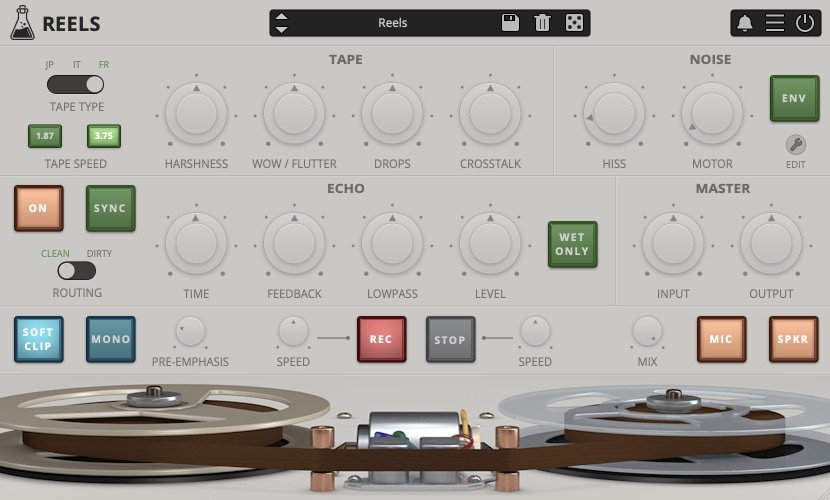
Reels is a lo-fi tape emulation plugin from AudioThing with a built-in echo section and tape start and stop effects.
According to the maker, it is based on an old Japanese portable reel-to-reel recorder found in a distressed state at a flea market. It aims to reproduce the roughness and instability of consumer machines, and the maker itself says it is not for anyone looking for hi-fi mastering tape emulation.
The imperfections it models are mid-range harshness, wow and flutter, random volume drops, left-right crosstalk, tape hiss and mid-frequency motor noise. Three 1/4-inch tape frequency responses and saturation characteristics are modelled.
It is offered for macOS, Windows and Linux in VST2, VST3, AU, AAX and CLAP formats, and there is also an iOS and iPadOS version (AUv3 and standalone). A demo is available.
Key features
Consumer-recorder imperfections
It recreates harshness, wow and flutter, drops, crosstalk, hiss and motor noise. It suits cases where you want to add the roughness of an old machine to a clean recording.
Three tape types (JP, IT, FR)
JP is a used tape with a comparatively better frequency response, IT is new old stock with a limited response, and FR is overused and badly stored, according to the maker. Wow, flutter and other parameters change with the tape.
Tape start and stop
It recreates the pitch-down fade-out when a tape stops and the pitch-up fade-in when it starts. The speed of the effect can be changed.
Echo section
A tape echo section is built in. The maker says the character of the chosen tape becomes more pronounced at higher feedback settings.
Speaker and mic emulation
Speaker and microphone emulation is included, which may help create the feel of playback through small equipment.
Hiss and motor noise with envelope
Hiss and motor noise can be added, with an envelope that follows the input level.
50 presets and randomizer
It includes 50 presets and a preset system with a randomizer. The window is resizable.
Specifications
| Item | Details |
|---|---|
| Maker | AudioThing |
| Type | Tape emulation with echo |
| Formats | VST2, VST3, AU, AAX, CLAP (Mac) / VST2, VST3, AAX, CLAP (Windows) |
| Supported OS (Plugin Boutique) | Windows 7-11; OS X 10.13 to macOS 14 (native Apple Silicon) |
| Requirements | 2 GHz CPU, 4 GB RAM (64-bit) |
| Tape types | 3 (JP, IT, FR) |
| Presets | 50 |
| Demo | 3 seconds of silence every 45 seconds; saving disabled |
What is included and system requirements
- Plugin (VST2 / VST3 / AU / AAX / CLAP)
- 50 presets
- Supported OS: macOS 10.10 or later and Windows 8-11 (64-bit) per the maker; OS X 10.13 to macOS 14 and Windows 7-11 per Plugin Boutique
- iOS and iPadOS version (AUv3 and standalone) offered separately on the App Store
How to use it
- Install the demo from the official site and insert Reels in your DAW.
- Choose a tape type (JP, IT or FR).
- Set the amount of hiss, motor noise and wow and flutter by ear.
- When using the echo, adjust the amount without pushing feedback too far.
- For the tape stop effect, set the speed and automate it at transitions.
- Pick a close preset and fine-tune from there.
- The randomizer can also be used to find unexpected settings.
- If you like it, purchase and register the license.
Where it may come in handy
Lo-fi beats and samples
On drums or samples, it may create the texture of an old cassette or reel-to-reel. It may fit lo-fi style productions.
Retro texture on vocals and instruments
A little hiss and wow on a clean vocal or instrument could create a period atmosphere.
Tape stop at transitions
At the end of a song or a break, the pitch-down fade-out of a stopping tape could be added, placed precisely with automation.
Echo ambience
The echo carries the character of a rough tape, which could be used for tails on vocals and instruments.
Who it may suit
- Those who want a rough, lo-fi tape texture
- Home recordists who want a retro feel on clean recordings
- Those who want to use tape stop effects as part of an arrangement
- Those who want detailed control of hiss and wow
Good to know before you buy
- The maker says it is not suited to anyone looking for hi-fi mastering tape emulation.
- The demo inserts 3 seconds of silence every 45 seconds and saving is disabled.
- The supported OS lists differ between the maker and the retailer, so check your system before buying.
Price
Please check the official page for the price.
More of the same kind
We have introduced 82 saturation and distortion effects. Here are some of the others.
- Signum Audio SKYE Clipper Surround
- Universal Audio Studer A800 Multichannel Tape Recorder
- Black Rooster Audio Magnetite
- Relab Development Color Drive
- Stagecraft Software Picante
- W. A. Production HEAT 2
We have introduced 34 other products from AudioThing.
- AudioThing Things – Fold
- AudioThing Valves
- AudioThing Philicorda
- AudioThing Gong Amp
- AudioThing miniVerb
For a side-by-side comparison scored on the same criteria, see our comparison of saturation and distortion effects.
See the full list in Product database: Effects.
Sources: audiothing.net pluginboutique.com (checked 2026-10-27)










Comments