
Disclosure: This page may contain affiliate links. Prices were checked on the date shown and may change.
An introduction to Eventide CrushStation, based on information from the maker and distributors: what it does, how to use it and who it may suit. It is not scored.
From buttery saturation to face-melting distortion, CrushStation brings serious heat to your productions.
— Eventide official site
What is CrushStation?
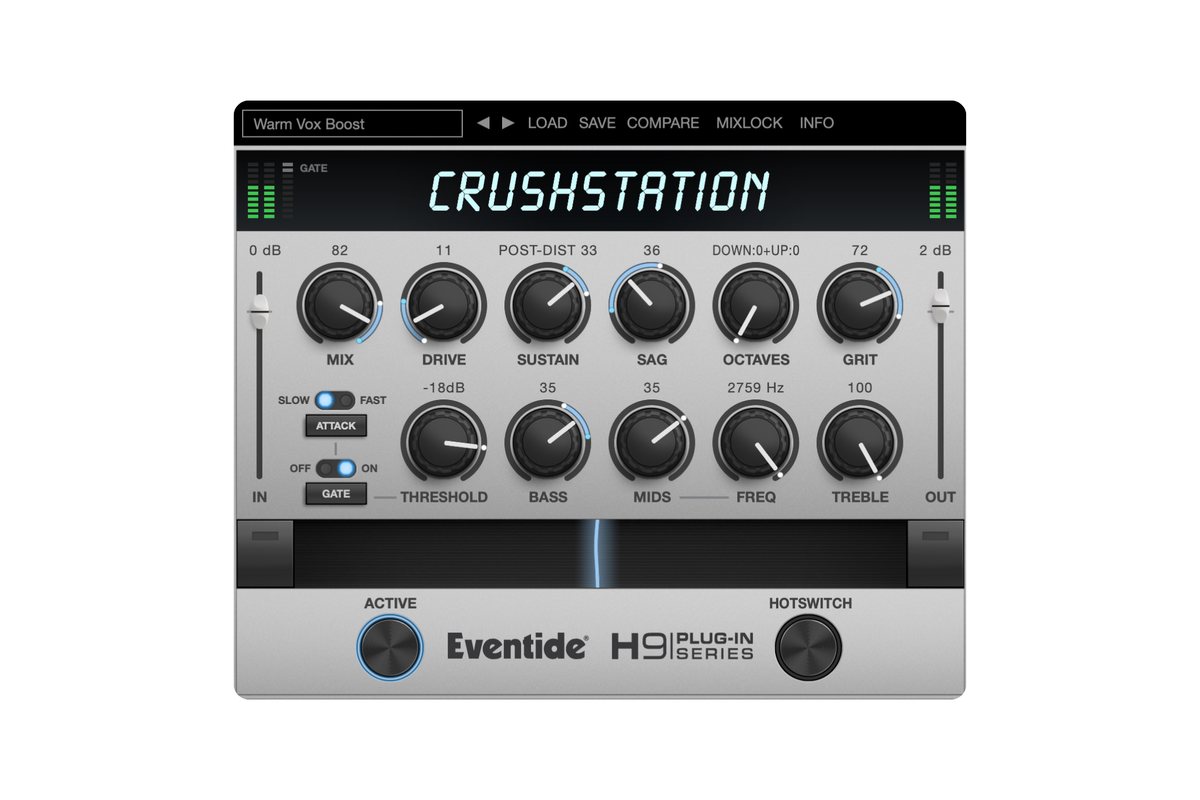
CrushStation is a stereo distortion and saturation plug-in from Eventide. Controls such as Drive and Grit let you move from soft saturation to heavy distortion.
Alongside the distortion engine it bundles a three-band EQ, a compressor, a noise gate and an octave mix that blends in higher and lower octaves. The Mix control blends the dry signal back in for parallel processing.
The effect originally came from the Eventide H9 Harmonizer pedal, and the company says the plug-in version was adapted for experimentation and live use. The Ribbon and Hotswitch controls are meant for changing the sound while you play.
Eventide's own examples include adding bite to a weak snare, grit to vocals and presence to a lead. Guitar, bass, synth and drum machine material are all shown as sources.
Key features
Drive and Grit
Drive is described as covering everything from a shallow boost to deep overdrive, while Grit adds low-end roughness. Combining the two lets you move the character of the sound over a wide range.
Sag for failing hardware
Sag imitates the behavior of dying analog gear, where the power rail sags and the sound sputters. It may help when clean distortion is not rough enough and you want a deliberately broken tone.
Octave mix
Higher and lower octaves can be mixed in, and raising Drive and Sustain crushes them together into new textures, according to Eventide. It could be an option for thickening synths or bass.
Three-band EQ, compressor and gate
A built-in EQ shapes tone, a compressor evens out levels, and a noise gate tames harsh output. With a high gate threshold and a dry mix you can also build gated parallel crunch.
Parallel processing with Mix
The Mix knob sets the balance between the dry and processed signals, which suits parallel compression or a light layer of distortion. MixLock keeps the Mix value fixed while you audition presets.
Ribbon and Hotswitch
Ribbon sweeps between two settings and can be assigned to a MIDI keyboard's mod wheel. Hotswitch jumps between two settings within a preset at the press of a button. Both may help add movement as a song develops.
Specifications
| Item | Details |
|---|---|
| Type | Stereo distortion / saturation |
| Plug-in formats (Windows) | AAX, VST2, VST3 (64-bit) |
| Plug-in formats (Mac) | AAX, AU, VST2, VST3 (64-bit) |
| Supported OS | Windows 10 or later (64-bit), macOS 10.14 or later (Intel / Apple Silicon) |
| iOS | iOS 11.0 or later (AUv3, standalone) |
| Authorization | Free iLok account (no iLok dongle required) |
| Trial | Free demo available on the official site |
What is included and system requirements
- CrushStation plug-in for Windows and Mac (iOS AUv3 and standalone are listed in the official compatibility)
- Presets (the official page says over 100)
- Formats: AAX, AU, VST2, VST3
- Authorization needs a free iLok account and iLok Manager (no dongle)
How to use it
- Buy from the official site or a retailer and receive the license.
- Create a free iLok account and authorize the license in iLok Manager.
- Run the installer, choose your formats (VST3, AU and so on) and rescan plug-ins in your DAW.
- Insert CrushStation on the track you want to distort, such as guitar, synth or vocals.
- Start from a preset, then set the depth with Drive and the balance with Mix.
- Use the three-band EQ to tame harsh bands and the gate to tighten the output.
- Assign two settings to Ribbon and move it as the song develops.
Where it may come in handy
Add bite to a weak snare or drums
A touch of Grit and compression could give a buried snare more outline. Keeping Mix low leaves the original sound in place, which makes it easier to blend.
Thicken bass or synths
Combining the octave mix with Sustain may add low-end weight and new overtones. Using the EQ to clean up extra bands can help it sit in the mix.
Add texture to vocals
A shallow Drive setting with the EQ adjusted for brightness may add texture to a vocal. Mix lets you fine-tune how much is applied.
Change the sound over time
Ribbon and Hotswitch may let you switch distortion depth for a chorus or a break.
Who it may suit
- People looking for a distortion for guitar, synths or drums
- Those who want distortion, EQ and compression in one plug-in
- Producers who want to move the tone along with a performance or arrangement
- Anyone who prefers to try a free demo first
Good to know before you buy
- Authorization requires a free iLok account (no dongle).
- The official page lists over 100 presets while a retailer lists 35, so the figures differ; this follows the official page.
- Official compatibility lists Windows 10 or later and macOS 10.14 or later.
- The free demo is a good way to check how it works in your DAW.
How it differs from similar products
We do not pick a winner; the official figures are placed side by side.
United Plugins Plamen
CrushStation applies one distortion stage to the whole stereo signal and adds octave mix, EQ, compression and a gate. Plamen is a multiband design where each of five bands can use one of five saturation types.
Price
$99 (Eventide official site, checked 2026-10-27). Prices can vary by region and promotion, so check the official page before buying.
See CrushStation on the product page
More of the same kind
We have introduced 82 saturation and distortion effects. Here are some of the others.
- D16 Group Devastor 2
- Native Instruments Kolor
- Kuassa EFEKTOR FZ3603 Fuzz
- MeldaProduction MWaveFolderMB
- MNTRA Instruments BRUITAGE
- Antelope Audio Reel-To-Reel
We have introduced 21 other products from Eventide.
- Eventide MangledVerb
- Eventide ShimmerVerb
- Eventide Generate
- Eventide Temperance Lite
- Eventide UltraReverb
For a side-by-side comparison scored on the same criteria, see our comparison of saturation and distortion effects.
See the full list in Product database: Effects.
Sources: eventideaudio.com pluginboutique.com (checked 2026-10-27)










Comments