
Disclosure: This page may contain affiliate links. Prices were checked on the date shown and may change.
An introduction to Antelope Audio Reel-To-Reel, based on information from the maker and distributors: what it does, how to use it and who it may suit. It is not scored.
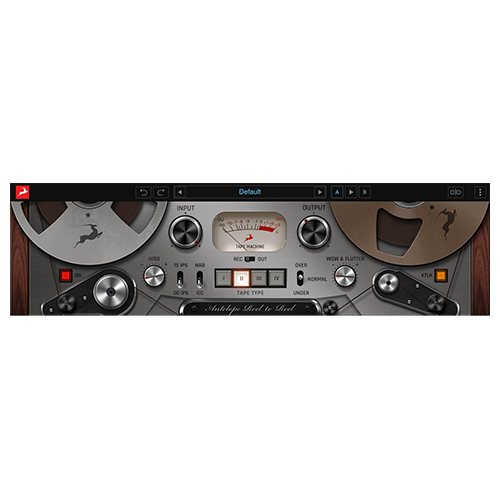
You can experiment with bias settings, tape hiss amounts, switch between four types of tape, and adjust wow & flutter amounts.
— Antelope Audio official site
What is Reel-To-Reel?
Reel-To-Reel is a tape saturation plug-in from Antelope Audio. Inspired by open-reel tape machines, it aims to add the coloration and warmth of tape to modern production. The maker says it draws on the knowledge of tape machines that founder Igor Levin has gathered since the 1970s.
Adjustable items include bias, the amount of tape hiss, a switch between four tape types and the amount of wow and flutter. The maker says details such as recording speed and EQ standards were also considered, so results can range from subtle texture to a clear tape flavor.
An assignable VU meter is included, and the plug-in is described for tracking as well as mixing and mastering. The meter can be used to set the input level so saturation is not overdone.
Two versions are provided. The native version runs in DAWs on macOS and Windows, and the Synergy Core version runs in real time with no perceptible latency on compatible Antelope Synergy Core devices. It is also part of Antelope Cosmos, a collection of more than 75 native plug-ins.
Key features
Four tape types
Four types modeled on different tape formulas can be switched, allowing a comparison of textures on the same source.
Bias control
Moving the tape bias changes how saturation sets in, from subtle coloration to more obvious saturation.
Hiss and wow & flutter
Tape hiss and speed-fluctuation wobble can be added, which may suit lo-fi moods.
Assignable VU meter
The meter can be assigned to the level you want to watch, helping check whether the input is pushed too far.
From tracking to mastering
The maker says it can be used from monitoring while tracking to mixing and mastering, and the Synergy Core version works in real time.
Recording speed and EQ standards
The maker notes that details such as recording speed and EQ standard switching were considered in the design.
Specifications
| Item | Details |
|---|---|
| Type | Tape saturation |
| Tape types | 4 |
| Main controls | Bias, hiss, wow/flutter, VU meter |
| Delivery | Native (macOS, Windows) / Synergy Core real-time version |
What is included and system requirements
- Native version (DAWs on macOS and Windows, no extra hardware)
- Synergy Core version (real time on compatible Synergy Core devices)
- Also included in Antelope Cosmos, a subscription collection of 75+ native plug-ins
- See System Requirements on the official site for details
How to use it
- Purchase on the official site or start an Antelope Cosmos trial.
- Create an Antelope account and download the installer.
- After installing, rescan plug-ins in your DAW.
- Insert Reel-To-Reel on a track or bus.
- Switch between the four tape types and compare textures.
- Adjust bias and listen to how saturation sets in.
- Add a small amount of hiss and wow and flutter if wanted.
- Set the input level while watching the VU meter.
Where it may come in handy
Coloring the mix bus
Placed on the mix bus, it could add tape-style warmth.
Texture on vocals and instruments
On individual tracks, switching tape types allows comparing textures.
Lo-fi atmosphere
Hiss and wow and flutter can create an older-recording feel.
Monitoring while recording
With a Synergy Core device, a player may hear the tape coloration while performing.
Who it may suit
- People looking for a tape-texture plug-in
- Those who want to adjust tape-style items such as bias and hiss
- Users of Antelope Synergy Core devices
- Current or prospective Antelope Cosmos users
Good to know before you buy
- The Synergy Core version requires a compatible Antelope device.
- The official price is shown in euros and the Plugin Boutique price in dollars.
- The statements here follow the maker's description of the product.
How it differs from similar products
We do not pick a winner; the official figures are placed side by side.
ZHEGA
Reel-To-Reel is a tape saturation plug-in with four tape types and controls for bias, hiss and wow and flutter, while ZHEGA is a distortion with five circuit modes and pre/post four-band EQs. Reel-To-Reel also runs in real time on Synergy Core.
Price
Please check the official page for the price.
See Reel-To-Reel on the product page
More of the same kind
We have introduced 82 saturation and distortion effects. Here are some of the others.
- Kuassa Efektor DS3603 Distortion
- Relab Development Color Drive
- Kuassa EFEKTOR FZ3603 Fuzz
- AIR Music Technology Tape Saturator
- Klevgrand Klevgrand LUXE
- Waves Abbey Road Saturator
We have introduced 54 other products from Antelope Audio.
- Antelope Audio ZHEGA
- Antelope Audio VEQ-4K BLACK
- Antelope Audio VEQ-4K ORANGE
- Antelope Audio VP Drum-All-Nite
- Antelope Audio VEQ-55A
For a side-by-side comparison scored on the same criteria, see our comparison of saturation and distortion effects.
See the full list in Product database: Effects.
Sources: en.antelopeaudio.com pluginboutique.com (checked 2026-10-27)










Comments