
Disclosure: This page may contain affiliate links. Prices were checked on the date shown and may change.
An introduction to Safari Audio Gorilla Drive V2, based on information from the maker and distributors: what it does, how to use it and who it may suit. It is not scored.
Gorilla Drive V2 brings the rich, harmonically dense character of classic germanium overdrive into your DAW, delivering everything from smooth analog warmth to thick, aggressive distortion.
— Safari Audio official site
What is Gorilla Drive V2?
Gorilla Drive V2 is a distortion and saturation plug-in from Safari Audio. The official description says it aims to reproduce, inside a DAW, the dense, warm harmonics of classic germanium overdrive, and it is the second generation of the original Gorilla Drive.
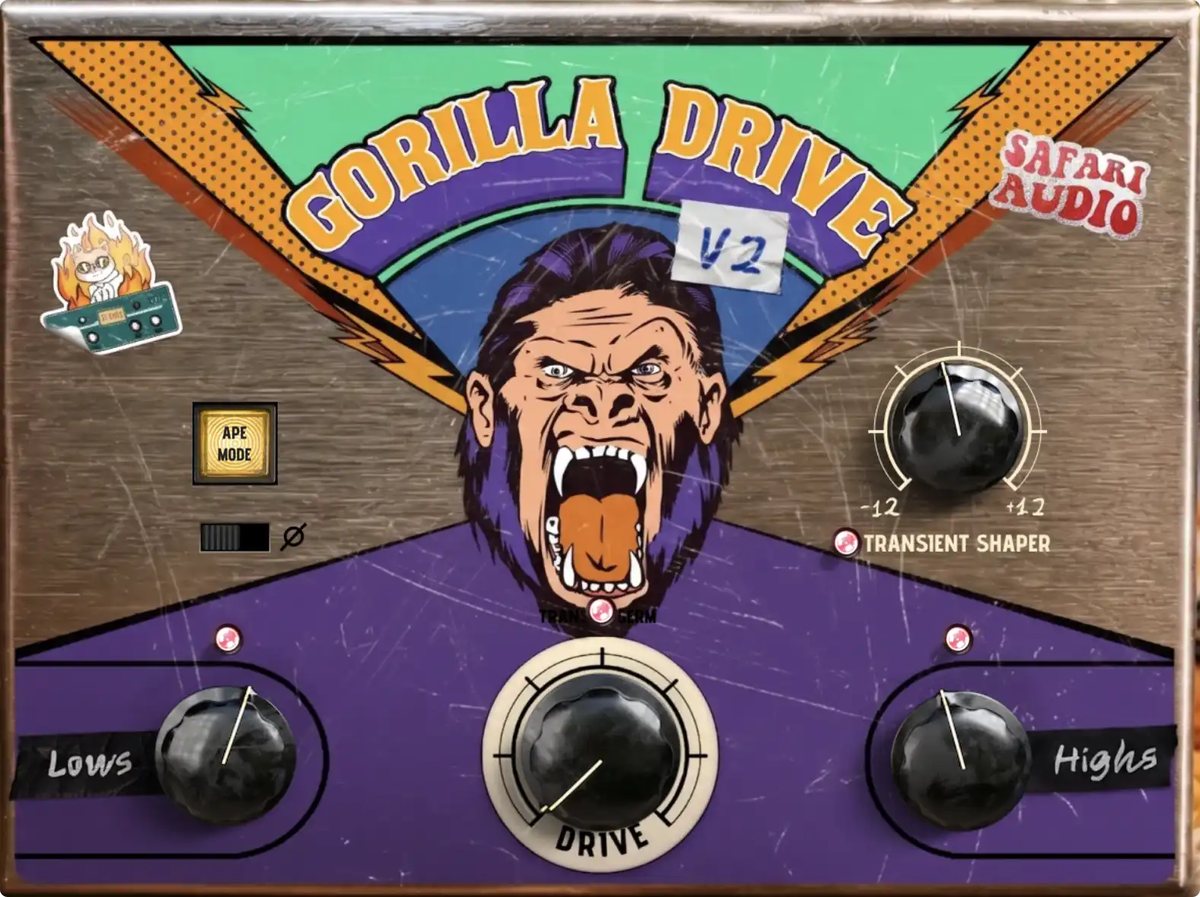
A new Transient Shaper is added in V2. One control moves the balance between the sharpness of the attack and the body of the sustain. The official page presents it as a way to keep the movement of the sound while distorting. Independent Lows and Highs drive stages are also provided for saturating the low and high ranges separately.
Turning on Ape Mode increases both distortion and compression. Other controls include Tone Tilt for the overall balance, Input Drive and Output Trim, Blend for mixing against the original, and Battery Emulation for the behavior of a weakened power supply.
It supports VST3, AU, AAX and standalone on macOS, and VST3, AAX and standalone on 64-bit Windows. The descriptions mention drums, bass, guitars, synths, vocals and buses as typical sources.
Key features
Germanium-style overdrive
It produces dense, warm harmonic distortion, from light warmth to thick, aggressive overdrive.
Transient Shaper (new)
One control balances attack against body. It may help with material whose attack tends to get buried after distortion.
Independent Lows and Highs drive
Low and high ranges are driven separately, so a user can shape results from deep warmth to crisp highs without an additional EQ.
Ape Mode
Turning it on increases distortion and compression. It is a rough-texture mode to try when normal settings feel mild.
Tone Tilt, Blend and Output Trim
Tone Tilt moves from dark and heavy to bright and cutting, Blend allows parallel saturation, and Output Trim sets the level.
Battery Emulation
This simulates a weakened power supply for an unstable, worn distortion.
Smart Gain, A/B, LUFS and presets
Level-matched comparison, a short-term LUFS readout and a folder-and-tag preset manager are shared across V2 plug-ins.
Specifications
| Item | Details |
|---|---|
| Maker | Safari Audio |
| Type | Overdrive / saturation |
| Version | V2 |
| Formats (macOS) | VST3, AU, AAX, standalone |
| Formats (Windows) | 64-bit VST3, AAX, standalone |
| Processor | 1 GHz Intel dual core or AMD equivalent |
| RAM | 4 GB minimum |
| OS | macOS 10.13 or later (11 or later recommended), Windows 8 or later |
| License | Perpetual (up to 4 machines) |
What is included and system requirements
- Gorilla Drive V2 itself (plug-in formats and standalone)
- Factory presets
- A 14-day free trial is offered on the official site
- When bought at Plugin Boutique, the serial number appears in the account
How to use it
- Buy at the official site or Plugin Boutique and download the version for your OS.
- Install with the installer (Mac) or by placing format files (Windows), then restart the DAW.
- Load Gorilla Drive V2 on the track to be distorted.
- Enter the serial number and press Activate.
- Raise Input Drive gradually to set the amount of distortion.
- Adjust Lows and Highs to set how each range is driven.
- Move the Transient Shaper to balance attack and body and set the overall tilt with Tone Tilt.
- Set Blend and Output Trim, then confirm with A/B comparison.
Where it may come in handy
Building weight on a drum bus
Using the Transient Shaper while driving a drum bus may add body while keeping the attack.
Adding harmonics to bass
Keeping Lows modest and raising Highs slightly may be a way to make bass easier to hear on small speakers.
Warming vocals
Using Blend to keep the original signal and mixing in light distortion may add warmth.
Roughing up synths and guitars
Ape Mode can be tried for a rougher texture with stronger distortion and compression.
Who it may suit
- People who want distortion from warm to rough on drums, bass and guitars
- Users who want to keep the attack while distorting
- Those who want to drive low and high ranges separately
- Anyone looking for a perpetual-license saturation plug-in
Good to know before you buy
- The official site has an upgrade offer for V1 owners, shown after logging in.
- Plugin Boutique states 2 GHz and 8 GB as requirements, while the official page states 1 GHz and 4 GB.
- The official catalog also lists a separate hardware pedal under a similar name. This article covers the plug-in version.
- Strong distortion raises the level, so check with Output Trim and Smart Gain.
How it differs from similar products
We do not pick a winner; the official figures are placed side by side.
Safari Audio Rabbit Tape V2
Gorilla Drive V2 is a germanium-style overdrive with a Transient Shaper, independent low and high drive stages and Ape Mode. Rabbit Tape V2 is a tape emulation with two machines, 7.5 and 15 IPS speeds, and Wow, Flutter and Drop Outs.
Price
Please check the official page for the price.
See Gorilla Drive V2 on the product page
More of the same kind
We have introduced 82 saturation and distortion effects. Here are some of the others.
- W. A. Production HEAT 2
- Stagecraft Software Picante
- Native Instruments Kolor
- United Plugins Cyberdrive
- Stagecraft Software Overdrive 5
- Kuassa Efektor DS3603 Distortion
We have introduced 9 other products from Safari Audio.
- Safari Audio Rabbit Tape V2
- Safari Audio Cobra Fuzz V2
- Safari Audio Meaw: Chain
- Safari Audio Camel Strip V2
- Safari Audio Safari Audio The Herd V2
For a side-by-side comparison scored on the same criteria, see our comparison of saturation and distortion effects.
See the full list in Product database: Effects.
Sources: safariaudio.com pluginboutique.com (checked 2026-10-27)










Comments