
Disclosure: This page may contain affiliate links. Prices were checked on the date shown and may change.
An introduction to Three-Body Technology Tape Vibe, based on information from the maker and distributors: what it does, how to use it and who it may suit. It is not scored.
Tape Vibe is a mild-to-moderate saturator built with a simple goal: to add vintage tape character to modern productions.
— Three-Body Technology official site
What is Tape Vibe?
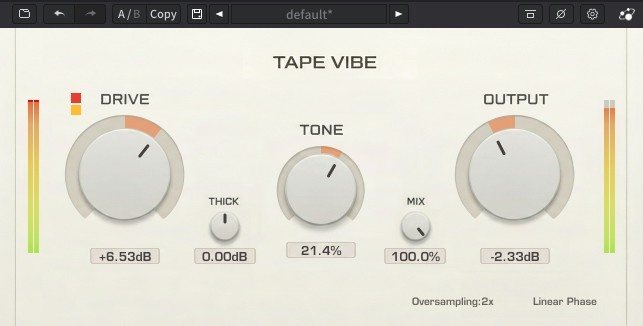
Tape Vibe is a plug-in from Three-Body Technology that adds tape-style saturation. The maker describes it as a tool for mild to moderate saturation with simple operation, aiming to add analog-inspired harmonic richness while preserving transients and mix clarity.
There are three controls: Drive, Tone and Thick. An internal level-matching algorithm compensates for gain changes as Drive increases, so tonal decisions are not biased by loudness.
Oversampling up to 16x is available to reduce aliasing. With oversampling off, latency is 0 ms, which makes it usable for tracking and live monitoring. With oversampling on, latency is about 0.1 ms in minimum phase mode and about 1 to 1.5 ms in linear phase mode from 2x to 16x.
CPU use is described as light enough to place on many tracks. It supports VST2, VST3, AAX and Audio Unit, including Apple Silicon. A limited free demo is available on the official site.
Key features
Three simple controls
Drive, Tone and Thick are enough to set the sound, which may suit quick decisions without detailed setup.
Built-in level match
Level changes from raising Drive are compensated automatically, which reduces the bias of mistaking louder for better.
Up to 16x oversampling
High factors reduce aliasing, and the balance with latency also depends on choosing minimum phase or linear phase.
Zero latency
With oversampling off the latency is 0 ms, which the maker positions for tracking and live use.
Light CPU use
It is optimized for low load, so it can be placed on many tracks in a mix.
Free demo
A free demo with no time limit or registration is offered, with saving and loading disabled and 1.5 seconds of silence every 15 minutes.
Specifications
| Item | Details |
|---|---|
| Type | Tape-style saturator |
| Controls | Drive, Tone, Thick |
| Oversampling | Up to 16x |
| Latency | 0 ms without oversampling |
| Formats | 64-bit VST2, VST3, AAX, Audio Unit |
| OS | macOS 11 or later (Plugin Boutique lists 10.15), Windows 8 or later |
| Requirements | Intel/AMD CPU with SSE 4.1 or Apple Silicon, 4 GB RAM, 100 MB disk space |
What is included and system requirements
- Tape Vibe plug-in
- Formats: 64-bit VST2, VST3, AAX, Audio Unit
- Requirements: macOS 11 or later, Windows 8 or later, 4 GB RAM, 100 MB disk space
- Free demo (macOS and Windows)
- User manual (available on the official site)
How to use it
- Download and try the free demo from the official site.
- After purchase, create an account, register the serial and download the installer.
- After installing, rescan plug-ins in your DAW.
- Insert Tape Vibe on a track or bus.
- Raise Drive gradually and listen to the harmonics being added.
- Adjust brightness with Tone.
- Adjust thickness with Thick.
- When tracking, turn oversampling off to get zero latency.
Where it may come in handy
Light touch on the mix bus
A small amount on the mix bus could add tape-style harmonics.
Monitoring while tracking
With zero-latency settings, it may add tape texture to what you hear while recording.
A little on every track
Because the CPU load is light, small amounts on each track is one approach.
Softening synths and drums
It may soften the digital edge of synths and drums.
Who it may suit
- People who want tape-style color without complexity
- Those who prefer to decide a sound quickly
- Users looking for a saturator usable while tracking
- Anyone wanting a light-on-CPU effect
Good to know before you buy
- It targets mild to moderate saturation, so heavier distortion may call for another plug-in.
- Enabling oversampling adds latency.
- The free demo cannot save or load.
- The minimum macOS version differs between the maker (11) and a reseller (10.15), so check before purchase.
Price
Please check the official page for the price.
See Tape Vibe on the product page
More of the same kind
We have introduced 82 saturation and distortion effects. Here are some of the others.
- MeldaProduction MBitFunMB
- W. A. Production Punchy Worm
- Waves Abbey Road Saturator
- AIR Music Technology Tape Saturator
- Klevgrand SquashIt
- Kuassa EFEKTOR GrandMaster
We have introduced 11 other products from Three-Body Technology.
- Three-Body Technology Nylon
- Three-Body Technology Sapphire Drive
- Three-Body Technology Transformer X
- Three-Body Technology Modern G-31
- Three-Body Technology Brit 84
For a side-by-side comparison scored on the same criteria, see our comparison of saturation and distortion effects.
See the full list in Product database: Effects.
Sources: threebodytech.com pluginboutique.com (checked 2026-10-27)










Comments