
Disclosure: This page may contain affiliate links. Prices were checked on the date shown and may change.
An introduction to Harrison Consoles Vocal Flow, based on information from the maker and distributors: what it does, how to use it and who it may suit. It is not scored.
Vocal Flow is a complete vocal processing solution that gives you 7 flexible effects to shape your vocal track
— Harrison Consoles official site
What is Vocal Flow?
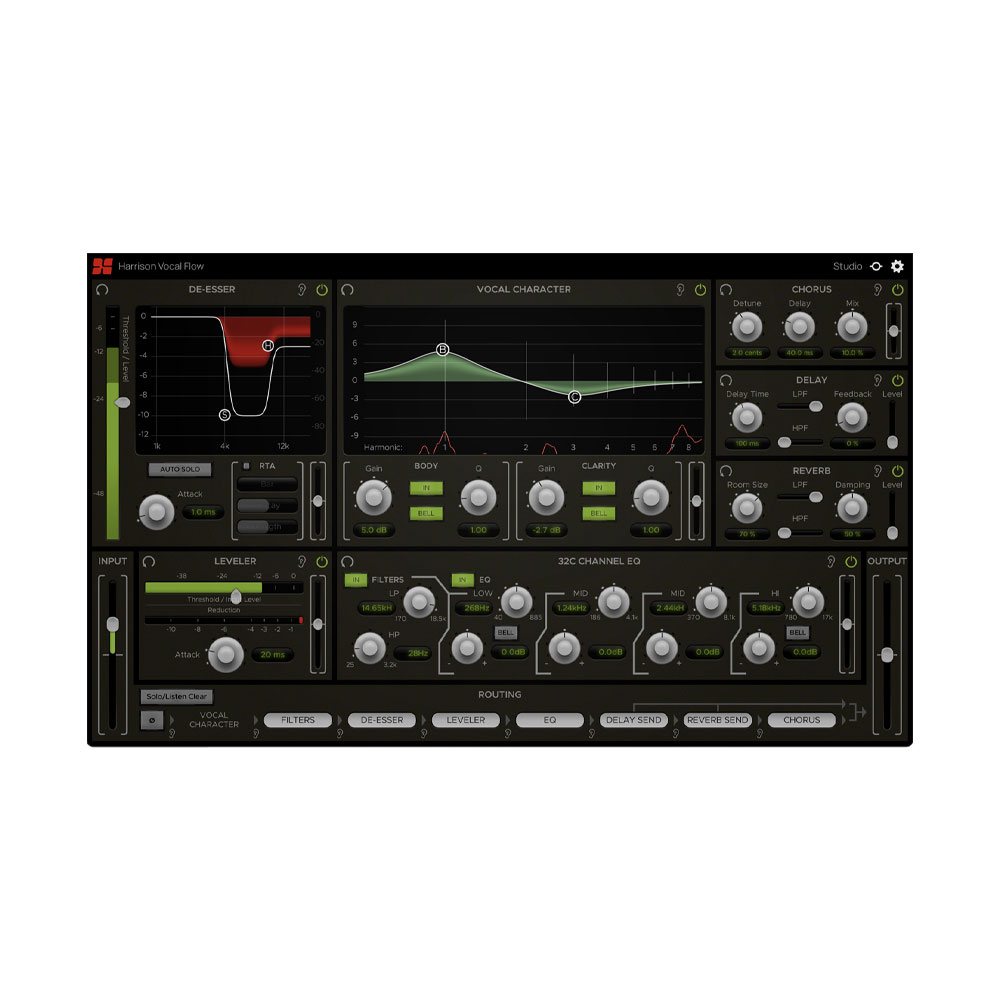
Vocal Flow is an all-in-one vocal mixing plug-in from Harrison, a company known for large-format consoles. It brings console-derived EQ and dynamics ideas into a plug-in made of seven processing modules plus input and output controls.
The main feature is Vocal Character, a two-band vocal EQ whose curve shifts along with the pitch of the sung notes. It has Body and Clarity bands. It tracks pitch on a chromatic scale, so it does not work on spoken voice and should be disabled for speech.
Also included are a four-band EQ with high-pass and low-pass filters based on the Harrison 32C console channel EQ, a de-esser based on the technology in Harrison MPC digital consoles, and a Leveler compressor derived from the Mixbus channel strip. Chorus, delay and reverb are built in as effects.
Each module has output trim, reset, solo and in/out controls, so the chain can be built while auditioning one stage at a time. Delay and reverb run in parallel and return at the end of the chain, similar to a send and return. Formats are AAX, AU, VST and VST3 on Windows and Mac.
Key features
Vocal Character
A two-band EQ with Body and Clarity bands whose curve follows the pitch of sung notes. It may help shape the weight and clarity of each note. It does not work on speech.
32C channel EQ
A four-band EQ based on the Harrison 32C: LOW 40 Hz to 600 Hz, LO MID 200 Hz to 3.1 kHz, HI MID 400 Hz to 6 kHz and HIGH 900 Hz to 13 kHz with +/-12 dB gain, plus 12 dB/oct high-pass (20 Hz to 3.15 kHz) and low-pass (160 Hz to 18 kHz) filters.
De-esser
The Ess band (low cutoff 1 kHz to 8 kHz) and Hi band (2 kHz to 12 kHz) are set by dragging markers for width and depth, with depth from 0 dB to -12 dB. It can tame harsh sibilance.
Leveler
A compressor derived from the Mixbus channel strip with threshold and attack (4 ms to 100 ms) controls. With a low ratio and fast release, it suits gently evening out level differences in a performance.
Chorus, delay and reverb
The chorus adds two pitch-shifted voices above and below, the delay offers up to 250 ms for slapback and the reverb adjusts space. Delay and reverb are parallel, with level faders setting the blend.
Per-module controls
Every module has reset, solo and IN buttons and a -20 dB to +20 dB output trim. Soloing keeps the gain structure set by the other modules, so level balance between stages can be judged while building the chain.
Specifications
| Item | Details |
|---|---|
| Type | All-in-one vocal channel strip |
| Modules | 7 (Vocal Character, 32C Channel EQ, De-Esser, Leveler, Vocal Effects, Master) |
| Formats | AAX, AU, VST, VST3 |
| OS | macOS 10.9+ / Windows 7+ |
| Pro Tools | 10.3.5+ on Windows, 11+ on Mac (enable AAX during installation) |
| Price | $99 (official store) |
What is included and system requirements
- Vocal Flow plug-in (Windows and Mac installers)
- User guide (PDF)
- Formats: AAX, AU, VST, VST3 (enable the formats to use during installation)
- Requirements: macOS 10.9+ / Windows 7+
How to use it
- Buy from the Harrison store and download the Windows or Mac installer.
- During installation, enable the formats (AAX, AU, VST and so on) that your DAW needs.
- Load Vocal Flow as an insert on the vocal track.
- Adjust Body and Clarity in Vocal Character.
- Use the 32C EQ and filters to remove unwanted low content and balance the overall tone.
- Tame sibilance with the de-esser and even out levels with the Leveler.
- Add chorus, delay and reverb if needed and set the blend with the level faders.
- Audition each module with solo and IN, and balance stages with the output trims.
Where it may come in handy
One plug-in for a vocal chain
It may be tried instead of loading EQ, de-esser and compressor one after another.
Shaping a melodic vocal
Vocal Character may help adjust weight and clarity phrase by phrase.
Slapback and light width
The built-in delay and chorus could add subtle space.
Cleaning up narration
With Vocal Character turned off, the EQ, de-esser and Leveler may be used on spoken voice.
Who it may suit
- Users who want to mix sung vocals quickly
- Users curious about Harrison's EQ and dynamics approach
- Users who want a complete vocal chain in a single plug-in
- Users who handle both speech and singing
Good to know before you buy
- Vocal Character tracks pitch chromatically and does not work on spoken voice; disable it for speech.
- Harrison is no longer developing plug-ins for Linux.
- The official store price is shown before tax.
Price
$99 (Harrison Consoles official site, checked 2026-10-27). Prices can vary by region and promotion, so check the official page before buying.
See Vocal Flow on the product page
More of the same kind
We have introduced 35 vocal processors. Here are some of the others.
- Bogren Digital A-Class Vocal
- Baby Audio Humanoid
- Synchro Arts VocAlign 7
- LANDR LANDR FX Voice
- Waves Manny Marroquin Triple D
- DOTEC-AUDIO DeeField
We have introduced 6 other products from Harrison Consoles.
- Harrison Consoles 32Classic Channel Strip
- Harrison Consoles MPC Compressor
- Harrison Consoles Harrison Consoles Stunning Phaser
- Harrison Consoles Drum Flow
- Harrison Consoles MPC Channel Strip
For a side-by-side comparison scored on the same criteria, see our comparison of vocal processors.
See the full list in Product database: Effects.
Sources: store.harrisonaudio.com pluginboutique.com (checked 2026-10-27)










Comments